
ManyRequests is a client portal and agency management platform built to bring client requests, services, delivery, and billing into one structured workflow.
Instead of making clients move between different tools for requests, files, conversations, services, and billing, ManyRequests brings a major part of this workflow into a branded client portal.
This makes ManyRequests particularly useful for agencies that sell productized, recurring, or otherwise structured services.
A feature list is useful, but it doesn’t tell you how well ManyRequests will fit into your agency. Think about your actual workflow: how clients buy a service, send in requests, provide files, and receive the finished work. That’s where the platform needs to prove its value.
That’s the angle of this ManyRequests review.
We’ll look at the things that matter when you’re actually using the platform — pricing, integrations, ease of use, client workflows, and the types of agencies it fits best.
Disclosure: This article contains affiliate links. If you sign up through one of them, ToolMapHQ may earn a commission at no extra cost to you.
Table of Contents
What Is ManyRequests?
ManyRequests is built around the relationship between an agency and its clients.
A typical workflow can look like:
Client buys a service → submits a request → uploads files or references → team handles the work → client reviews the result → billing or subscription continues.
The important distinction is that ManyRequests isn’t simply an internal project-management tool. Its client portal and service system are central to the product.
What Is ManyRequests Used For?
Agencies can use ManyRequests for:
- Client portals
- Service catalogs
- One-time and recurring services
- Client requests and custom forms
- Conditional request forms
- File uploads
- Time tracking
- Invoicing and payments
- Subscriptions
- Client and CRM management
- Workload planning
- Reporting
- Design and video proofing
- Client communication
- Automations and integrations
That combination makes it particularly interesting for agencies that want to standardize how clients buy services and request work.
ManyRequests Quick Verdict
ManyRequests is best understood as a client-facing operating layer for structured agency services, rather than simply another project-management app.
It fits particularly well when clients regularly buy defined services and return to the agency with new requests. Clients have one place to send work, share files, and check what the team has delivered. They don’t have to jump between different tools just to keep a request moving.
The catch is that ManyRequests expects a fairly structured way of working. If you only need basic project management, it may offer more than you actually need. The cost also goes up as you add internal team members or move to a higher plan.
ManyRequests Pros and Cons
Pros
- Client portal designed around agency workflows
- Strong fit for productized and recurring services
- Structured request management
- Conditional request forms
- Services, subscriptions, add-ons, credits, and upsells
- Billing and payment workflows
- Time tracking and workload planning
- Design and video proofing
- Custom domain and branding options
- Zapier and other automation options
- MCP support for AI-assisted workflows
- Unlimited clients
- Reporting
Cons
- No permanent free plan
- Additional internal seats increase the cost
- Some advanced features require higher plans
- API plan availability should be verified against current documentation
- More specialized than general project-management software
- Highly customized workflows may require additional tools
- Independent review data is still limited
ManyRequests Features
The features make more sense when viewed as part of the agency workflow rather than as an isolated checklist.
The core is client portal + services + requests + billing. Around that are operational tools such as time tracking and workload management, followed by client-experience and automation features.
Client Portal
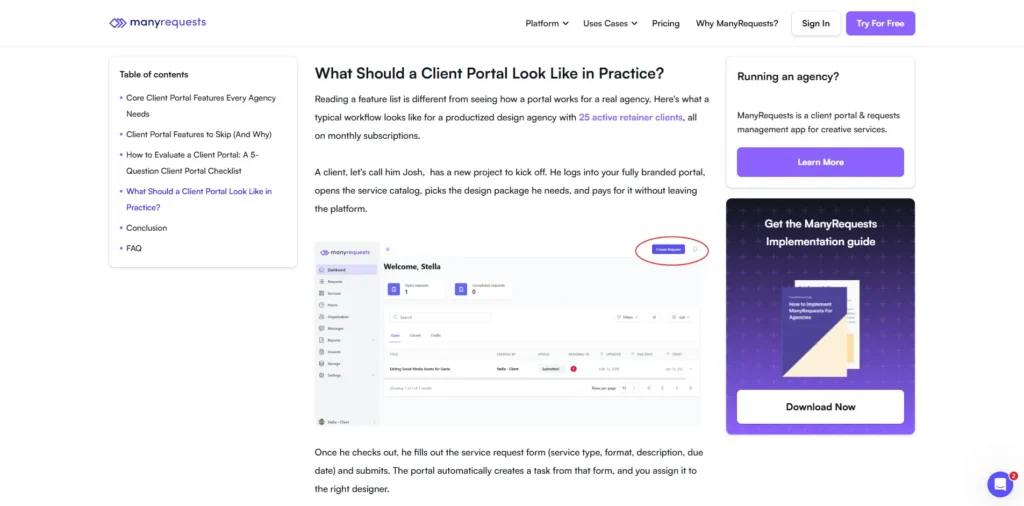
The client portal sits at the center of ManyRequests.
Clients can access their services, send requests, upload files, and communicate with the agency from there. They can also review completed work and check billing or subscription details without moving to another system.
Agencies can use their own domain for the portal and customize its appearance to keep the experience connected to their brand.
Take a design agency with a monthly design subscription. Clients could use the portal to submit design requests, exchange files, review completed work, and manage their service.
Client and CRM Management
ManyRequests keeps client information connected to the rest of the workflow.
Client profiles, organizations, notes, subscriptions, activity, requests, and services can all be handled within the same workflow. That means the team doesn’t have to keep each piece of client information in a completely separate place.
This matters more when the agency is handling several services or recurring work for the same clients.
Request Management
Request management is a major part of ManyRequests.
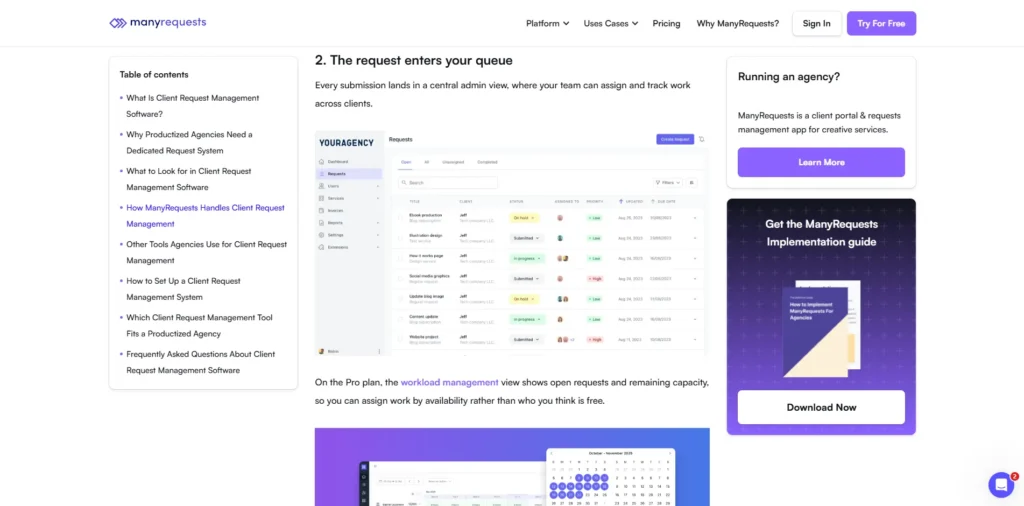
Teams can prepare structured requests with custom fields, file uploads, priorities, due dates, tags, work assignments, statuses, and notifications.
These requests can also be viewed in different formats like Kanban, list, and queue views.
This gives an agency a structured way to turn incoming client work into assigned and easily trackable work.
Conditional Request Forms
With conditional logic, forms can change based on the options chosen by the client.
For example, a logo design form can ask for brand guidelines and preferred styles, while a video editing form can ask for footage, video duration, format, and other necessary details.
This reduces unnecessary questions and helps the team get the information it needs at the start of the request.
Services and Productized-Service Management
This is one of the areas where ManyRequests stands out for agencies selling repeatable services.
Services can be one-time or recurring and can include subscriptions, add-ons, upsells, credits, hourly packages or top-ups, checkout forms, and quantity- or headcount-based pricing.
Client trials are also supported.
For an agency selling a recurring SEO, design, content, or development service, this creates a connection between what the client purchases and how the client later requests the work.
Time Tracking
ManyRequests includes time tracking and timesheets for agencies that need to monitor time spent on client work.
This can be useful for hourly services or simply for understanding how much internal time different services consume.
Invoicing and Payments
Billing is connected to the wider service workflow.
Billing covers one-time and recurring payments, subscriptions, invoices, discounts and coupons, sales tax, Stripe, Stripe ACH, and manual payments.
If services and client requests are already being handled in ManyRequests, keeping billing there as well can make the overall workflow easier to manage.
Team and Workload Management
Workload Management is focused on the team’s capacity and work allocation rather than trying to replace a large project-management platform.
The team can see availability, estimated hours, capacity, schedules, upcoming work, and potential overbooking in one view.
For recurring client work, knowing what needs to be done is only part of the picture. The agency also needs to know whether the team has enough capacity to take it on.
Reporting
ManyRequests provides reporting around areas such as clients, teams, time, workload, services, and business performance.
The practical value depends on how consistently the agency records its work, but the reporting layer can give managers a clearer view of both client activity and internal operations.
Design and Video Proofing
Creative agencies can use ManyRequests’ design and video proofing features to collect feedback and approvals around deliverables.
This can keep review conversations closer to the actual work instead of relying entirely on separate email threads or feedback tools.
Client Communication and Notifications
Communication and notifications are integrated into the wider workflow.
Exact capabilities vary by plan. Pro, for example, adds Slack and custom email notifications.
The benefit is less about replacing every communication tool and more about keeping important client activity connected to requests and service delivery.
Branding and White Labeling
ManyRequests supports custom domains, so agencies can use their own domain for the client portal.
There is a difference between having a custom domain and completely removing ManyRequests branding, though.
Custom domains are available in Core, while removing ManyRequests branding and using custom email notifications are Pro features.
Agencies looking for a more fully white-labeled experience should therefore compare the plan differences carefully.
ManyRequests Integrations and Automation
ManyRequests doesn’t have to operate as a completely isolated system. It provides several ways to connect the platform with the rest of an agency’s technology stack.
Integrations
ManyRequests connects with tools such as Stripe, Zapier, Loom, Intercom, Crisp, HubSpot Chat, and Meta Pixel. Extensions, webhooks, and other integration options provide additional ways to connect the platform with an agency’s existing tools.
Not every integration works the same way across the plans. If a particular connection is important to your workflow, check the current documentation before setting it up.
Portal Extensions
ManyRequests also offers portal extensions for tools such as ClickUp, Monday.com, Jotform, Typeform, Calendly, Airtable, Google Sheets, Looker Studio, AgencyAnalytics, and SE Ranking.
These extensions are different from native integrations and can bring additional functionality or information into the client portal.
Zapier Automation
Zapier can automate workflows involving clients, requests, payments, subscriptions, comments, and reviews.
This is useful when ManyRequests is part of a larger stack rather than the only system an agency uses.
Webhooks and API
ManyRequests also supports webhooks and API-based connections for more customized workflows.
There is currently a documentation discrepancy worth knowing about: the pricing page places API access under Enterprise, while the API help documentation says API access is available on Pro.
If API access is important to your workflow, verify the current plan eligibility with ManyRequests before purchasing.
ManyRequests MCP and AI Automation
ManyRequests now also provides an MCP server that allows compatible AI assistants to work with and take actions in areas such as requests, clients, invoices, subscriptions, workload analysis, reports and graphs, and bulk actions.
That creates possibilities for AI-assisted agency operations, such as analyzing workload information or working with request and client data through an AI interface.
MCP is best viewed as another automation and interaction layer. It doesn’t make Zapier, webhooks, or API connections obsolete.
ManyRequests Pricing
ManyRequests has three main pricing tiers:
| Plan | Monthly | Annual Equivalent |
| Core | $59/month | $39/month |
| Pro | $99/month | $79/month |
| Enterprise | From $1,000/month | Custom |
Annual billing provides the lower effective monthly rate.
One internal team seat is included with each plan. Additional internal seats cost extra, while clients don’t count as seats.
Core
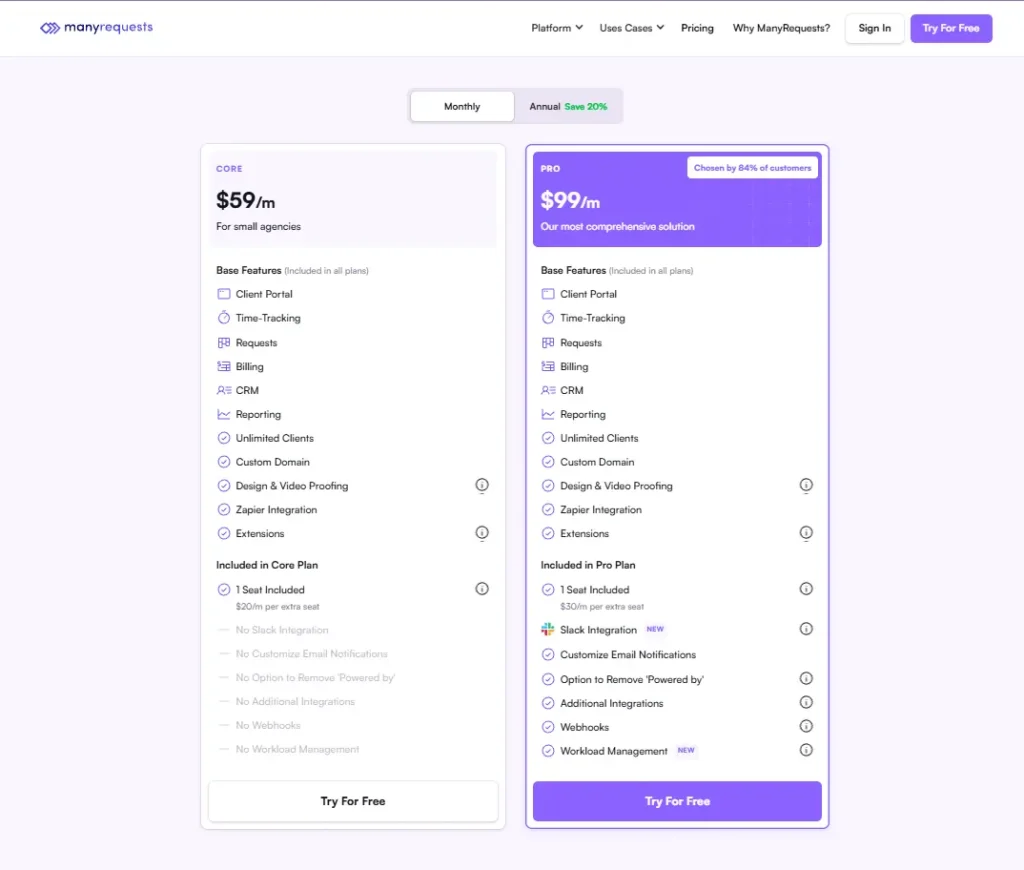
Core is $59 per month on monthly billing. Choose annual billing and the monthly equivalent comes down to $39.
The plan brings together the main pieces needed for client work: a client portal, requests, billing, CRM, reporting, and time tracking. Unlimited clients, a custom domain, design and video proofing, Zapier, and extensions are included as well.
For agencies selling structured services and handling regular client requests, Core provides the main workflow without the extra Pro features.
Pro
Pro moves the price to $99 per month, or $79 per month on annual billing.
This tier adds more tools for team operations and automation. Slack, custom email notifications, additional integrations, webhooks, Workload Management, and the option to remove ManyRequests branding are included.
That extra functionality becomes relevant when an agency needs tighter control over its team, automation, or client-facing branding.
Enterprise
Enterprise starts at $1,000 per month, with the final pricing handled on a custom basis.
It is designed for larger deployments and includes custom pricing per seat, a branded mobile app, and concierge onboarding.
There is one thing to check before choosing this tier: the current pricing page and API documentation don’t describe API availability in the same way. If API access matters to your setup, confirm the requirement with ManyRequests first.
Extra Team Seats
This is an important part of the pricing calculation.
Core seats cost $20/month each, or $15/month on annual billing.
Pro seats cost $30/month each, or $25/month on annual billing.
Clients don’t count as internal team seats.
So the practical calculation is:
Base plan + additional internal seats = actual subscription cost.
Free Trial and Free Plan
ManyRequests offers a 14-day free trial with no credit card required.
There is no permanent free plan.
That makes the trial particularly useful for testing an actual agency workflow before committing.
Note: Software pricing, features, plans, and availability can change over time. Please check the official ManyRequests website for the latest information before making a purchase or signing up for a paid plan.
Which ManyRequests Plan Should You Choose?
Core Makes Sense If…
Core is worth testing if you’re a solo or small agency that needs a client portal, structured services, requests, billing, reporting, and a custom domain without the additional Pro-specific features.
Pro Makes Sense If…
Pro becomes more relevant when you need Workload Management, Slack, webhooks, custom email notifications, additional integrations, or removal of ManyRequests branding.
Enterprise Makes Sense If…
Enterprise is aimed more at larger deployments requiring custom pricing, concierge onboarding, a branded mobile app, or enterprise-level requirements.
Is ManyRequests Easy to Use?
Client Experience
The client side is focused around relatively straightforward actions: access services, submit requests, upload files, communicate, review work, and manage billing or subscriptions.
That makes sense for an agency where clients should not need to understand the agency’s internal project-management system.
Admin Experience
Setting up ManyRequests is more involved on the agency side.
Services and pricing need to be configured, along with forms, conditional rules, assignments, billing, notifications, integrations, and workload settings. There are quite a few pieces to put in place before the workflow is ready.
That setup becomes easier to manage when the agency already knows how it wants client work to move from request to delivery.
Learning Curve
The learning curve is likely to be lower for agencies with defined services and repeatable workflows.
Highly customized businesses may need more configuration before ManyRequests fits naturally into their processes.
Who Should Use ManyRequests?
Productized-Service Agencies
This is one of the clearest fits.
If you sell defined packages or recurring services, ManyRequests connects the customer-facing journey:
Service → Purchase → Request → Delivery → Billing
Creative and Design Agencies
Design agencies can combine structured requests, file uploads, assignments, proofing, and client communication.
A monthly design subscription is a good example of where this structure can be useful.
Marketing and SEO Agencies
Recurring SEO, content, and marketing services can also benefit from the combination of subscriptions, requests, workload planning, and reporting.
Webflow and Development Agencies
Agencies handling ongoing website changes, maintenance, and content requests may find the client portal useful.
Complex software-development projects, however, may still need a dedicated internal project-management system.
Agencies Selling Recurring Services
If recurring services are a significant part of the business, connecting subscriptions, client access, requests, and delivery can make the overall client workflow more consistent.
Who Shouldn’t Use ManyRequests?
Businesses Looking for a Permanent Free Plan
There is a 14-day trial, but no permanent free tier.
Teams That Only Need Basic Project Management
If you only need tasks, deadlines, assignments, and team collaboration, ManyRequests may be more agency-specific infrastructure than you need.
For that type of workflow, a broader project-management platform such as ClickUp may be worth comparing.
Teams Requiring Extremely Broad Customization
ManyRequests has a defined agency-service model. Businesses with unusual or heavily customized workflows should test those requirements before migrating.
Very Small Service Businesses With Simple Workflows
If you have only a few clients and a straightforward service and billing process, the platform may provide more infrastructure than you actually need.
A simpler service-management platform such as Bonsai is another option to compare.
What Do Users Say About ManyRequests?
Independent review data provides some useful signals, but the available sample is still small.
Positive feedback tends to focus on client request management, organization, centralized workflows, client usability, billing-related workflows, and customer support.
The recurring concerns include pricing, additional team-seat costs, customization, workflow limitations, and the setup required for more advanced use cases.
Community discussion is also relatively limited, so these comments are better treated as signals rather than a broad measure of customer sentiment.
The safest approach is to compare this feedback with the documented features and then test your own workflow during the free trial.
What Users Commonly Praise
The recurring positive themes include:
- Client request management
- Organization
- Centralized workflows
- Client usability
- Billing-related workflows
- Customer support
What Users Commonly Criticize
The recurring concerns include:
- Pricing
- Additional team-seat costs
- Customization
- Workflow limitations
- Setup requirements for more advanced use cases
How Much Weight Should You Give the Reviews?
Use them as supporting evidence rather than as the main reason to choose or reject the platform.
The independent sample is relatively small, and community discussion is limited. Your own workflow matters more.
A useful test is to take one real service you sell and run it through the platform during the trial.
Is ManyRequests Worth It in 2026?
Whether ManyRequests makes sense depends largely on how repeatable your agency’s client workflow is.
Consider a design agency selling a monthly service. A client needs somewhere to access the service, submit requests, provide files, receive completed work, and manage the ongoing relationship.
ManyRequests is designed around that kind of workflow.
The same principle can apply to recurring SEO, content, development, or marketing services.
The benefit isn’t that every internal agency process has to move into ManyRequests. You can still use external tools through integrations, extensions, Zapier, webhooks, or API connections.
The question is whether having the client-facing workflow structured around your services solves a real problem for your agency.
The trade-offs matter too. If your business only needs basic project management, has very few client requests, or relies heavily on highly customized workflows, ManyRequests may be more infrastructure than you need.
When ManyRequests Makes Sense
ManyRequests makes more sense when your agency is dealing with repeatable client workflows rather than completely different projects every time.
A recurring design, SEO, content, or development service gives the platform a clear workflow to organize.
When the Trade-Offs May Not Make Sense
If the business has very few clients, simple workflows, or highly customized projects, the additional portal, service, automation, and workload infrastructure may not justify the cost and setup.
Growing teams should also calculate additional internal seats rather than judging the platform only by its base subscription price.
What Has Changed Recently?
One notable development is the addition of the ManyRequests MCP server, which allows compatible AI assistants to interact with areas such as requests, clients, invoices, subscriptions, workload information, and reports.
That adds another automation layer for agencies experimenting with AI-assisted operations.
But it doesn’t change the fundamental reason to evaluate ManyRequests: whether its client, service, request, and billing workflow fits your agency.
Final Verdict
ManyRequests isn’t simply valuable because it has a long feature list. Its main appeal is that several parts of the client relationship are designed to work together.
For agencies selling defined or recurring services, that can create a cleaner path from service purchase to request to delivery to billing.
The main things to pay attention to are the cost as your internal team grows, the requirements of bigger plans, and whether your way of working actually benefits from this level of structure.
A practical way to judge the platform is to put one of your existing services through it during the free trial. See how the client experience feels from the first request through to delivery. If the process fits naturally into the way your agency already works, the platform may be a good fit. If it creates more steps than it removes, that’s useful to know before you commit.
Want to see how ManyRequests would work with your agency?
The 14-day trial is long enough to put ManyRequests through a real agency workflow. Choose a service you already sell and use that as your test case.
Create the service, submit a test request, and go through the client side yourself. Check the portal, billing, and team workflow along the way. By the end of the trial, you’ll have a much clearer idea of whether ManyRequests fits the way your agency works.
Explore More Software Reviews
- Dubsado Review 2026 — client management and business workflows
- HoneyBook Review 2026 — broader client-service business management
- HoneyBook vs Dubsado — direct comparison of the two platforms
Frequently Asked Questions About ManyRequests
Is ManyRequests free?
No. ManyRequests offers a 14-day free trial with no credit card required, but there is no permanent free plan.
How much does ManyRequests cost?
Core costs $59/month or $39/month when billed annually. Pro costs $99/month or $79/month when billed annually. Enterprise starts at $1,000/month with custom pricing. Additional internal team seats cost extra.
Is ManyRequests good for productized services?
Yes. Productized and recurring services are among the clearest use cases for ManyRequests because services, requests, subscriptions, delivery, and billing can be connected in one workflow.
Does ManyRequests integrate with Zapier?
Yes. ManyRequests supports Zapier automation for workflows involving clients, requests, payments, subscriptions, comments, and reviews.
Does ManyRequests have an API?
ManyRequests provides API capabilities, but its current pricing page and API documentation describe plan availability differently. Verify the current eligibility directly with ManyRequests if API access is important to you.
Does ManyRequests support AI?
Yes. Its MCP server allows compatible AI assistants to interact with areas such as requests, clients, invoices, subscriptions, workload information, and reports.
Is ManyRequests good for small agencies?
It can be, particularly for small agencies selling structured services that need a client portal and organized request workflow. Very small businesses with simple client and billing processes may find the platform more extensive than necessary.