
Introduction
Running a freelance or solopreneur business is not just about delivering the work clients paid for.
You also have to handle proposals, contracts, projects, time tracking, invoices, payments, client communication, expenses, and all the administrative tasks that keep the business moving.
As your client list grows, keeping everything organized can be quite difficult—especially when different parts of your business are scattered across different tools.
Bonsai is designed to bring many of these tasks together onto a single platform. But having everything in one place does not automatically make a product worth paying for.
The real question is whether Bonsai can actually solve the problems that freelancers and solopreneurs face—and whether it works well enough to be worth the cost.
That’s exactly what we’ll examine in this Bonsai review.
Table of Contents
The Problems Freelancers & Solopreneurs Face
Being good at your actual work doesn’t necessarily mean you’re good at all the paperwork and business tasks that come with it.
A freelance designer might be great at designing, but they still have to deal with contracts, project budgets, invoices, payment reminders, and talking to clients. A consultant might spend most of their day doing the actual work for a client, and then have to figure out billing, expenses, and project profits afterward.
As you get more and more clients, managing all these extra responsibilities can turn into a huge headache for your business.
Too Much Administrative Work
A typical client project can involve:
Lead → Proposal → Contract → Project Setup → Actual Work → Time Tracking → Invoice → Payment → Follow-up
None of these tasks is necessarily hard on its own. The real trouble is that you have to repeat them for every single client, all while doing the actual work you are getting paid for.
For a solopreneur, there is no one else around to handle these responsibilities. Every single contract, reminder, invoice, scheduling request, and project update ultimately lands right on your desk.
Information Gets Scattered
Your proposal might be in one app, the contract somewhere else, project tasks in another tool, client files in cloud storage, invoices on an invoicing platform, and important conversations buried in your email.
Now you are not just managing the client—you are managing the tools used to manage the client.
This means constantly switching between apps, manually moving information from one place to another, and trying to remember where everything is kept.
Getting Paid Is More Than Sending an Invoice
Finishing the work does not mean at all that the business side of things is over.
You still have to send the invoice, track its status, deal with late payments, and sometimes follow up with the client. For regular clients who come back every month, this entire process might have to be repeated month after month.
The trouble is not just about creating an invoice. The real issue is everything that happens between sending the invoice and actually getting paid.
Revenue Doesn’t Tell the Whole Story
A project might bring in good money, but it could still be a poor use of your time.
For example, a $2,000 fixed-fee project can look great at first glance, but later you find out that it took way more hours than expected and even caused some extra expenses.
As your business grows, understanding time, expenses, billing, budgets, and profitability together becomes increasingly important.
Repeating the Same Process
Most client businesses work in a familiar way:
Proposal → Contract → Onboarding → Project → Invoice → Payment.
If you repeat these administrative tasks manually, this process becomes a job in itself, which is the biggest challenge, because now you are not just doing the client’s work, but also managing the system around it. In this review, rather than simply counting Bonsai’s features, we will test whether they actually reduce these everyday problems or not.
What Is Bonsai?
Bonsai is a business management platform designed for freelancers, solopreneurs, and service businesses. It brings workflows such as proposals, contracts, projects, time tracking, invoicing, payments, expenses, and client management into one platform.
The idea is simple: instead of using separate tools for every stage of a client relationship, you can manage more of the process from one place.
That’s what makes Bonsai worth examining against the problems above.
Quick Verdict
Bonsai is an excellent option for freelancers and solopreneurs who spend more time managing business tasks than their clients’ actual work.
Its biggest advantage is that it connects many tasks like proposals, contracts, projects, time tracking, invoicing, payments, and client management together, so you do not have to manage each task separately.
But the catch is that Bonsai makes the most sense for you only when you actually need several of these features.
If you only need basic project management or just need to send an invoice once in a while, it might be a bit hard to justify its many features and the price of its plan.
Early verdict: if work scattered across different apps is one of the biggest problems in your business, then you should seriously consider Bonsai.
Pros & Cons
Pros
- Connected business workflows — Proposals, contracts, projects, time tracking, invoicing, payments, expenses, and client management can work within one platform.
- Strong fit for freelancers and solopreneurs — Built around the needs of client-based businesses.
- Contracts and proposals — Templates and electronic signatures can simplify the move from prospect to signed client.
- Time and billing connection — Tracked time can feed into billing, with multiple project billing models available.
- Client portal — Gives clients a central place for project information, files, invoices, and communication.
- Project financial visibility — Budgets, expenses, revenue, and profitability tools help you understand project performance.
Cons
- The starting price can be misleading — The $9 annual Basic plan doesn’t include many of the features that make Bonsai a full client-business platform.
- Payment processing costs extra — Online payments can involve transaction fees in addition to the subscription.
- Some users report limitations — Feedback includes requests for more flexibility, customization, and deeper functionality in certain areas.
- Can be more than you need — If you only need one or two simple functions, a specialized tool may offer better value.
The bottom line: Bonsai’s breadth is both its biggest advantage and its main trade-off. The more of its workflow you actually use, the easier it is to justify the platform.
Key Features
Proposals, Contracts & Client Onboarding
Bonsai integrates proposals and contracts right inside the same client workflow. You can use ready-made templates, collect electronic signatures, and move the project into the next stages once a proposal is accepted.
Depending on your workflow, advances and other onboarding steps can also be handled within Bonsai.
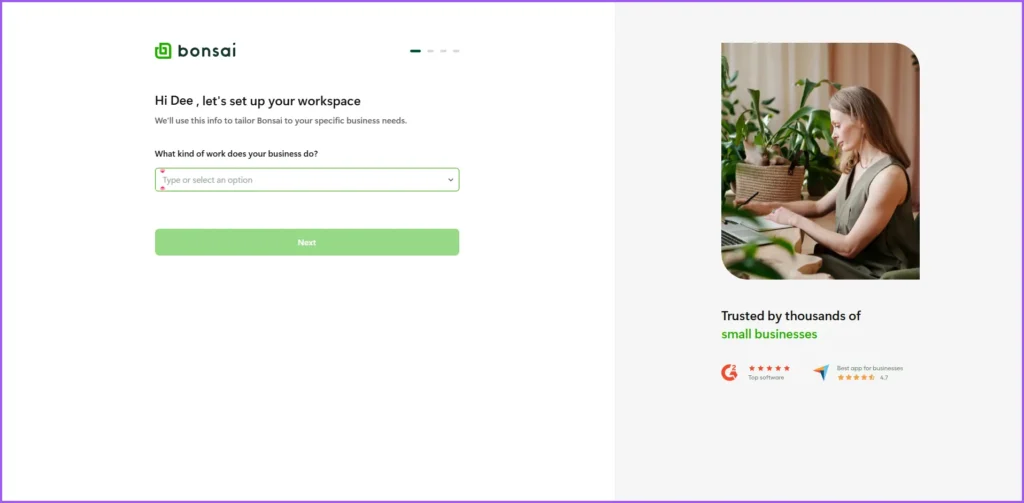
The main benefit is the connection between proposal → agreement → project setup, which can make a repeatable client onboarding process more efficient.
Bonsai also includes contract reminders, forms, questionnaires, scheduling, and other onboarding tools.
Project Management & Time Tracking
Bonsai combines project tasks and time tracking together, which lets you track your effort against each individual task. At the same time, you can clearly see the difference between billable time, unbilled time, and time that has already been invoiced.
It supports several types of project billing models like Time & Materials, Fixed Fee, Retainer, and Non-billable, and it even lets you set up project budgets based on time or money.
The practical benefit is that your work, tracked time, and billing are all linked together. This feature is especially useful for hourly projects or for fixed-fee work where you need to keep a close eye on how much time is being spent.
Additionally, on certain plans, Bonsai offers project views, workload management, Gantt views, and task dependencies.
Invoicing, Payments & Reminders
Bonsai lets you create invoices, accept online payments, and link your billing with client and project details. While making an invoice, you can also directly pull in the tracked hours of work (billable time).
For regular, ongoing work, Bonsai supports sending invoices automatically every month (recurring invoices) along with automated reminders before and after the invoice due date.
To collect payments, you have options like Bonsai Payments, Stripe, and PayPal, depending on your location and availability. Keep in mind that processing fees can apply to these payments.
Additionally, depending on your plan, Bonsai offers estimates (quotes), deposit invoices, late fees, and other billing tools.
Client Portal & Communication
Bonsai’s Client Portal gives clients a dedicated place to access project information, files, documents, invoices, and communication. Messaging, file sharing, client tasks, and activity tracking add further collaboration options on applicable plans.
Project Profitability & Expenses
Bonsai connects project revenue with tracked time, expenses, budgets, and costs, giving you a clearer picture of project performance. You can record project and billable expenses, while profitability tools help compare what a project earns against the time and costs involved. Bonsai also includes income tracking, financial reporting, profitability forecasting, and tax-related tools on applicable plans.
Workflow Automation
Bonsai can automate certain parts of your repeatable client workflows. Depending on how you work, actions like a proposal getting accepted, a contract being signed, a form being completed, or invoice activity can automatically trigger follow-up tasks.
This helps greatly reduce your manual steps and effort in repetitive processes like onboarding new clients and doing follow-ups.
Additionally, depending on your plan, Bonsai includes forms, questionnaires, scheduling, reminders, recurring workflows, and integrations with other apps.
Pricing
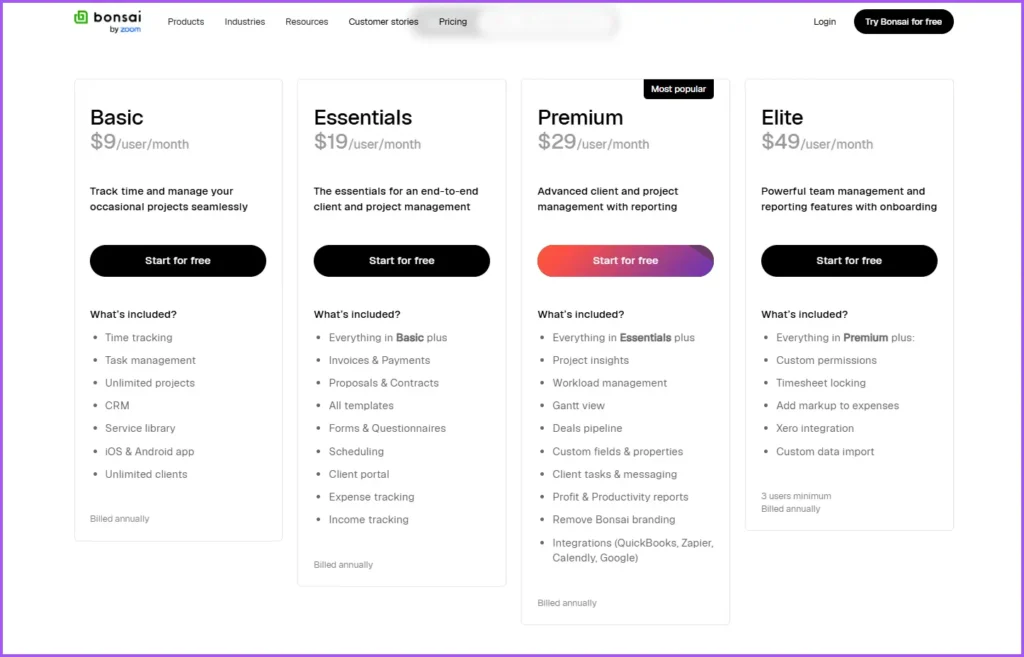
Bonsai currently offers four plans: Basic, Essentials, Premium, and Elite. Annual billing lowers the effective monthly price.
| Plan | Monthly billing | Annual billing |
| Basic | $15/user/month | $9/user/month |
| Essentials | $25/user/month | $19/user/month |
| Premium | $39/user/month | $29/user/month |
| Elite | $59/user/month | $49/user/month |
Elite currently requires a minimum of three users.
Which Bonsai Plan Makes Sense?
The Basic plan only covers the bare fundamentals like project and time management. But if you want features like proposals, contracts, invoicing, payments, scheduling, the client portal, and expense tracking, those actually start with the Essentials plan.
For most freelancers and solopreneurs who want to use Bonsai’s complete business workflow, the Essentials plan is the one I would look at first. It costs $19 per user per month when billed annually.
After that, the Premium plan at $29 adds more advanced project insights, workload management, reporting, and integrations. The Elite plan at $49 is built for the advanced needs of bigger teams, and a typical solo freelancer is very unlikely to ever need it.
Payment Processing Fees
If you collect payments from your clients through Bonsai, the subscription plan is not necessarily your only expense. Bonsai Payments currently charges 2.9% + $0.30 for credit or debit cards, and 1% for ACH (bank transfers), with a minimum fee of $1. If you are going to process large client payments through Bonsai, make sure to factor these fees into your total cost.
Free Trial
Bonsai currently offers a 7-day free trial, but you will need to enter your card or payment details to start it. Your signup screenshot shows $0 as ‘Due Today’, with the Premium plan priced at $39 per month on a monthly basis, or $29 per month when billed annually.
Pricing takeaway: Don’t judge Bonsai by the $9 starting price alone. If you want the broader client-management workflow, Essentials is the more realistic starting point for most freelancers.
💡 Note: Bonsai’s pricing, plans, features, and payment terms may change over time. For the latest pricing, plan details, and features, please check the official Bonsai website.
Performance & Real-World Feedback
Bonsai’s biggest strength is its ease of use and ability to bring multiple workflows together under one roof. Right now, it holds a solid 4.6/5 overall rating on Capterra, and another 4.6/5 just for being user-friendly. This aligns with a recurring theme in user feedback: freelancers appreciate having their proposals, contracts, projects, invoices, and client information connected instead of switching between multiple tools.
That said, the feedback isn’t universally positive. Some users wish they had more room to customize things or more flexibility, especially with the client portal and project management side. Payment experiences are also mixed, with some users mentioning concerns about processing fees or payment holds. These are individual user experiences and don’t necessarily mean every Bonsai customer will encounter the same issues.
At the end of the day, Bonsai does its best work as a broad, easy-to-manage business platform rather than a super-specialized tool that focuses on just one thing. For freelancers and solopreneurs who just want things to be simple and connected, that’s a huge win.
Who Should Use Bonsai?
Bonsai is most beneficial for those freelancers and solopreneurs who do not just spend their time finishing client tasks, but also manage multiple clients and different parts of the business on their own.
Freelancers Managing Multiple Clients
If you are constantly handling proposals, contracts, projects, time tracking, invoices, and payments for several clients, Bonsai’s connected workflow can significantly cut down the headache of managing each task separately.
Solopreneurs Running the Business Alone
This platform is probably the strongest fit for these exact people. When the responsibility of both delivering the actual work to clients and handling all the paperwork falls entirely on your own shoulders, having these workflows in one place can reduce some of the administrative burden.
Small Service Businesses
Bonsai can also work great for small agencies and service businesses where the same workflow is repeated for every client. Its higher plans even bring in features like workload management, reporting, and team permissions, which can support more advanced team requirements.
Final Verdict: Is Bonsai Worth It?
After testing Bonsai against the problems that freelancers and solopreneurs face in real life, its value becomes quite clear. If the extra tasks around managing your clients have become a headache on their own—even more than the actual client work—then you should definitely give Bonsai serious consideration.
Its biggest strength is not just any single feature. Instead, it is the way the different parts of the workflow all link together—all the way from proposals and contracts to projects, time tracking, invoicing, payments, talking to clients, and financial tracking. This can make a real difference when you are tired of moving details back and forth between multiple apps and repeating the same paperwork for every single client.
The trade-off here is that Bonsai makes the most sense only when you actually need these multiple features. If you just need a simple task manager or only need to send an invoice once in a while, this broad business-management platform might be way more than you actually need. And while its $9 Basic plan looks attractive, the complete client-business workflow actually starts with the Essentials plan, which costs $19 per month when billed annually.
Our Final Take
For freelancers and solopreneurs managing multiple clients, Bonsai is an excellent all-in-one option.
Its biggest selling point is not the number of its features—but the fact that all those features work together to create a single client-business workflow.
Bonsai isn’t perfect, either, and it is important to pay attention to the price of its plans along with the payment processing fees. But if you have reached that turning point where managing the business has become just as exhausting as doing the actual work, then Bonsai makes a very strong and compelling case for you.
For this audience, we’d recommend giving Bonsai a serious look—especially its Essentials plan, where its core client-business workflow becomes available.
Ready to see if Bonsai fits your workflow? Start with the 7-day free trial.
Explore More Freelancer & Productivity Reviews
Looking for more tools to help run your freelance or solopreneur business?
Explore our reviews of software for productivity, project management, AI, and client workflows.
- ChatGPT Review — AI assistance for research, writing, brainstorming, and everyday work.
- Microsoft Copilot Review — AI assistance across work and productivity.
- ClickUp Review — Project and task management for organizing complex workflows.
- FreshBooks Review — Invoicing, expenses, time tracking, and financial management for freelancers and small businesses.
More freelancer and solopreneur software reviews are coming to ToolMapHQ.
Frequently Asked Questions About Bonsai
Is Bonsai good for freelancers and solopreneurs?
Yes. Bonsai is particularly useful for freelancers and solopreneurs managing multiple clients and several parts of their business, including contracts, projects, time tracking, invoicing, payments, and client management.
How much does Bonsai cost?
Bonsai starts at $9/user/month when billed annually for Basic. Essentials costs $19, Premium $29, and Elite $49 per user/month with annual billing. Online payment processing can add transaction fees.
Does Bonsai have contracts and electronic signatures?
Yes. Bonsai provides contract templates and electronic signatures, along with tools for managing the client agreement and onboarding process.
Can Bonsai track time and create invoices?
Yes. You can track time against projects and tasks and use billable time when creating invoices. Bonsai supports hourly, fixed-fee, retainer, and other project billing models.
Does Bonsai have a client portal?
Yes. The Client Portal gives clients a central place to access project information, files, documents, invoices, and communication.
Does Bonsai offer a free trial?
Yes. Bonsai currently offers a 7-day free trial. Payment details are required to start the trial, and the selected subscription begins after the trial unless cancelled.
Is Bonsai worth it?
For freelancers and solopreneurs who need several connected business workflows, yes, Bonsai is worth serious consideration. Its main value comes from bringing client management, contracts, projects, billing, payments, and financial tracking together.
If you only need one simple function, a specialized tool may be a better fit.