
Claude Review: The Verdict
Overall Rating: ⭐⭐⭐⭐☆ 4.8/5
Honestly, if you’re stuck doing heavy writing, research, or coding all day, just use Claude. It’s easily the best option out there right now. The biggest difference is that it actually takes a beat to think through things, instead of just dumping out the first generic response it can generate. Throw a messy, 50-page PDF or a weird coding bug at it, and it feels like you’re working with a sharp colleague, not some basic chatbot. Plus, it actually listens to instructions the first time. You don’t have to spend half your day typing “no, fix this” over and over again.
Look, it isn’t perfect. It definitely loses to ChatGPT if you need to generate images, and it still lacks that massive, do-everything app ecosystem. But if your main priority is high-quality writing and sorting through a mountain of complex data, Claude stands out as one of the strongest AI assistants available today. The Recent updates have made Claude a much stronger everyday assistant. If your workflow is mostly docs and code, it’s a total game-changer.
Table of Contents
What Is Claude AI?
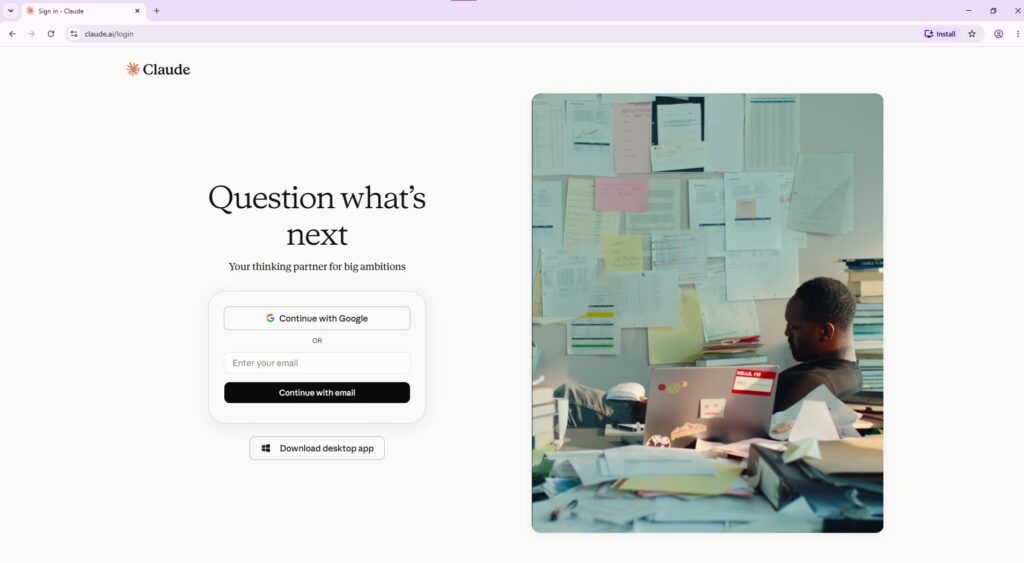
Ever tried dumping a massive research paper or a 100-page client proposal into a chatbot? Usually, it’s a disaster. Most assistants lose the plot after a few questions, or you have to constantly prompt them to stay on track. Claude AI handles this entirely differently. It’s built from the ground up to stay organized and actually pay attention to massive, multi-turn conversations.
Anthropic basically designed a workspace for deep work. It handles the usual stuff like drafting articles, summarizing large documents, or debugging code, but it doesn’t feel robotic anymore. Over the last year, they’ve packed it with features like live search, voice mode, project folders, and direct Slack and Workspace integrations.
Frankly, Claude chooses quality over speed. It doesn’t rush just to give you an instant response; it actually takes a second to organize information and respect complex rules across giant files. If your job revolves around reading, writing, or solving complex reasoning problems, you’ll notice the difference immediately. Is it perfect for everyone? No way. If you want top-tier image generation or an all-in-one ecosystem, stick with ChatGPT. But if you spend your day working with large volumes of documents and heavy reasoning, Claude is tough to beat.
Key Features
Writing That Needs Minimal Editing
Many AI tools spit out drafts that need a massive page-by-page rewrite before they are usable. Claude doesn’t do that. It hands back writing that is actually clean, properly structured, and closely aligned with your prompt. Whether it is a messy blog draft, a client proposal, or a quick email, the copy flows naturally right away. You spend way less time fixing silly formatting mistakes and can get to your final version much faster.
Working with Long Documents
Claude handles information overload effortlessly. You can just toss massive reports, dense legal contracts, or raw meeting notes straight into the chat window. It allows you to quickly pull out key metrics, rewrite boring sections, or cross-reference facts across the entire file. Best of all, it actually holds onto the context without losing the plot halfway through. For anyone buried in reading all day, it completely eliminates the manual sorting headache
Breaking Down Complex Topics
Claude is brilliant at walking you through things step-by-step. Instead of just rushing to an answer, it breaks down hard ideas into a logical flow that is way easier to wrap your head around. It makes learning technical subjects, mapping out big projects, or figuring out a weird business problem feel less overwhelming. You get an organized game plan instead of information overload.
Helping with Programming Tasks
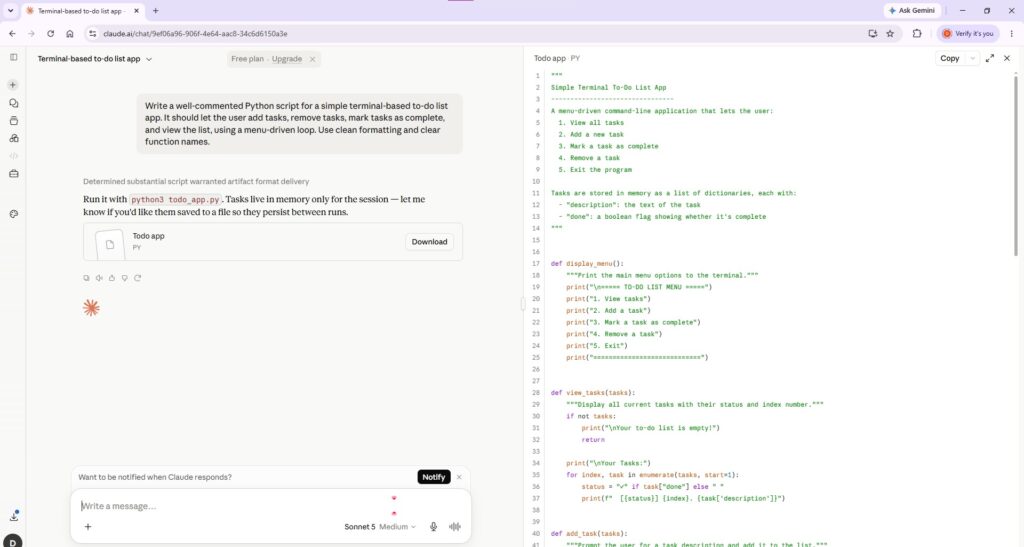
Claude is an absolute beast when it comes to programming tasks. It doesn’t matter if you’re trying to learn the basics or managing a massive, chaotic project—it handles writing functional syntax, digging through buggy errors, and explaining weird logic with ease. Where it really stands out is reviewing your messy snippets and throwing back much cleaner, tighter alternatives. Hardcore developers will obviously stick to their specialized IDE setups for massive architecture shifts, but for everyday troubleshooting, debugging, and routine tasks, Claude is a lifesaver.
Keeping Work Organized
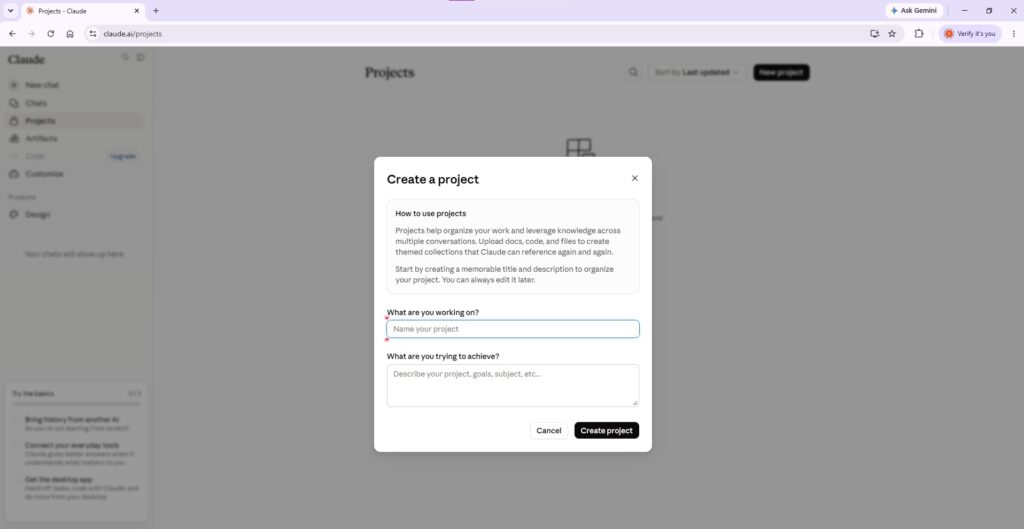
Honestly, it is just built for long-term projects instead of quick Q&As. You can keep all your related chats grouped together and reuse your background files across different tasks. It lets you jump right back into old work without starting from scratch every single time. If you are juggling three or four things at once, it cuts out the annoying setup time completely.
Live Web Searching
Claude handles live web searches incredibly well. It doesn’t matter what you’re trying to look up; it can handle digging through recent news, checking software documentation, and pulling up real-time product comparisons. Where it really shines is bringing fresh data directly into your active workspace. You can just complete your research without it relying on old training limits. Look, research power-users will still use traditional search engines for heavy data mining, but for daily fact-checking, quick lookups, or gathering quick context, Claude is a lifesaver.
Projects and Memory
Claude handles ongoing work incredibly well. It doesn’t matter what kind of project you’re tracking; it can group related chats, organize messy background documents, and store specific instruction sets. Where it really shines is holding onto your personal preferences across entirely different conversations. You can just jump into a new chat without it forgetting your overall goals. Look, basic users will still treat every chat like a blank slate and paste context over and over, but for long-term work, managing massive workflows, or cutting out repetitive typing, Claude is a lifesaver.
Voice Mode and Integrations
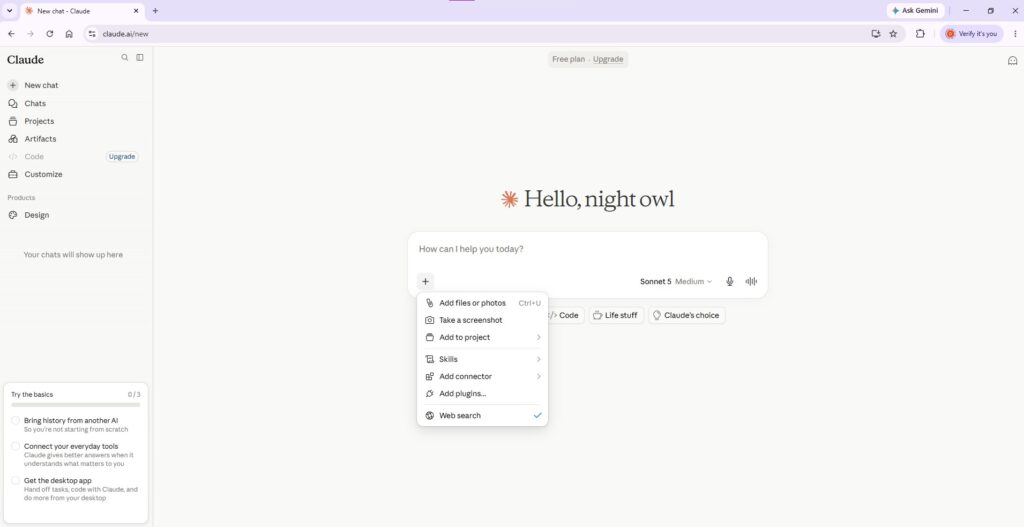
The voice thing is crazy good. You just talk. Great for venting ideas out loud when you can’t type. Also, it links to Slack and Google Workspace. It pulls your files right into the chat so you don’t have to keep swapping windows like an idiot. Most folks will just keep copy-pasting things manually the old way. But if you hate bouncing between apps or just want to speak your prompts, it’s a massive shortcut.
Where Claude Falls Short
Look, no assistant does it all, and Claude has its own weak spots. If you need a tool to spit out AI images or edit videos, you are going to hit a wall fast
Limited Built-In Creative Tools
Anthropic built this thing for text, heavy coding logic, and raw data processing—not media creation. It skips out on the flashy multimedia plugins to focus purely on helping you write and solve complex problems. If your daily routine requires heavy graphic design or multimedia, it is simply not an all-in-one creative suite.
Can Be Overly Cautious
Claude is practically obsessed with safety and rules. While it is great for avoiding harmful stuff, it often means the bot gets way too defensive over totally normal questions. You might throw a completely harmless prompt at it and just get back a generic refusal or a super limited response. If you’re working on complex or slightly sensitive topics, dealing with its constant lecturing and unnecessary guardrails can get pretty annoying.
The best stuff costs money
The free plan handles basic lookups fine, but the smartest models and coolest features sit behind a strict paywall. If you live in this tool for professional work, dropping cash on the subscription is basically mandatory to avoid hit-or-miss limits. But if you just need occasional help drafting an email or checking a quick block of code, you can probably just coast on the free tier without a problem.
It still screws up
Look, Claude isn’t magic. It will confidently misread a prompt, blow past massive details, or just completely pull a fake fact out of thin air while sounding totally certain. If you are doing real client work or financial stuff, do not just copy-paste it blindly. You genuinely have to double-check the math and the facts yourself before you look stupid sending it out.
Who Should Use Claude?
Claude isn’t just for one specific job. It is a solid choice for anyone swimming in text, code, or messy problems every day.
Writers
If you live in docs, newsletters, or blog drafts, it gives you clean text that doesn’t sound like a robot wrote it.
Students & Researchers
It slices through monster PDFs, dry papers, and confusing concepts without making you lose your mind.
Developers
Great for hunting down annoying bugs, explaining weird functions, or writing quick scripts when you are stuck.
Business Professionals.
Perfect for knocking out client proposals, dissecting reports, and trimming down boring, repetitive busywork.
Document-Heavy Teams:
If your company handles endless contracts, policies, or manuals, this thing reads them in seconds so you don’t have to.
Pros and Cons
Pros
- Produces natural, well-structured writing
- Excellent for working with long documents
- Explains complex topics clearly
- Helpful for coding and technical tasks
- Clean and distraction-free interface
- Suitable for both individuals and teams
Cons
- Some advanced features require a paid subscription
- Responses can occasionally be overly cautious
- Still requires fact-checking for important work
- Learning the best prompting style takes some practice
Claude Pricing Options
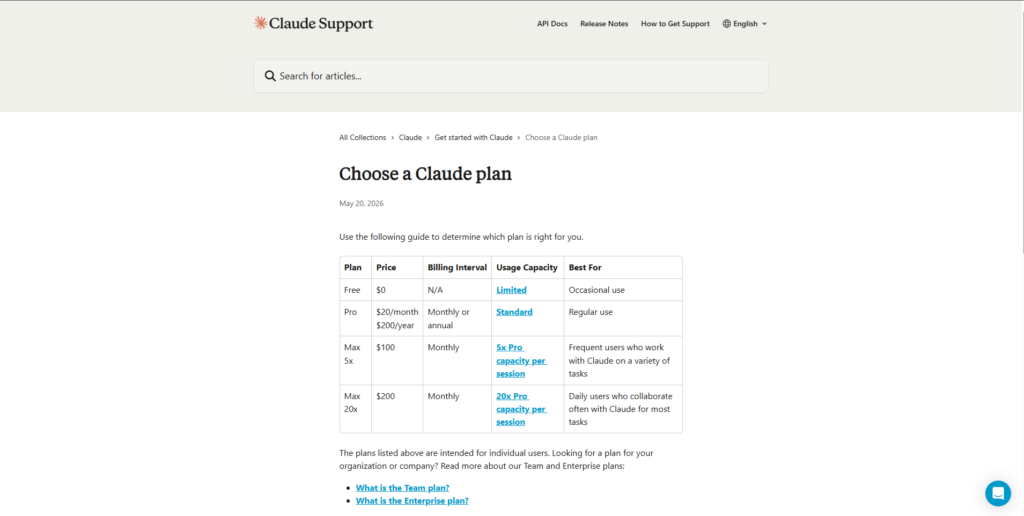
Claude offers a flexible mix of free and paid tiers depending on how heavily you use AI in your day-to-day workflow.
| Plan | Price (USD) | Billing | Best For |
| Free | $0 | N/A | Occasional users exploring Claude |
| Pro | $20/month or $200/year | Monthly or Annual | Regular users who need higher usage limits and premium features |
| Max 5x | $100/month | Monthly | Frequent users with significantly higher usage limits |
| Max 20x | $200/month | Monthly | Power users who depend on Claude for intensive daily work |
View Claude Pricing
Which plan makes sense?
- Free Plan: Stick to this if you just want to test the waters. It handles quick, daily tasks just fine.
- Pro Plan: Grab this if your job revolves around heavy writing, deep research, or coding. It gives you the best bang for your buck.
- Max Plans: Pick this only if you are an extreme power user running massive, non-stop workflows all day. It pushes your usage limits way higher.
Note: Team and Enterprise plans are also available for businesses that require collaboration tools, advanced security, and administrative controls. Contact Anthropic for custom pricing.
Pricing Disclaimer: These numbers are based on US rates at the time of writing. You’ll want to double-check Anthropic’s pricing page for any recent regional price updates before you pull out your card.
Claude Alternatives
If you love what Claude does for writing and thinking, but want to see what else is out there.
ChatGPT
ChatGPT is a great next stop because it acts as an all-in-one helper for coding, drawing pictures, talking out loud, and using extra apps.
Best for: Everyday tasks where you need a bit of everything in one place.
Also read: ChatGPT Review
Google Gemini
If you find yourself spending a large part of the day in Gmail, Google Docs, Sheets, and Google Drive, Gemini would be a better option due to its tight integration with the Google ecosystem.
Best for: Google Workspace Users.
Check out our Gemini Review
Perplexity AI
Perplexity is concerned more with research than with conversation. Every response that comes from Perplexity includes a citation, which makes it one of the most useful AI applications for researching contemporary subjects.
Best for: Students, researchers, journalists, and professionals.
Microsoft Copilot
The Microsoft Copilot application works well with Windows and Microsoft 365. It is worth trying out for those whose work revolves around Word, Excel, PowerPoint, and Teams.
Best for: Microsoft ecosystem users.
Quick Comparison
| AI Tool | Best For |
| Claude | Long-form writing, document analysis, and reasoning |
| ChatGPT | All-in-one AI assistant |
| Google Gemini | Google Workspace integration |
| Perplexity AI | AI-powered research with citations |
| Microsoft Copilot | Microsoft 365 productivity |
Frequently Asked Questions
Is Claude free?
Yes. Anyone can use the basic version of Claude for free. Just keep in mind that there are daily limits on how much you can message it.
Is Claude Pro worth the money?
If you rely on AI every day for heavy writing, coding, or research, yes. The Pro plan gives you way more daily usage and unlocks the most powerful models.
Can Claude read PDF files?
Yes. You can drop in PDFs, spreadsheets, or long reports. Claude can summarize them, find specific data, or answer questions about the file.
Is Claude good at coding?
Yes. It can write code from scratch, debug errors, and explain tricky programming concepts across most major languages.
Can Claude search the web?
Yes. Claude can browse the internet to pull in live, up-to-date information. It is still smart to double-check critical facts, though.
Which plan should I get?
Start with the free version. If you find yourself hitting usage limits or needing sharper answers, upgrade to the Pro plan.
Is Claude better than ChatGPT?
It depends on your workflow. Claude usually wins at handling massive documents, deep research, and natural writing. ChatGPT is often better if you need built-in image generation or custom bots.
The Final Takeaway
Claude has easily earned its spot as one of the most capable tools out there today. It goes way beyond just answering simple questions. Think of it as a collaborative partner to help you sort through messy thoughts, clean up scattered notes, and write much better drafts when you are stuck.
It handles the brutal work best—things like writing long pieces, digging through massive files, checking logic, and speeding up daily tasks. It slashes your workload dramatically but keeps your standards high, whether you’re trying to code, study, or manage a project.
But keep your guard up. No AI handles everything perfectly. Claude gets weirdly timid sometimes and plays it too safe. Just make sure to look over what it spits out before using it for anything that actually matters. Once you figure out its quirks—where it excels and where it completely blows it—you’ll honestly get a ton of mileage out of the tool.
Our Rating: 4.8 / 5
If you spend your day writing, digging through research, coding, or managing data, you seriously need to test Claude out. The free tier is perfect for messing around with the tool at first. If it ends up becoming a staple in your daily routine, paying for the premium upgrade is a no-brainer.
About This Review:
This review was prepared by the ToolMapHQ editorial team. All software products were evaluated based on their features, pricing, usability, value, and practical usage cases. If possible, all data are verified through official sources, but software evolves rapidly—pricing and specific features shift all the time. Definitely check their landing page to see the latest rules before pulling out your credit card.