
Introduction
Knowing how to collect website content from clients sounds simple—until you’re waiting for homepage copy, service descriptions, images, logo files, testimonials, and other details you need to actually start the project.
A common approach is to send one message asking the client to “send all the website content.” The problem is that this leaves too much for the client to figure out: which pages need content, what exactly to send, what format to use, and where everything should go.
The result can be a familiar cycle for freelance web designers: send a reminder, receive a few files, discover something is missing, follow up again, and repeat.
The better solution isn’t necessarily to chase clients more often. It’s to make the content-collection process clear, structured, and easy to complete.
This guide shows a practical system for collecting website content, tracking what’s missing, and reducing the follow-up work that can slow down a web design project.
Why Website Content Collection Becomes a Problem
Website content collection is often treated like a simple handoff when it is really a small project of its own. A client may know their business extremely well, but that doesn’t mean they know exactly what a web designer needs from them.
“Send Me Your Website Content” Is Too Vague
From the client’s perspective, a vague request can raise questions:
- Which pages do you need content for?
- Should I write the copy myself?
- Do you need my old website text?
- Which images should I send?
- Do you need the original logo files?
- What about testimonials?
- Should everything be sent at once?
- Where should I upload it?
If those questions aren’t answered upfront, the client has to figure out the process themselves. That makes delays more likely and creates more work for the designer later.
Website Content Rarely Arrives in One Neat Package
Even responsive clients may send copy in an email, images through WhatsApp, a logo in a PDF, testimonials in a document, service information from an old website, and brand assets through Google Drive. Now the problem isn’t just getting the content; it’s keeping track of what you have, what is missing, and where everything came from.
Missing Content Can Affect the Rest of the Project
A missing piece of content can prevent a page from being completed properly. That can lead to placeholders, later revisions, additional feedback, and changes to the project timeline. Content collection is worth treating as a proper part of the web-design workflow.
What Website Content Should You Collect From a Client?
Before asking a client to send website content, know exactly what you’re asking for. The requirements vary by project, so don’t send every client a giant checklist. Collect only what the project actually needs and make each request specific.
Business and Company Information
- Business name and short description
- Main services or products
- Target customers
- Business location or service area
- Contact details and business hours
- Social media profiles
- Relevant certifications, memberships, or credentials
Some of this information may already exist on the client’s current website or business documents, so don’t ask the client to recreate information you can reasonably obtain elsewhere.
Homepage Content
- Main headline or value proposition
- Short introduction
- Key services or products
- Main benefits
- Calls to action
- Supporting images
- Testimonials or trust signals
- Important statistics or achievements
If the client hasn’t written the copy yet, make that clear at the beginning of the project. Collecting existing content and writing new content are two different tasks.
About Page Information
- Company or founder story
- Team information and bios
- Mission or values
- Experience or qualifications
- Relevant photos
- Awards or achievements
A short explanation of the information you need is usually more useful than simply asking for “About page content.”
Services or Product Information
- Service or product name
- Description
- Key features or deliverables
- Benefits
- Pricing, if publicly displayed
- Images or examples
- FAQs
- Related testimonials or case studies
- Call to action
For a service-based business, break the request into individual services rather than asking for one large block of information.
Images and Brand Assets
- Logo files and brand guidelines
- Brand colors and fonts
- Team, product, or project photos
- Illustrations or icons
- Videos
- Downloadable PDFs or other resources
Specify the preferred file format when it matters. Asking for “the logo” can produce a screenshot or low-resolution image when you actually need the original file.
Testimonials, Case Studies, and Social Proof
- Customer testimonials
- Client names and roles
- Company names
- Case-study details
- Before-and-after results
- Relevant statistics
- Permission to display customer information
If testimonials need editing or approval before publication, include that in the workflow rather than leaving it until the design is nearly finished.
Contact, Location, and Other Website-Specific Information
- Email, phone, address, service areas, and business hours
- Booking links and social profiles
- FAQs
- Privacy policy and terms where applicable
- Booking requirements
- Newsletter or lead-magnet information
- Integrations or third-party links
- Existing SEO content
- Redirect requirements
Don’t automatically ask every client for everything on this list. The right request depends on the website, scope of work, and what the client has already provided.
Don’t Ask Clients to “Send Everything”
One of the easiest ways to make website content collection difficult is to send a message that simply says, “Please send all the content for your website.” It sounds straightforward, but it leaves too many decisions to the client.
A better approach is to turn one large request into smaller, clearly defined content requests.
Start With a Page-by-Page Content Inventory
Before contacting the client, list the pages included in the project and the content each page needs.
| Page | Typical content needed |
| Home | Headline, introduction, services, CTA, images |
| About | Company story, team information, photos |
| Services | Service descriptions, benefits, FAQs |
| Contact | Contact details, hours, location |
| Testimonials | Reviews, names, company details |
This gives the client a clear picture of what you’re asking for and gives you a simple way to track what’s complete and what’s missing.
Tell the Client Exactly What to Provide
Instead of asking for “About page content,” try: “For the About page, please provide a short company history, a paragraph about what makes your business different, and a short bio and photo for each team member.”
The second request gives the client a clearer definition of done. The same principle works for service pages: explain the service name, description, who it’s for, benefits, what’s included, relevant images, and FAQs where applicable.
Separate Required Items From Optional Items
Not every piece of content has the same priority.
- Required before design starts: main business information, homepage content, service descriptions, logo, essential images
- Useful but can come later: additional testimonials, blog content, extra case studies, optional downloadable resources
This prevents one missing testimonial from holding up an entire website project and makes your follow-ups more useful.
Give Each Request a Clear Owner
If several people are involved on the client’s side, identify who is responsible for each type of content. For example, the business owner may handle company information, a marketing manager may provide existing copy, and a photographer may supply approved images.
A simple owner field can prevent the classic “I thought someone else was sending that” problem.
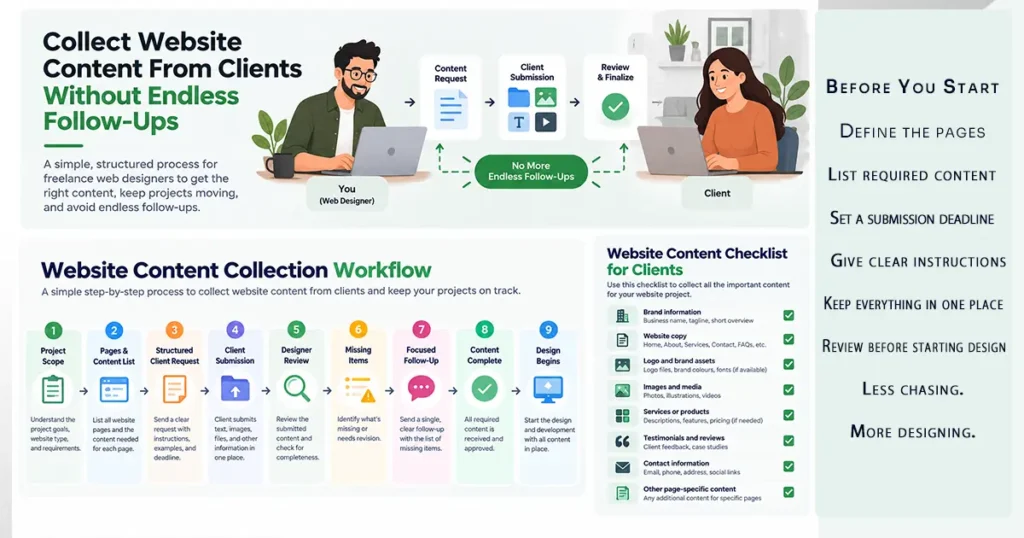
A 9-Step Website Content Collection Process
Once you know what content you need, turn it into a repeatable workflow. A good process should answer three questions: What does the client need to provide? Where should they provide it? How will you know what’s still missing?
Step 1 — List the Pages You Need Content For
Start with the website structure: Home, About, Services, individual service pages, Portfolio, Testimonials, Contact, FAQ, or whatever is actually included in the project. This prevents you from requesting content that isn’t part of the scope.
Step 2 — Break Each Page Into Specific Requests
Instead of “Please provide the Home page content,” request the headline, introduction, services, key benefits, primary CTA, supporting images, and testimonials where applicable. Smaller requests are easier for clients to complete and easier for you to track.
Step 3 — Explain What the Client Should Provide
Give a short explanation wherever a request could be unclear. For example, define what you mean by a homepage headline, service description, or supporting image. You don’t need an instruction manual for every field; just remove the uncertainty.
Step 4 — Define Acceptable Formats
Tell clients how you want the material supplied. Text can go directly into the form or document; logos may need original source files; photos should be provided at usable quality; and testimonials may need the information or permission required for publication.
Step 5 — Set a Realistic Deadline
A content request without a deadline can become an open-ended task. Give the client a clear date and explain why it matters: “Please submit the remaining website content by Friday so we can keep the design phase on schedule.”
Step 6 — Give the Client One Place to Submit Everything
Instead of copy in email, images in WhatsApp, files in Drive, and answers somewhere else, give the client one primary submission point. That could be a structured form, shared document, client portal, or dedicated content-collection tool. The exact tool matters less than having a clear source of truth.
Step 7 — Review Submissions Before Using Them
Check whether every required page is covered, important sections are missing, images are usable, information conflicts, testimonials are approved, or files are incomplete. Catching these issues early is much easier than discovering them halfway through the design.
Step 8 — Track What’s Still Missing
A simple tracker is enough:
| Item | Status | Owner |
| Homepage copy | Complete | Client |
| About page | Complete | Client |
| Service descriptions | Missing | Client |
| Logo | Complete | Client |
| Team photos | Missing | Client |
| Testimonials | Review needed | Client |
Now your follow-up can be specific: “We have everything needed for the Home and About pages. We still need the three service descriptions and team photos.”
Step 9 — Follow Up Only on Specific Missing Items
Don’t repeatedly ask the client to “send the content.” Tell them exactly what remains. The client should be able to see what is done, what is missing, and what they need to do next.
What to Do When a Client Still Doesn’t Send the Content
Even with a clear process, some clients will miss deadlines. Avoid turning every missing item into another vague reminder.
Separate Essential Content From Optional Content
Not every missing item should stop the project. You may need final service descriptions before designing those pages, while an additional testimonial can be added later. Distinguish what genuinely blocks the project from what can wait.
Send a Focused Follow-Up
Instead of “Just following up on the website content,” say: “Thanks for sending the homepage content. We have everything we need for that page. We still need the three service descriptions and team photos before we can complete those sections.”
Make the Next Action Obvious
A useful follow-up should make clear what needs to be provided, where it should be submitted, what format is required if relevant, and when it is needed.
Adjust the Project Timeline When Necessary
If missing content prevents you from starting or completing a project stage, document that rather than quietly absorbing the delay. Make the relationship between the outstanding client deliverable and the project timeline clear.
Don’t Let Optional Content Hold Up the Project
Where appropriate, you may be able to use an agreed placeholder or existing approved material while waiting for optional content. The important thing is to distinguish between content that is genuinely blocking the project and content that can be added later.
Should You Use a Questionnaire, Form, or Content Collection Tool?
There isn’t one right method for every project. The right choice depends on how much information you collect, how often you build websites, and how much time you spend managing follow-ups.
| Method | Works well when | Main limitation |
| Small projects with a few content items | Information can become scattered | |
| Google Forms or simple forms | You collect similar structured information repeatedly | Less flexible for complex projects |
| Shared document | The client needs to provide or edit longer copy | Files, missing items, and approvals can become harder to manage |
| Questionnaire | You want a repeatable set of client questions | Can become too long |
| Dedicated content-collection software | You regularly collect lots of content and files | Adds a software cost |
How to Decide Which Method Is Right for You
- Small project with a few items → Email may be enough.
- Simple recurring information → A form may work well.
- Mostly long-form copy → A shared document may be appropriate.
- Repeatable client questionnaire → Use a structured questionnaire.
- Lots of content, files, and recurring follow-ups → Dedicated content-collection software may make sense.
If your current process works and doesn’t create unnecessary follow-up work, keep using it.
When Does a Dedicated Content Collection Tool Make Sense?
The case for dedicated software becomes stronger when content collection is a repeated part of your workflow.
You’re Asking Clients for the Same Information on Every Project
If every website starts with similar requests for business information, services, homepage content, images, brand assets, testimonials, and contact details, a reusable workflow can save you from rebuilding the process from scratch.
You’re Spending Too Much Time Chasing Missing Items
If you regularly think, “I know I asked for this. Where is it?” or send multiple messages about the same logo, service description, image, or testimonial, the problem may be the collection system rather than the client. A structured tool can give you a central place to see what was requested, submitted, and still needs attention.
Your Projects Involve Lots of Files and Information
Website projects can involve written copy, images, logos, PDFs, videos, testimonials, URLs, business information, and page-specific instructions. When all of that needs to come from one client, a structured submission workflow can be easier to manage than separate emails and file-sharing links.
You Want a Repeatable Client Experience
Instead of every client receiving a different email, you can use a consistent process: project starts → content request → client submits → you review → missing items are identified → project moves forward.
Where Content Snare Fits
Content Snare is one example of a dedicated content-collection tool designed around this type of workflow. It may be worth considering if your main problem is repeatedly collecting information and files from clients rather than managing the entire web-design project.
For a freelance web designer, that distinction matters. You don’t necessarily need a complete client-management platform just to collect website content. A dedicated content-collection tool can make sense when that specific part of your workflow has become repetitive or difficult to manage manually.
If you want a deeper look at the software itself, see our Content Snare Review 2026.
A Simple Rule to Remember
Don’t make the client figure out what you need.
Turn “I need website content” into: “Here’s exactly what we need, here’s where to provide it, here’s when we need it, and here’s what happens next.”
Final Takeaway
Collecting website content from clients doesn’t have to become a long series of reminders. The biggest improvement usually comes from changing the process itself.
Break the request into clear pages and specific items. Explain what you need. Give the client one place to submit everything. Review the material before moving forward. Track what’s still missing and follow up on specific items instead of repeatedly asking for “the website content.”
For smaller projects, a simple form or document may be enough. If you’re regularly spending time chasing copy, images, files, and other information, a dedicated content-collection tool may be worth considering.
Frequently Asked Questions
How do you collect website content from clients?
List the project pages, break each page into specific content requests, and give the client one clear place to submit everything. Review the submission, track missing items, and follow up only on what remains.
What content should a web designer ask a client for?
Common requirements include business information, page copy, service descriptions, images, logos, testimonials, team information, contact details, and project-specific material. Build the request around the actual pages and scope.
What should a website content questionnaire include?
A useful questionnaire can cover business information, homepage details, About-page information, services or products, contact details, brand assets, testimonials, and project-specific requirements. Keep questions specific enough to define a complete answer.
How do I get clients to send website content on time?
Make the request specific, give the client a clear deadline, explain why it matters, and make submission easy. If something is missing, follow up with the exact outstanding items.
How can freelance web designers collect client content more efficiently?
Use a repeatable page-by-page workflow, keep submissions in one primary location, review content before the next stage, and track missing items. If manual follow-ups become recurring, consider dedicated content-collection software.
When should you use a website content collection tool?
A dedicated tool becomes more useful when you collect similar information across many projects, handle lots of files, or spend significant time chasing missing items. For smaller projects, email, a form, or a shared document may be enough.