
Introduction
Running a service business involves much more than merely providing excellent work for your clients. You also have to manage inquiries, send forms, prepare proposals, get contracts signed, schedule appointments, send invoices, collect payments, and keep clients updated throughout this entire process.
When these tasks are handled separately, even a small list of clients can generate a surprising amount of administrative work. A missed follow-up action, an incomplete questionnaire, or an invoice not sent on time can quickly become another thing that you must remember.
This Dubsado review looks at its features, pricing, benefits, and drawbacks, and whether it makes sense for independent professionals and small service businesses in 2026.
Dubsado brings many parts of the client management process onto a single platform, including forms, proposals, contracts, invoicing, payments, client portals, scheduling, and workflow automation. Some of its more advanced tools are available only on the Premier plan.
However, having all of these tools in one place does not automatically make a platform worth paying for.
The bigger question is whether Dubsado can actually make client management simpler for independent professionals and service businesses—and whether its automation features provide enough value to justify the subscription fee and the learning curve.
Affiliate Disclosure: This article contains affiliate links. If you purchase Dubsado through our link, ToolMapHQ may earn a commission at no additional cost to you. We only recommend tools we believe can provide genuine value to our readers.
Table of Contents
Why Client Management Gets Complicated for Service Businesses
A new client might begin with a simple inquiry, but this process rarely ends there.
You may need to send a questionnaire, prepare a proposal, get a contract signed, collect an advance payment, schedule an appointment, send reminders, complete the work, and ultimately send an invoice or payment request.
When each step is handled through a different tool, email thread, spreadsheet, or calendar, keeping everything interconnected becomes more difficult.
This is especially frustrating for independent professionals and small service businesses because the person performing the client work is often also responsible for the administrative side of the business.
The problem is not necessarily that any individual task is difficult. Rather, it is that the exact same tasks have to be repeated for every client.
For example, imagine an independent designer who receives a new inquiry. They may need to reply to the potential client, send a form, prepare a proposal, get the contract signed, collect an advance payment, schedule an introductory call, and send a welcome email.
None of those steps is particularly complex on its own. However, repeating this entire process for every new client takes time—and forgetting even a single step can create problems later.
That is exactly where Dubsado becomes interesting.
Instead of viewing forms, contracts, payments, scheduling, and follow-up actions as completely separate tasks, Dubsado is designed to connect them into a repeatable client process. Its flows can automate various actions based on the events that occur during that process.
What Is Dubsado?
Dubsado is a client-management and business-management platform designed primarily for service-based businesses. It brings different parts of the client journey into a single system, including capturing leads, forms, proposals, contracts, invoices, payments, scheduling, client portals, and automated workflows.
The core idea is simple: instead of interconnecting multiple separate tools to manage a client from the very first inquiry through payment and project completion, you can handle many of those steps inside Dubsado itself.
For example, a potential client information form can bring a new prospect into Dubsado as a project. From there, you can use questionnaires, proposals, contracts, invoices, scheduling, and other steps as part of the same client journey.
If you are also exploring broader tools for managing an independent business, our Bonsai review looks at another approach to bringing client and business-management tasks together.
This does not mean Dubsado is automatically the better choice. The two tools approach business management differently, so the right fit depends entirely on how you work.
Dubsado becomes particularly interesting when your business follows a repeatable client workflow.
However, if a completely different process is required for every client, or you only work with a handful of clients and have very little administrative work, Dubsado’s broader features may be more than you need.
Dubsado Quick Verdict
Dubsado is worth considering when you want to manage a large part of your client journey from a single place and automate repetitive administrative tasks.
Its strongest aspect is not any single feature. Rather, it is the way different parts of the client process can work together—from lead capture and proposals to contracts, invoices, payments, scheduling, and follow-up actions. Dubsado itself positions this platform around creating repeatable processes rather than starting work from scratch with every single client.
The other side of this is its complexity.
Dubsado gives you considerable control over how your processes work, but this flexibility also means there is much more to configure and learn compared to a basic invoicing or client management tool.
Our quick take: Dubsado makes the most sense for independent professionals and service businesses that possess a repeatable client process. If you only require basic invoicing, contracts, or simple client management, a lighter tool may provide better value.
Dubsado Pros and Cons
Dubsado has a strong feature set for managing client workflows, but its flexibility isn’t automatically an advantage for everyone.
Pros
- Client management, forms, contracts, invoices, payments, and workflow steps can be managed from one platform.
- Premier includes scheduling and more advanced workflow automation.
- Interactive proposals can connect service selections with contracts and invoices.
- Client portals give clients a central place to access relevant project information and documents.
- The 21-day trial gives you an opportunity to test the platform before committing to a paid plan.
Cons
- There is a learning curve, particularly when setting up automated workflows.
- Some of the more advanced workflow and scheduling capabilities are limited to Premier.
- If your client process is very simple, you may not use enough of Dubsado’s functionality to justify the cost.
- Setting up the system properly can take more time than using a basic invoicing or client-management tool.
Dubsado Features
Dubsado’s feature set covers much of the client journey, but not every feature will matter equally to every business.
For freelancers and small service businesses, the areas worth paying the most attention to are client management, forms and proposals, invoicing and payments, scheduling, and automation.
Client Management and Client Portals
Dubsado gives you a central place to organize clients and projects rather than keeping information scattered across different systems.
Its client portals can give clients access to relevant project information and documents, which can make the overall process feel more organized from the client’s side.
This becomes much more useful as the number of active clients increases. Instead of searching through email threads for contracts, invoices, forms, or other documents, you have a dedicated space for the client relationship.
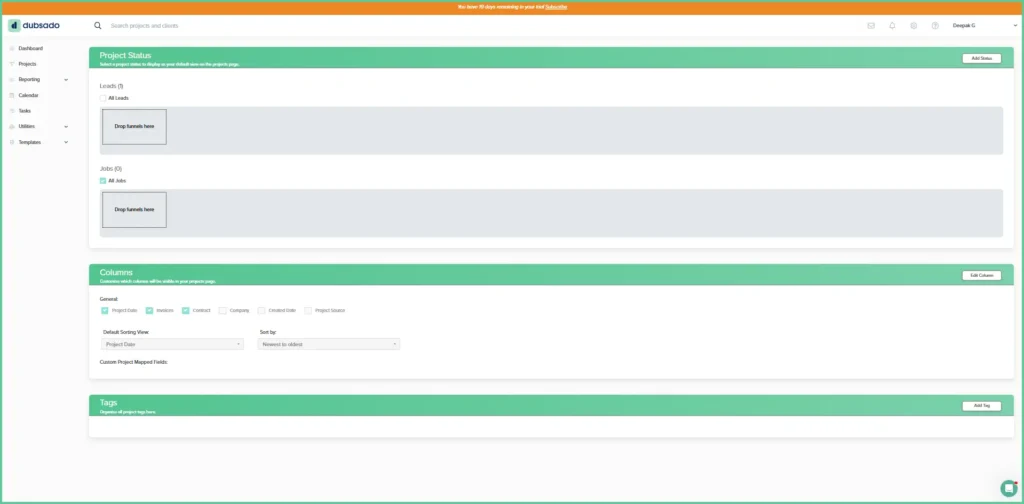
Dubsado also includes project and client organization tools such as status tracking, tags, search, and task management.
The result is not necessarily a dramatic change for someone with three clients. However, when you are managing multiple projects at different stages, having that information organized within a single system becomes more valuable.
Forms, Proposals and Contracts
Forms are an important part of Dubsado’s client workflow.
You can create questionnaires, lead capture forms, proposals, contracts, and other documents for different stages of the client process. Lead capture forms can be embedded on your website or shared as links, and submissions can create projects in Dubsado.
The proposal system is particularly interesting.
Dubsado proposals aren’t simply static documents. Clients can select services or packages, see pricing update based on their selections, and continue through contract signing and payment. The resulting invoice can be generated from the client’s selections.
For a service business with standardized packages, that can remove several manual steps from the sales and onboarding process.
For example, instead of sending a PDF proposal, waiting for the client to choose a package, manually creating an invoice, and then sending a separate contract, the different steps can be connected within the same process.
Contracts are also part of the same system, including electronic signatures.
Invoicing and Payments
Dubsado includes invoicing and payment tools alongside its client-management features.
You can create invoices with specific items, integrate offerings, discounts, payment plans, recurring invoicing, and other payment options. Dubsado also supports payment processing and system connections.
The main benefit here is not about displacing a dedicated accounting system, but rather keeping the payment process connected to client management.
For example, instead of finishing a contract and then manually creating an invoice in another application, Dubsado can connect those steps within a single workflow.
If your main priority is invoicing, expenses, and financial management rather than the automation of the client workflow, our FreshBooks review sheds light more closely on that approach.
Therefore, the use of Dubsado seems more logical when the payment process is merely one part of a broader client-management process, rather than the main reason for which you are searching for this software.
Scheduling
Dubsado’s built-in scheduling feature is one of the most important differences between its Starter plan and Premier plan.
This scheduler allows clients to book meetings or appointments based on your availability and can also be synchronized with a connected external calendar. Dubsado can also handle appointment confirmations and reminders automatically. This scheduling feature is available only on the ‘Premier’ plan, not on the ‘Starter’ one.
This can be extremely useful for consultants, trainers, photographers, designers, and other service businesses where appointments are a regular part of working with clients. Its bigger benefit is that this scheduling doesn’t have to remain completely separate from the rest of your workflow. You can attach forms to the flow of scheduling and use appointment scheduling as part of a broader client process.
However, if you rarely schedule meetings or appointments with clients, then this feature alone might not be sufficient to justify moving to the ‘Premier’ plan.
Automation and Workflows
Automation is the area where Dubsado becomes remarkably more interesting.
Its workflow system, called Flows, allows you to connect different actions in the client’s journey and automate repetitive steps. Flows can send emails, forms, contracts, invoices, schedulers, and create new tasks or update the project status based on specific triggers.
Imagine that a new client submits an inquiry.
Instead of manually remembering every next step, your process could be structured in such a way that the client receives the appropriate follow-up message, passes through the proposal and contract stages, receives payment information, and moves forward into the onboarding process.
The exact workflow depends on how you configure this system, but that is the bigger idea behind Dubsado:
Set up a repeatable process once, then let the software handle some of the repetitive administration.
Dubsado itself recommends mapping out your client process before building Flows. That makes sense because automation works best when you already understand the process you’re trying to automate.
This is also where Dubsado’s learning curve becomes more relevant.
Automation can save time once it’s configured properly, but building a useful workflow requires understanding how the different pieces connect. You also need to test your process before sending real clients through it.
That’s an important distinction: Dubsado doesn’t magically create an efficient workflow for you. It gives you the tools to build one.
Other Dubsado Features
Dubsado also includes task tracking, project management, reporting, email templates, calendar connections, time tracking, and other business-management features. Its current feature set also includes tools such as AI-generated email thread summaries and universal search.
Not every business will need all of these features. Its value comes from the fact that you can build a workflow aligned with your already existing style of working, rather than using every feature simply because it is available.
Dubsado Pricing
Dubsado currently offers two main plans: Starter and Premier.
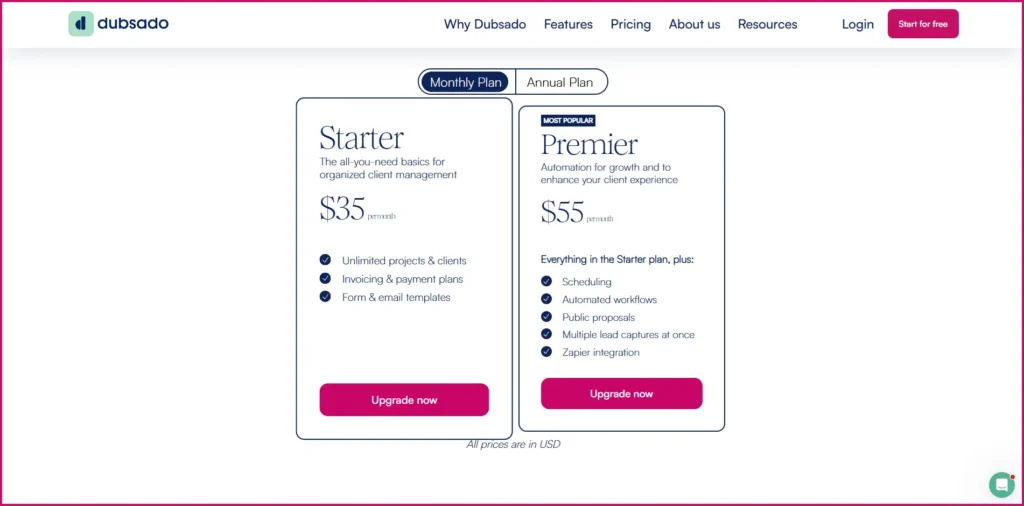
Both plans provide core tools for managing clients, forms, contracts, invoices, and payments, while Premier adds features such as scheduling and more advanced workflow capabilities.
| Plan | Monthly | Annual | Best For |
| Starter | $35/month | $335/year | Freelancers and small businesses that need core client-management tools |
| Premier | $55/month | $525/year | Businesses that need scheduling, automation, and additional capabilities |
Dubsado also offers a 21-day free trial with access to Premier features.
Because software pricing and included features can change, it’s worth checking the official Dubsado pricing page before subscribing.
→ Check the latest Dubsado pricing
Which Dubsado Plan Should You Choose?
Starter is likely enough if you mainly need client management, forms, proposals, contracts, invoicing, and payments.
It gives you the core tools without requiring you to pay for advanced capabilities that you may not use.
Premier makes more sense if scheduling and automation are important parts of your workflow. It adds scheduling and more advanced workflow functionality, along with additional capabilities and integrations.
The simplest way to choose is to look at how you currently manage clients.
If you’re comfortable handling scheduling and follow-ups manually, Starter may be enough.
If you’re repeatedly performing the same administrative steps and want to automate more of them, Premier becomes easier to justify.
The 21-day trial is also useful here because you can test the more advanced features before deciding whether they’re actually valuable to your business.
Is Dubsado Easy to Use?
Once you understand how the different features of Dubsado connect with each other, it does not necessarily remain difficult, but arranging everything can take some time. This platform gives you a lot of control over forms, client workflows, automation, and other parts of the client journey. That flexibility is useful, but it also means that there is more material to learn here compared to a simple invoicing or client-management tool.
When you start building automated workflows, this learning process becomes more noticeable. You need to understand what should happen at each stage, which action will trigger the next action, and how the different forms, contracts, invoices, and scheduling stages connect with each other.
Dubsado’s own setup guidance recommends preparing a map of the client journey before building your automated process and testing the complete workflow before using it with real clients. The good thing is that you do not need to automate everything from the very first day. You can begin with those core features which you actually need, and as your business and client process become more established, you can gradually build more automation.
Who Should Use Dubsado?
Dubsado is best suited for those freelancers and small service businesses who possess a repeatable client process and who want to spend less time handling repetitive administrative tasks.
It is especially useful when your normal client journey includes several connected stages, such as:
- lead capture / collecting lead information
- Forms or questionnaires
- Proposals
- Contracts
- Invoicing
- Payments
- Appointment scheduling
- Follow-up emails
Businesses like consultants, designers, photographers, trainers, virtual assistants, and other client-service professionals can find Dubsado especially useful when they handle identical processes for each new client.
You do not need a large team to take advantage of this.
In fact, automation can be particularly valuable for solo business owners who are themselves responsible for both client work and administration. The main point is not the size of the business. The main point is how repeatable the client process is.
Who Shouldn’t Use Dubsado?
If your client process is very simple, then Dubsado might not be the best choice.
If you only need basic invoicing, contracts, or a tool to keep watch over a small number of clients, you will not be able to use enough of Dubsado’s comprehensive functionality to justify the subscription fee and the setup time.
It is also worth considering whether you will actually use its automation features. If you prefer to manually handle communication with clients, scheduling, and follow-up messages—and your current arrangement is not causing any problem—then paying for a platform built around connected workflows might not provide sufficient additional value.
In short, as your client process becomes more complex, Dubsado becomes that much more appealing. If simplicity is your main priority, then a lighter tool might be more appropriate.
Is Dubsado Worth It in 2026?
For freelancers, solopreneurs, and small service businesses who possess a repeatable client process, Dubsado can be worth its cost. Its biggest value is not any single feature. Its real value lies in the ability to connect different parts of your client workflow and automate those tasks that you would otherwise have to handle manually.
As your list of clients grows, it becomes even easier to see its value. If you are regularly sending identical forms, proposals, contracts, invoices, reminders, and follow-up messages, then having those stages connected with each other can save time and reduce the probability of something being forgotten.
But there is an important catch here. Dubsado’s automation is most useful when you have a process that is worth automating. If your business is still small, each client is handled differently, or you do not have much administrative work to begin with, then this additional arrangement might not provide much benefit.
Its price matters as well. The Starter plan can fulfill the basic client-management and payment requirements of a small service business, whereas the ‘Premier’ plan makes more sense when appointment scheduling and automation are important enough to justify the higher cost.
Our take: Dubsado is worth considering when you want more control and automation over your client workflow. If your priority is simply finding the easiest tool for basic client management or invoicing, then a simpler solution might provide better value.
Final Verdict
Dubsado is a strong option for freelancers and small service businesses that want to manage more of their client workflow from one place.
Its combination of client management, forms, proposals, contracts, invoice creation, payments, appointment scheduling, and automation can reduce the volume of repetitive administrative tasks involved in managing clients. The main trade-off is its complexity.
Dubsado gives you considerable flexibility, but getting the most from the platform requires some setup and learning. That isn’t necessarily a weakness—it depends on whether you actually need the flexibility.
For a business with a repeatable workflow and a growing amount of client administration, that trade-off can make sense.
For someone who only needs basic invoicing or simple client management, Dubsado may be more than they actually need.
Bottom line: Dubsado is most attractive when you want to construct a repeatable client process and automate the administrative tasks around it. If that sounds like the way your business operates, then testing it is worthwhile. If you merely desire a lightweight tool for one or two basic tasks, then searching elsewhere might be better for you.
Ready to Try Dubsado?
If Dubsado’s client-management and automation features look like a good fit for your workflow, you can try the platform before deciding whether it’s right for your business.
Explore More Software Reviews
Looking at different ways to manage your freelance or service business? These reviews may also help:
- Bonsai Review — A closer look at software for freelance business management, proposals, contracts, invoicing, and client workflows.
- FreshBooks Review — A closer look at invoicing, expenses, payments, and financial management for freelancers and small businesses.
Frequently Asked Questions
Is Dubsado good for freelancers?
Yes. Dubsado can be a good fit for freelancers who manage a repeatable client process involving forms, proposals, contracts, invoices, payments, scheduling, and follow-ups.
Its automation features can also reduce some of the repetitive administrative work involved in managing clients.
How much does Dubsado cost?
Dubsado currently offers two plans: Starter at $35/month or $335/year, and Premier at $55/month or $525/year. It also offers a 21-day free trial with access to Premier features.
Because pricing can change, check Dubsado’s official pricing page for the latest information.
Is Dubsado easy to learn?
Dubsado has a learning curve, particularly when setting up automated workflows.
However, you can start with the core features and gradually add automation as you become more comfortable with the platform.
Does Dubsado have a free plan?
Dubsado does not currently offer a permanent free plan. It does, however, offer a 21-day free trial that lets you test the platform before committing to a paid plan.
Is Dubsado worth it?
Dubsado can be worth it if you have a repeatable client workflow and want to automate administrative tasks.
If you only need basic client management or invoicing, a simpler tool may provide better value.