
Introduction
Running a service business means dealing with many such tasks, which have nothing to do with the work your clients actually hired you to do.
You answer inquiries. Send proposals. Follow up for signatures. Schedule meetings. Send invoices. Follow up for payments. Then, in between all these, there are many small tasks which somehow take more time than expected.
The difficult part is that these tasks are often divided into different tools. Your potential clients may come through a form, your meetings may happen through a calendar application, your contracts may be elsewhere, and your invoices may be at some other place.
HoneyBook adopts a different approach. It brings client management, potential client acquisition, proposals, contracts, invoices, payments, scheduling, and automation onto a single platform.
This sounds convenient. But does keeping all these things together actually make managing clients easier?
In this HoneyBook review, we will consider this very point. We will cover its features, pricing, payment-processing costs, ease of use, strengths, limitations, and the types of businesses for which this platform may be useful—or may not be useful—in the year 2026.
Table of Contents
Free Client Management Kit
Get practical checklists and templates to organize your freelance client workflow.
Why Client Management Gets Complicated for Service Businesses
A new client usually starts with something simple: an inquiry.
After that, the process can become surprisingly busy. You may need to collect project details, answer questions, prepare a proposal, obtain a signature on a contract, collect a deposit, schedule the work, and keep the client updated throughout this entire duration.
None of these tasks is particularly difficult on its own. The problem is keeping track of all of them and maintaining the client relationship.
For example, a photographer may receive an inquiry via email, discuss the project there, send a proposal through one tool, prepare a contract at another place, collect the advance payment through another service, and use a separate calendar for scheduling. The work itself may be straightforward, but managing all those moving parts can attract more attention than expected.
This is where client management software can be useful. Instead of keeping project details, communication, documents, and payments scattered across different places, a platform like HoneyBook brings many of those pieces into a single client workflow.
The idea is simple: keep the client journey connected, so that you spend less time keeping track of the process and can spend more time actually working with the client.
Whether HoneyBook does this well depends on how your business operates. This is exactly what we will examine in the remaining part of this review.
What Is HoneyBook?
HoneyBook is an all-in-one client relationship and business management platform that has been designed mainly for independent workers, independent professionals, and small service businesses.
At its core, it helps you keep track of potential clients, actual clients, and projects. You can organize contacts, view the progress of projects through a customizable pipeline, keep client communication together, and manage the files and other details connected to each project.
But HoneyBook goes beyond basic client management. This platform also connects proposals, contracts, invoices, payments, scheduling, and automation to the client workflow. Its ‘Smart Files’ can combine steps such as choosing a service, signing a contract, and making a payment into a single experience for the client.
That connected approach is what truly defines HoneyBook. It is less about being a tool for one specific task and more about keeping the different parts of working with a client together in a single system.
It does have Customer Relationship Management (CRM) functionality, but its focus is clearly on client and project management rather than running a complex sales operation. If your business needs an advanced sales CRM that includes things like complex opportunity management or forecasting, then this is something you will want to consider separately.
However, for a typical service business, HoneyBook’s focused approach can be useful. Instead of treating it merely as a database of contacts, this platform is built around actual client relationships—from the first inquiry down to the project and payment.
HoneyBook Review: Quick Verdict
HoneyBook is built around a simple idea: keeping the different parts of client management in a single place.
This approach can be useful if your work regularly involves potential clients, projects, proposals, contracts, payments, scheduling, and follow-up actions. Instead of connecting these tasks with each other across several tools, HoneyBook connects them around a single client workflow.
The other aspect of this is that you may not even need every single thing offered by HoneyBook. A business that only requires basic invoices or client records may find this comprehensive platform unnecessary, while businesses searching for a highly specialized sales CRM may find its focus too narrow.
In short, HoneyBook is most attractive when you want to keep your client workflow connected—not merely when you need another tool for one specific task.
Want a Simpler Client Workflow?
Use our free Freelancer Client Management Kit to keep inquiries, projects, payments, and follow-ups organized.
HoneyBook Pros and Cons
HoneyBook Pros
- Connected client workflow: Leads, projects, proposals, contracts, invoices, and payments can be managed within the same platform.
- Unlimited clients and projects: This is included across all three current plans.
- Client-facing tools: Smart Files, the client portal, templates, and payment options help keep the client experience connected.
- Automation and scheduling: Essentials and Premium add automation and scheduling tools for businesses with more involved workflows.
- Useful integrations: QuickBooks Online and other integrations can connect HoneyBook with parts of an existing business setup.
HoneyBook Cons
- Not a deep sales CRM: Its CRM is centered on clients and projects rather than complex sales operations.
- Some useful features are plan-dependent: Scheduling, automation, and several integrations require a higher-tier plan.
- Payment fees add to the overall cost: Subscription pricing isn’t the only expense if you collect payments through HoneyBook.
- May be more than you need: If you only need basic invoicing, contracts, or client records, much of the platform may go unused.
- Customization can be limiting: Businesses with highly specific workflows may find HoneyBook’s automation and workflow structure less flexible than they need. Some users also report that managing many active projects can make the interface feel more cluttered.
These points don’t make HoneyBook inherently good or bad. They simply show where the platform’s approach is likely to fit—and where you may want to look more closely at what you actually need.
HoneyBook Features
HoneyBook brings several parts of the client workflow into one platform. The individual tools aren’t necessarily unusual on their own. What matters is how they connect.
A lead can move into a project, a project can lead to a proposal and contract, and the client can continue through payment and scheduling without you having to rebuild the process in another system. That’s the part of HoneyBook that deserves the most attention.
Client Management and HoneyBook CRM
HoneyBook gives you a central place to organize potential clients, actual clients, and projects. Its Customer Relationship Management (CRM) includes a customizable project progress path, contact records, communication, files, notes, and payment information, so that you can see where a client is in the booking process without keeping those details in separate places.
This progress path can also be customized according to the way you work. For example, you may have stages for new inquiry, consultation, proposal sent, reserved, and project completed.
This is useful for service businesses that require simple client and project organization. However, it has not been designed to replace a highly specialized sales CRM. If your workflow depends on complex opportunity management or advanced sales operations, then this is an important distinction.
Lead Capture and Forms
HoneyBook’s lead forms let potential clients submit their details directly into your workflow. Instead of copying information from an email or website form into your client system, the inquiry can become part of your HoneyBook pipeline.
You can also use lead forms alongside questionnaires and other client-facing content to collect the information you need before a project gets underway.
The number of live lead forms depends on your plan, so businesses with multiple services or brands should check the limits before choosing a tier.
Proposals, Contracts and Smart Files
This is one of the more distinctive parts of HoneyBook.
‘Smart Files’ can combine services, questions, contracts, invoices, payment screens, and scheduling into a single interactive client document. A client can select a service, sign the contract, and make a payment without having to go through several separate documents.
You can also customize these files with your branding and reuse them as templates. For those businesses that sell repeatable services or packages, this can reduce the repeated back-and-forth involved in getting a new client booked.
Invoicing and Payments
HoneyBook handles creating invoices and payment collection within the same client workflow.
You can create invoices, determine the payment schedules, offer recurring payments, and give different payment options to clients. ‘Smart Files’ can also connect service selections with invoices and contracts, so that information does not have to be entered repeatedly.
The practical advantage of this is less about HoneyBook merely being capable of sending an invoice—many platforms can do that. It is more about keeping the invoice connected to the project and the remaining client relationship.
Payment-processing fees are a separate matter for consideration, so we will discuss them later.
If invoicing is a bigger priority for your business, you can also read our FreshBooks review.
Scheduling
HoneyBook’s Scheduler is available on Essentials and Premium. Clients can book sessions based on your availability, and scheduling can also be included directly inside Smart Files.
That can be useful when booking a consultation or session is already part of your normal client process. Instead of sending a separate scheduling link after a proposal or contract, you can keep that step inside the same workflow.
If you rarely schedule client meetings, though, this feature may not have much impact on your day-to-day work.
Automation
Automation is aimed at the repetitive parts of client management.
HoneyBook can automate messages, follow-ups, files, and tasks, helping you keep a process moving without manually handling every step.
The useful part is what happens after you’ve built the workflow. For example, a client reaching a particular stage could trigger a follow-up or another step in the process.
There is still some setup involved. Automation works best when you already understand your own workflow and know which parts are worth taking off your to-do list.
HoneyBook AI
HoneyBook also includes artificial intelligence (AI) features built around client and business workflows. These include tools for drafting emails, preparing for meetings, writing meeting notes, creating project summaries, and building automations.
The useful question here is not only whether HoneyBook has artificial intelligence. Rather, it is whether these features remove enough small tasks to make a difference in your daily work.
For some businesses, these can be useful additions. For others, compared with the main client-management features, their importance will probably remain secondary.
Client Portal, Templates, Reports and More
There is much more to HoneyBook beyond the main workflow. This platform also includes a client portal, reusable templates, reporting tools, expense tracking, mobile applications, and integration with other business software.
The client portal gives clients a central place for project information, files, communication, and payments, while templates can save you from recreating similar documents all over again for every new project. Reporting and expense tools add some visibility into the financial side of the business.
HoneyBook has continued to add workflow features in the year 2026, which include ‘Tap to Pay’ (payment by touch) for in-person payments, and new ways to organize projects and create ‘Smart Files’.
You probably will not use every single feature given here. That is fine. The more useful question is whether the features you do use naturally fit into the way you already manage your clients.
HoneyBook Pricing
HoneyBook currently offers three plans: Starter, Essentials, and Premium. You can choose monthly or annual billing. With annual billing, the plans cost $29, $49, and $109 per month respectively, while monthly billing costs $36, $59, and $129. HoneyBook says annual billing saves up to 18% compared with monthly billing.
| Plan | Monthly Billing | Annual Billing |
| Starter | $36/month | $29/month |
| Essentials | $59/month | $49/month |
| Premium | $129/month | $109/month |
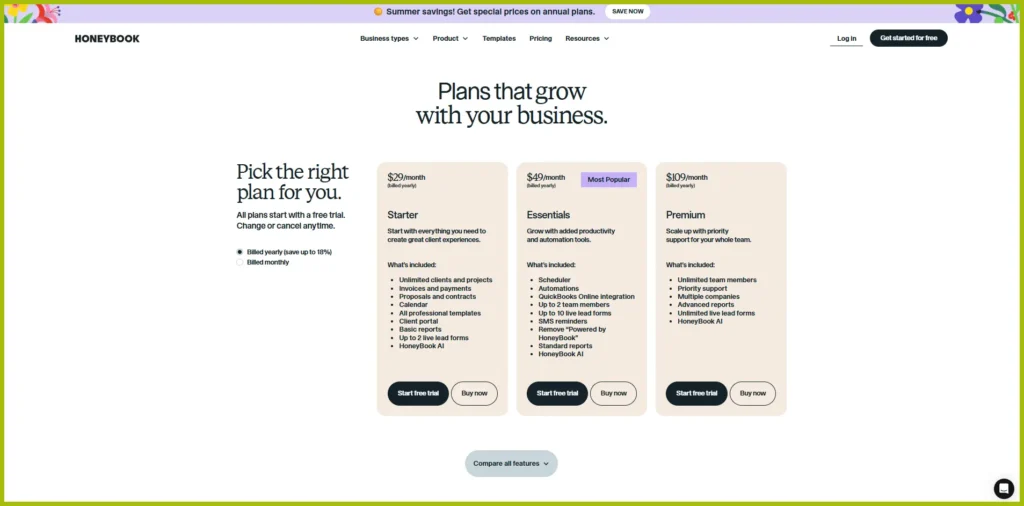
All three plans include unlimited clients and projects, so HoneyBook doesn’t charge more simply because your client list or number of projects grows. The plans mainly differ in the tools and capacity they add on top of that core offering.
Starter — $29/month billed annually
Starter includes the core HoneyBook workflow: unlimited clients and projects, invoices and payments, proposals and contracts, the Calendar, professional templates, a client portal, basic reports, up to two live lead forms, and HoneyBook AI.
There is an important distinction here. Starter includes the Calendar, but the Scheduler is part of Essentials and Premium. Automations and QuickBooks Online integration are also not included with Starter.
Essentials — $49/month billed annually
Essentials includes everything in Starter and adds the Scheduler, Automations, QuickBooks Online integration, up to two team members, up to ten live lead forms, SMS reminders, standard reports, and the option to remove the “Powered by HoneyBook” branding.
HoneyBook currently labels Essentials as “Most Popular” on its pricing page. That’s HoneyBook’s own label, though, so it shouldn’t be taken as an indication that this plan will suit every business.
Premium — $109/month billed annually
Premium includes everything in Essentials and adds unlimited team members, priority support, multiple companies, advanced reports, and unlimited live lead forms.
The price difference is significant, so these additions are mainly relevant if you actually need the extra team capacity, multiple-company support, or more advanced reporting.
HoneyBook also offers a 30-day free trial with no credit card required, although some advanced features may have eligibility limitations during the trial. You can cancel from your company settings if you decide the platform isn’t right for your business.
The important thing with HoneyBook’s pricing is therefore not simply which plan has the longest feature list. It’s which of these additional capabilities you’ll actually use. The subscription is also only one part of the overall cost, since payment-processing fees apply separately.
Note: HoneyBook’s pricing, plan features, limits, and payment-processing fees may change over time. Check HoneyBook’s official pricing page before subscribing to confirm the latest prices and what’s included in each plan.
HoneyBook Payment Processing Fees
The monthly subscription is not the only cost to keep in mind with HoneyBook. If you use HoneyBook to collect payments from clients, payment-processing fees are charged separately.
For card payments, HoneyBook currently says fees start at 2.7% + $0.10 per transaction. ACH bank transfers are charged at 1.5%. The exact card-processing rate can depend on the payment type and eligibility, so it is worth checking HoneyBook’s current pricing page before subscribing.
HoneyBook also supports payment schedules, recurring invoices, and automatic payments. So, if your clients don’t always pay the full amount at once, you can set up a payment structure that fits the way you normally work.
One thing is worth knowing here. You cannot connect another payment processor, such as PayPal, Venmo, or Stripe, to process payments through HoneyBook invoices. Payments made through HoneyBook’s invoices are processed through HoneyBook’s own payment system.
So when you’re working out the actual cost of HoneyBook, don’t look only at the monthly subscription. If you collect a significant amount of money through the platform, the transaction fees can become an important part of the overall cost.
Note: HoneyBook’s payment-processing fees and terms may change over time. The rates mentioned above are based on the information available at the time of writing. Check HoneyBook’s official pricing and payment-processing pages for the latest rates and applicable terms before subscribing or accepting payments.
Which HoneyBook Plan Should You Choose?
The right HoneyBook plan depends on which parts of the platform you actually need.
Starter makes sense if you’re mainly looking for the core client workflow. It covers client and project management, proposals, contracts, invoices, payments, the Calendar, templates, and a client portal. If you work alone and don’t need built-in automation or the Scheduler, moving to a higher plan may not add much to your day-to-day work.
Essentials becomes more relevant when scheduling and automation are part of your regular workflow. The plan also adds QuickBooks Online integration and support for up to two team members. For a small service business that is starting to handle more clients or more repeatable processes, those additions may be more useful than simply having access to a longer feature list.
Premium is mainly about capacity and more advanced business requirements. Unlimited team members, multiple companies, priority support, advanced reports, and unlimited live potential client forms become more relevant when the business has grown beyond a simple solo setup.
You do not need to choose the highest plan simply because it includes more things. The better approach is to start with those features that match your current workflow and move to a higher plan only when you actually require the additional capabilities.
This also makes the comparison of plans easier: ‘Starter’ is focused on the main workflow, ‘Essentials’ adds more workflow and team functionality, and Premium is aimed at larger or more complex operations.
Is HoneyBook Easy to Use?
HoneyBook is fairly easy to use once the basic workflow is set up. Projects, contacts, files, payments, and client communication are organized around a single workspace, so you do not need to repeatedly switch between different tools to manage one client.
For straightforward tasks, the learning process is relatively easy. Adding a client, creating an invoice, sending a proposal, or checking a project’s status does not require much technical knowledge.
However, initial setup requires more effort.
If you want to build your own workflow with templates, Smart Files, lead forms, automations, and scheduling, you’ll need to spend some time configuring everything. That’s not necessarily a problem, but it’s worth separating easy to use from ready to use immediately.
The client side is also worth considering. HoneyBook’s client portal gives clients a central place to access project information, files, messages, payments, and other shared details. The platform also has iOS and Android apps for handling everyday tasks away from your computer, although the mobile experience doesn’t include every desktop feature.
So, HoneyBook isn’t difficult to understand, but getting it configured around your particular business can take some time. Once that setup is done, the connected workflow is where much of its convenience comes from.
Who Is HoneyBook a Good Fit For?
HoneyBook is mainly suited to businesses where client work follows a reasonably repeatable process. The exact industry matters less than how you handle your clients.
HoneyBook May Be a Good Fit If…
HoneyBook can be practical for freelancers, photographers, designers, consultants, trainers, event professionals, and other service providers who regularly move clients through similar steps.
Freelancers searching for broader business-management tools can also explore our Bonsai review.
For example, if a typical project starts with an inquiry and then moves through a proposal, contract, advance payment, scheduling meetings, and follow-up action, connecting those steps with each other can reduce the amount of administrative work involved.
It can also work for those small teams that want client management, documents, payments, and workflow automation in a single system.
If you’re also comparing other client-management platforms, see our Dubsado review.
HoneyBook May Not Be the Right Fit If…
HoneyBook may be more than you need if your main requirement is simply sending invoices or keeping basic client records.
It may also be less suitable for those businesses whose sales processes are highly specialized or workflows are unusually complex. HoneyBook’s focus is on client and project management rather than advanced sales CRM, therefore those businesses that rely heavily on complex opportunity management, sales forecasting, or other specialized CRM functions may require a more focused system.
The same applies even when your processes are highly customized. HoneyBook gives you space to create workflows, but some businesses may desire more flexibility than what this platform provides.
Ultimately, the question is less about which industry you are in and more about whether HoneyBook’s approach to organizing client work matches the way your business operates.
Is HoneyBook Worth It in 2026? Our Final Verdict
HoneyBook’s value comes from how much of the client journey you can actually bring into one workflow.
For a service business that regularly handles inquiries, proposals, contracts, payments, scheduling, and follow-ups, having those steps connected can reduce the amount of administrative work involved. You don’t have to rely on several separate tools for every stage of the same client relationship.
The platform also gives you room to grow into more advanced workflows. Automation, scheduling, reporting, team features, and integrations become useful as your operation becomes more involved. But that doesn’t mean every business needs them.
If you only need basic invoicing, contracts, or client records, HoneyBook’s broader feature set may be more than you need. Its CRM is also focused on client and project management rather than advanced sales operations, which can matter if your business relies on a more sophisticated sales process.
Pricing deserves consideration too. The subscription is only part of the overall cost if you collect payments through HoneyBook, since payment-processing fees apply separately.
So, is HoneyBook worth it in 2026?
It can be a practical fit when you want the different parts of your client workflow connected in one place. If you won’t use much beyond a few basic functions, the wider platform may be harder to justify.
In the end, HoneyBook isn’t about having the most tools possible. Its value depends on whether the tools it brings together match the way you actually work with clients.
Take Your Client Workflow With You
Download The Freelancer Client Management Kit for practical templates, checklists, and workflows you can use in your own business.
HoneyBook FAQ
Can HoneyBook replace separate invoicing and contract tools?
For many service businesses, it can. HoneyBook lets you create proposals, contracts, invoices, and payment requests within the same client workflow, which can reduce the need for separate tools. Whether it can fully replace your existing setup depends on the level of customization and specialized functionality you need.
Does HoneyBook work on mobile?
Yes. HoneyBook has iOS and Android apps for managing projects, communicating with clients, sending invoices, and handling other everyday tasks. The mobile apps don’t include every feature available on the desktop version, so more involved setup may still be easier on a computer.
Does HoneyBook integrate with QuickBooks?
Yes. QuickBooks Online integration is available with the Essentials and Premium plans. It can help connect HoneyBook’s client and payment activity with your accounting workflow.
Can clients make recurring payments through HoneyBook?
Yes. HoneyBook supports recurring invoices, payment schedules, and autopay. These options can be useful for retainers, installment arrangements, subscriptions, and other services where clients pay more than once.
Does HoneyBook have a client portal?
Yes. HoneyBook’s client portal gives clients a central place to access project information, files, messages, payments, and other shared details. The portal can also be customized with your business branding.
Can HoneyBook track business expenses?
Yes. HoneyBook includes expense tracking, while Essentials and Premium can connect bank or credit-card accounts to import expenses. This can be useful if you want some financial tracking alongside your client-management workflow.