Introduction
If you run a marketing agency, one of the less exciting parts of onboarding a new client is getting access to all the accounts you need to do the work.
You may need access to their Facebook Page, Instagram account, Meta Business Portfolio, Google Ads account, Google Analytics property, Shopify store, TikTok account, or other marketing platforms. And if the client isn’t familiar with these platforms, explaining where to click and which permissions to select can turn into a surprisingly long back-and-forth.
That’s where Leadsie comes in.
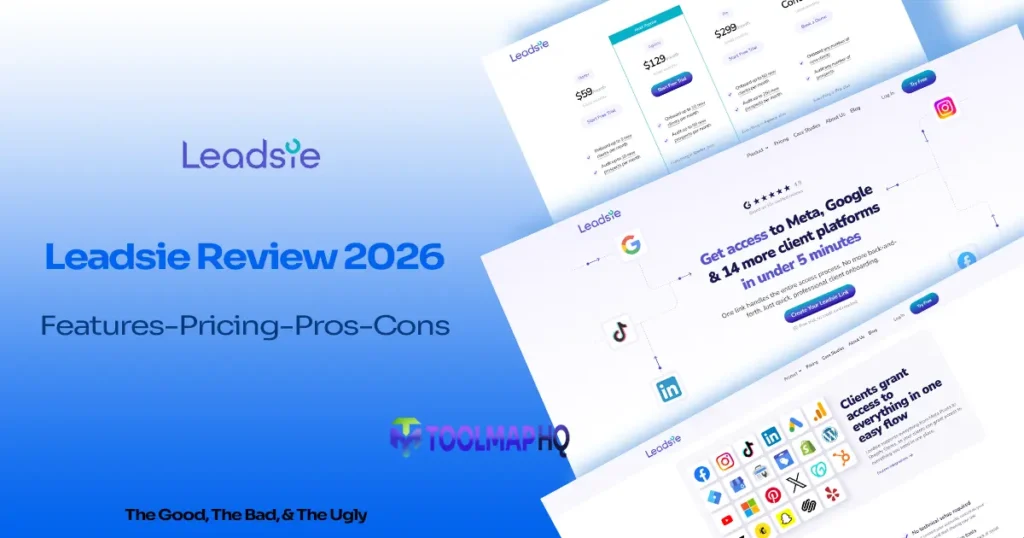
Leadsie is a client access and onboarding platform designed to make it easier for agencies to collect access to clients’ marketing accounts. Instead of asking clients to manually navigate different platforms and figure out their permission settings, you can send them a guided access request.
In this Leadsie review, we’ll look at its features, integrations, pricing, limitations, ease of use, alternatives, and who it’s actually worth considering for.
Note: Software features, pricing, plans, and integrations can change over time. Before making a purchase, check the official Leadsie website for the latest information.
Table of Contents
What Is Leadsie?
When agencies onboard new clients, Leadsie is used to get access to their accounts.
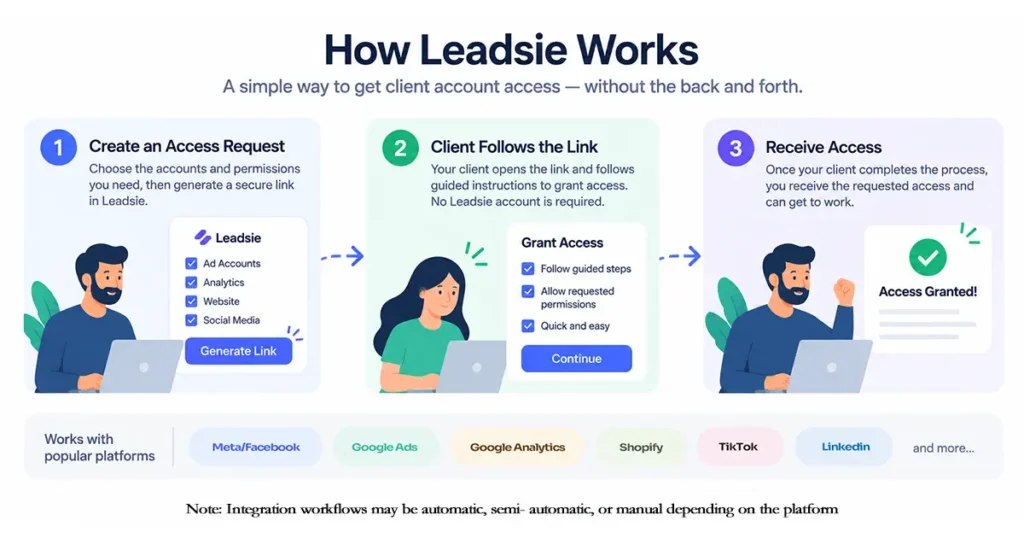
Its logic is very straightforward: the agency prepares a request for access and sends its link to the client. The client simply goes to that link, follows the explained steps, and grants the necessary permissions.
Usually, you have to explain the process separately for every platform like Facebook, Google Ads, Google Analytics, or Shopify. Leadsie brings these different access requests together in one place and can reduce that back-and-forth.
But also know what Leadsie is not. Despite its name, it is not a platform that brings you leads or works as a CRM. Its real job is to make onboarding easier and help you get access to the client’s accounts.
That makes it particularly relevant for agencies that repeatedly need access to clients’ marketing accounts.
How Does Leadsie Work?
The workflow generally looks like this:
- The agency creates an access request.
- The agency chooses the accounts or assets it needs access to.
- Leadsie generates a link that can be sent to the client.
- The client follows the instructions and authorizes access.
- Leadsie helps the agency receive or troubleshoot the requested access.
Clients do not need to create a Leadsie account to complete an access request.
The exact process depends on which platform is being connected. Some integrations offer more automation than others, while some require manual steps or validation.
This difference matters because Leadsie simplifies the onboarding process, but it cannot eliminate the permission rules set by Meta, Google, Shopify, or other platforms.
Quick Verdict
Leadsie is a specialized client-access tool for agencies that regularly onboard clients across multiple marketing platforms.
Its main advantage is convenience. Instead of repeatedly explaining complicated account-permission processes, an agency can give clients a guided access request.
The trade-off is cost.
With plans starting at $59 per month, Leadsie makes more sense when client onboarding is a regular part of your business rather than something you do occasionally.
It also isn’t an all-in-one agency management platform. You’ll still need other software for things such as project management, CRM, invoicing, contracts, and broader client communication.
Leadsie Pros and Cons
Pros
- Simplifies client account-access requests
- One-link onboarding workflow
- Supports multiple major marketing platforms
- Offers view-only access requests
- Includes tools for troubleshooting Meta access problems
- Can help with Meta asset creation and assignment
- Supports custom access links
- Provides automation options through webhooks
- Offers an API for advanced integrations
- Supports white-label access requests on qualifying plans
- Clients don’t need a Leadsie account
- Includes access-management features beyond the initial onboarding stage
- Supports multi-brand use on the Pro plan
Cons
- Starting price may be difficult to justify for low-volume users
- Client/prospect limits apply to standard paid plans
- Different integrations don’t all provide the same level of automation
- Platform-specific permission problems can still occur
- It doesn’t replace a complete client-management or agency-management system
- Some advanced capabilities are restricted to higher plans or cost extra
Leadsie Features
Leadsie’s feature set is broader than simply creating a link and asking a client for access. The platform combines access requests, troubleshooting, Meta asset management, automation, and ongoing access management.
1-Link Access Requests
The core Leadsie feature is its one-link access-request system.
Rather than sending a client several different instructions for different platforms, an agency can create a request containing the access it needs and give the client a single link.
This is particularly useful when onboarding involves multiple accounts.
For example, a paid-media agency might need access to a client’s Meta Business Portfolio, Facebook Page, Instagram account, and Google Ads account. A single guided request can make that process easier for the client to understand.
The benefit here is not really the link itself. It is having one standardized process for a task that can otherwise become a collection of platform-specific instructions.
Custom Access Links and View-Only Requests
Leadsie supports unlimited custom access links, allowing agencies to create reusable access-request workflows for different clients or use cases.
It also supports view-only requests.
That’s useful when someone needs to inspect an account without being given the same level of control as an administrator or manager.
For example, an agency may initially need read-only access to evaluate an account before deciding what work needs to be done.
The distinction between prospects and clients is also built into Leadsie’s credit system. A prospect is someone who gives view-only access, while a client is someone who grants manage or administrative access to at least one asset.
Client Dashboard and Notifications
Leadsie provides a client dashboard to help agencies keep track of client access and onboarding activity.
Notifications help agencies stay informed when access-related events occur.
For agencies onboarding multiple clients at once, having access information in one place can be more practical than keeping track of separate emails and manual checklists.
Access Detective
Access Detective is designed to help troubleshoot access problems, particularly with Meta.
For example, a client might be able to see an asset but not have sufficient permission to share it with the agency.
Instead of simply telling the client to “check your Business Manager,” Access Detective can help identify where the permission problem is and what needs to be fixed.
This addresses one of the more frustrating parts of client onboarding: the client may technically have access to an asset but still not have the right permissions to share it.
Independent user reviews also point to the same general picture: Leadsie can make onboarding easier, but platform-specific permission problems can still require troubleshooting.
Meta Asset Creation and Auto-Assign
Leadsie goes beyond requesting access for certain Meta assets.
Clients can create Meta Business Portfolios, Ad Accounts, Catalogs, Pages, and Pixels/Datasets through the Leadsie workflow. However, Pages and Pixels still involve the Facebook interface; Leadsie guides the user to the appropriate place and checks whether the asset was created.
That distinction is worth mentioning because saying that Leadsie simply “creates everything automatically” would give the wrong impression.
Leadsie also supports automatic assignment of Meta assets, helping agencies reduce some of the manual work that normally follows receiving access.
The exact capabilities vary by Meta asset, so the access and creation workflow is not identical for Instagram accounts, Pages, Ad Accounts, Catalogs, Pixels/Datasets, and Leads Access.
Access Management After Onboarding
Leadsie’s usefulness doesn’t necessarily stop once the client grants access.
Its broader access-management functionality includes features such as Refresh Access and Offboarding.
Refresh Access can help when an existing connection needs to be renewed or updated, while offboarding provides a structured way to deal with access when an agency relationship ends.
This matters because client access isn’t only an onboarding problem. Agencies also need to manage what happens when permissions change or a client relationship ends.
White-Label Access Requests
Leadsie supports white-labeling for agencies that want the access-request experience to look more like their own brand.
Depending on the plan, agencies can customize elements such as:
- Logo
- Colours
- Font
- Custom slug
- Call-to-action
- Embedded access requests
White-label access requests are available on the Agency plan and above. Enterprise adds a more extensive grey-label app and embed option.
This can make the onboarding experience feel more consistent with an agency’s existing client-facing brand.
Other Leadsie Features
Leadsie also includes features such as:
- On-Demand Support
- Multi-Language access requests
- 3-Month Credit Rollover
- Notifications
- Creator Whitelisting
- Embedded access requests
Creator Whitelisting is particularly relevant for agencies and marketers working with influencers and supported Meta assets.
The main point is that Leadsie covers more than the initial request. It can help before access is granted, when an access problem occurs, and after access has been received.
Leadsie Integrations
Leadsie currently describes its coverage as 31 different accounts and assets across Meta, Google, and 14 additional platforms.
Its supported platforms include:
- Google Business Profile
- Google Analytics
- Google Ads
- Google Search Console
- Google Merchant Center
- Google Tag Manager
- Shopify
- Microsoft Advertising
- TikTok
- WordPress
- YouTube
- X
- GoDaddy
- HubSpot
- Klaviyo
- Mailchimp
- Snapchat
- Squarespace
- Yelp
The important point is that integration support does not mean every platform uses the same fully automatic workflow.
Leadsie’s documentation currently describes automatic, semi-automatic, and manual workflows depending on the platform and asset. For example, Google Ads can use an automatic workflow, while some Meta, Google Search Console, LinkedIn, Shopify, WordPress, YouTube, Pinterest, X, and other workflows can require additional steps or validation.
So if one platform is particularly important to your agency, check that specific integration before buying rather than relying only on the overall integration count.
Leadsie can also connect with tools like Zapier, Pabbly Connect, and Make. Along with this, you also get the option to send webhook data to your own application.
This means that whenever an access request is completed, it can become part of your larger onboarding workflow. You don’t have to keep opening Leadsie to check everything manually.
Leadsie API
The Leadsie API is aimed at agencies that need deeper integration with their own systems.
It can be used to check which customers have granted access and what access they have provided. Custom user IDs can also help connect Leadsie records with an agency’s internal systems.
API access is available for Agency, Pro, and Enterprise plans at an additional cost.
For most small agencies, this probably isn’t something you need on day one. It becomes more relevant when client onboarding is already automated and Leadsie needs to exchange access information with your CRM or internal application.
The simple distinction is:
Webhooks are useful when you want Leadsie events to trigger something elsewhere.
The API is more useful when you want your own system to actively work with Leadsie data.
Leadsie Pricing
Leadsie uses subscription pricing rather than a one-time purchase.
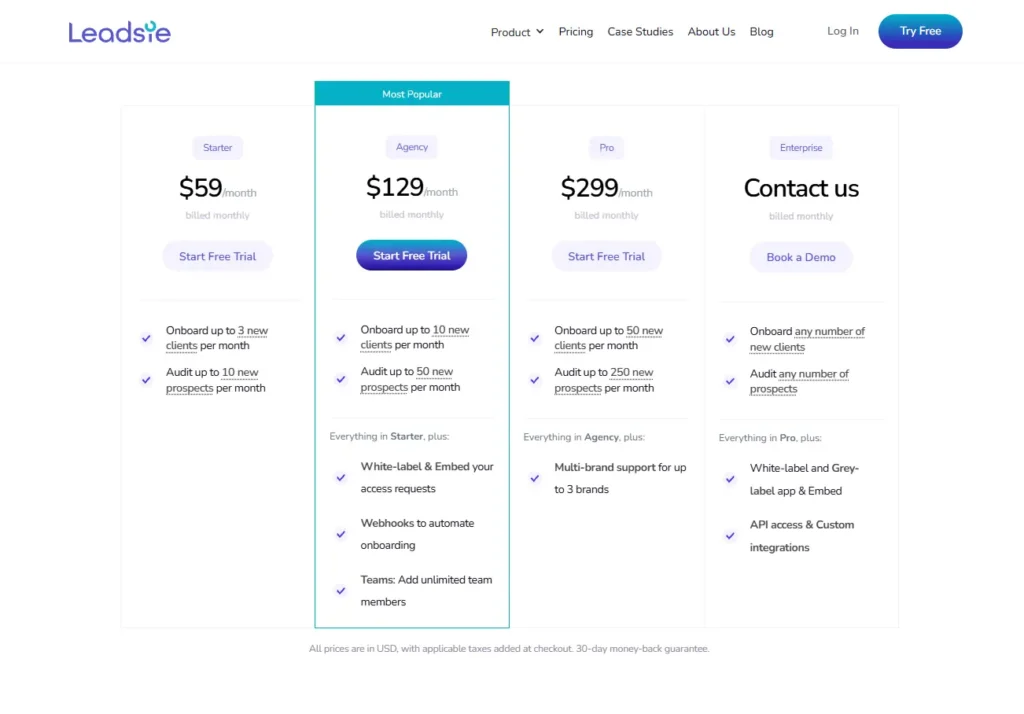
At the time of this review, the official pricing is:
| Plan | Monthly | Annual | New Clients / Month | Prospects / Month |
| Starter | $59/month | $590/year | 3 | 10 |
| Agency | $129/month | $1,290/year | 10 | 50 |
| Pro | $299/month | $2,990/year | 50 | 250 |
| Enterprise | Contact sales | Custom | Any number | Unlimited |
Annual billing is presented as the equivalent of two months free.
The plan differences are important because higher plans add workflow, team, branding, and multi-brand capabilities rather than simply increasing the client allowance.
Starter
$59/month or $590/year
Starter includes:
- 3 new clients per month
- 10 prospects per month
- 1-Link access requests
- Custom access links
- View-only requests
- Access Detective
- Meta asset creation
- Auto-Assign
- Multi-language access requests
- Client Dashboard
- On-Demand Support
- 3-month credit rollover
The main limitation is the relatively low monthly client allowance.
For an agency onboarding only a few new clients each month, that may be sufficient.
Agency
$129/month or $1,290/year
Agency increases the allowance to:
- 10 new clients per month
- 50 prospects per month
More importantly, Agency adds:
- White-label and embedded access requests
- Webhooks
- Unlimited team members
This makes Agency a meaningful step up if branding, team workflows, or automation matter to your agency.
Pro
$299/month or $2,990/year
Pro allows:
- 50 new clients per month
- 250 prospects per month
It includes the Agency-level capabilities and adds multi-brand support for up to three brands.
API access is also available at this level, although Leadsie lists API access as an additional-cost feature.
Enterprise
Enterprise pricing is custom.
The plan is intended for organizations with requirements beyond the standard plans and does not use the same fixed client/prospect limits.
Enterprise adds:
- White-label and grey-label app and embed
- API access
- Custom integrations
For exact Enterprise pricing and requirements, you’ll need to contact Leadsie.
How Leadsie’s Client and Prospect Limits Work
The client/prospect system is important because the monthly limits aren’t simply a limit on how many access links you can create.
A new client is someone who gives manage or administrative access to at least one asset.
A prospect is someone who gives view-only access to at least one asset.
One onboarding credit is used per new client, regardless of how many assets that client shares. View-only access is also counted on a client-based basis.
Leadsie also provides 3-month credit rollover, meaning unused credits can carry forward for up to three months.
There can also be overage charges if you exceed your included credits, so agencies with unpredictable onboarding volume should pay attention to the credit limits rather than looking only at the headline monthly price.
Does Leadsie Have a Free Plan?
No permanent free plan is currently listed.
Leadsie offers a 14-day unlimited free trial, and a credit card isn’t required to start the trial. The company also states that the trial can be extended until you onboard a client.
There is also a 30-day money-back guarantee on paid plans.
One useful detail is that existing client access doesn’t automatically disappear simply because you cancel your Leadsie subscription. The relevant platform access remains in place unless the client removes or revokes it.
Before you buy, please check the official pricing page, as pricing, limits, features, and integration capabilities may change over time.
Which Leadsie Plan Should You Choose?
Starter Makes Sense If…
Starter is worth considering if your agency onboards only a small number of new clients each month and mainly needs the core access-request features.
The 3-client monthly limit is the main thing to watch.
If you regularly exceed that number, or need webhooks, white-label/embed capabilities, or unlimited team members, Agency becomes the more relevant plan to compare.
Agency Makes Sense If…
Agency is more relevant if onboarding is a regular part of your business and you need up to 10 new clients and 50 prospects per month.
The bigger reason to move up is the additional workflow functionality: white-label and embedded requests, webhooks, and unlimited team members.
Pro Makes Sense If…
Pro is aimed at agencies with substantially higher onboarding volume.
The 50-client and 250-prospect limits provide considerably more room, while multi-brand support can matter if you operate several agency brands.
The API is also available at this level at additional cost if you need deeper system integration.
Enterprise Makes Sense If…
Enterprise is intended for organizations with requirements beyond the standard plans.
If you need very high onboarding volume, grey-label app/embed capabilities, custom integrations, or a more customized setup, this is the tier to discuss with Leadsie.
Is Leadsie Easy to Use?
The main reason Leadsie can feel easier than traditional client onboarding is that it puts the instructions in front of the client rather than expecting the agency to explain every platform manually.
That’s particularly useful for clients who aren’t comfortable with Meta Business Manager, Google Ads, or similar systems.
Independent reviews also support this part of the experience, with users describing easier onboarding and less back-and-forth.
However, “easy” doesn’t mean every connection will always be effortless.
Meta and other platforms have their own permission systems. A client can have the wrong role, own an asset through another Business Portfolio, or simply not have permission to grant the access being requested.
Leadsie’s Access Detective and platform-specific instructions can help with these situations, but they don’t eliminate the underlying complexity.
So the better way to think about Leadsie is that it simplifies the access process rather than completely removing platform-specific permission problems.
What Are the Limitations of Leadsie?
Pricing Can Be Harder to Justify at Low Volume
At $59 per month for Starter, Leadsie isn’t aimed at people who onboard a client once every few months.
If you only occasionally need to collect account access, paying a recurring subscription may be difficult to justify.
This is also an area that comes up when users compare Leadsie with alternatives. Community discussions have included users looking at lower-cost options, although those are individual experiences rather than proof of a broad consensus.
The value becomes easier to assess when your team repeatedly loses time dealing with access requests.
Platform Permissions Can Still Cause Problems
Leadsie can guide the client through the process, but Meta, Google, Shopify, and other platforms still control their own permissions.
If the client doesn’t have the right access, Leadsie can’t simply override that platform’s rules.
This is why features such as Access Detective are useful, but they shouldn’t be interpreted as a guarantee that every connection will work automatically.
Integrations Don’t All Work the Same Way
Some platforms support more automation than others.
Others may require manual steps, validation, or additional instructions.
So if your agency depends heavily on one specific platform, check that integration individually rather than relying only on the overall integration count.
Leadsie Doesn’t Replace Your Whole Client-Onboarding Stack
Leadsie solves a specific problem: collecting and managing client account access.
It isn’t designed to replace your CRM, project management software, contracts, invoicing system, proposal software, or complete client portal.
For many agencies, that’s perfectly fine.
But if you’re looking for an all-in-one agency-management platform, Leadsie isn’t trying to be one.
If you need a broader client-management platform, you can also look at our HoneyBook Review 2026.
Who Should Use Leadsie?
Marketing Agencies
Marketing agencies are one of the clearest use cases.
If your team repeatedly needs access to clients’ social, advertising, analytics, ecommerce, and website accounts, a centralized access-request workflow can reduce onboarding friction.
PPC and Paid Media Teams
Paid media teams often need access to advertising accounts, business portfolios, pixels, catalogues, and related assets.
Leadsie’s Meta and Google support makes it relevant for this type of workflow.
Social Media Agencies
Social media agencies can use Leadsie to request access to Facebook Pages, Instagram accounts, and other supported platforms without relying entirely on manual instructions.
SEO and Digital Marketing Agencies
SEO and broader digital marketing agencies may need access to Google Analytics, Search Console, Tag Manager, Google Business Profile, and other accounts.
Having those requests handled through a common workflow can make onboarding more consistent.
Agencies Onboarding Multiple Clients Across Several Platforms
This is probably where Leadsie’s broader feature set becomes most useful.
If each new client requires access to five or ten different services, having a structured process can reduce repetitive explanations and manual follow-up.
Who Shouldn’t Use Leadsie?
Businesses That Rarely Onboard Clients
If you only onboard a handful of clients occasionally, a recurring $59+ monthly subscription may not provide enough value.
Freelancers With Very Simple Access Requirements
A freelancer who only needs access to one or two platforms may find a dedicated access-management platform unnecessary.
The more complex the onboarding process becomes, the more useful Leadsie is likely to be.
If you’re looking for a broader platform for running your freelance business, our Bonsai Review 2026 covers a different type of workflow.
Businesses Looking for a Complete Client-Management System
If you need CRM, project management, contracts, invoices, forms, scheduling, and client portals in one platform, Leadsie isn’t designed to fill all of those roles.
For that type of broader workflow, you may also want to compare it with tools such as Dubsado.
Businesses Looking for Lead-Generation Software
The name can be misleading.
Leadsie isn’t primarily a lead-generation tool. Its core purpose is helping agencies obtain and manage access to client accounts.
Leadsie vs Alternatives
Leadsie belongs to a relatively specialized category of software focused on client account access.
There are other dedicated access-request tools, while broader agency-management platforms solve a much wider part of the client relationship.
Community discussions have mentioned alternatives such as Digitalsero, AgencyAccess, and Linkmyagency. These mentions should be treated as individual recommendations rather than proof that one alternative is universally better.
Digitalsero and ClientInvite are particularly relevant to investigate if your main requirement is guided client access rather than complete agency management.
The practical comparison should come down to:
- Which platforms you need
- How much automation you need
- How many clients and prospects you onboard
- Whether you need white-labeling
- Whether you need team or multi-brand functionality
- How much you are willing to spend
Leadsie’s current offering goes beyond basic access requests with features such as Access Detective, Meta asset creation, ongoing access management, webhooks, API access, and broader platform coverage.
So the right alternative depends on the problem you are actually trying to solve.
If your main problem is:
“How do I get clients to give me access to all the accounts I need without explaining every platform manually?”
Leadsie’s specialized approach is directly relevant.
If your problem is:
“How do I manage my entire client relationship from lead to invoice to project delivery?”
you’ll probably need a broader platform.
Is Leadsie Worth It in 2026?
When the Cost Can Make Sense
The subscription can make more sense when client onboarding happens frequently and access requests consume meaningful amounts of staff time.
For an agency onboarding clients across Meta, Google, Shopify, TikTok, LinkedIn, and other platforms, having one structured process can reduce repetitive explanations and manual follow-up.
The value isn’t really in the link itself.
It’s in the combination of standardized access requests, troubleshooting, platform integrations, automation, and ongoing access management.
When the Cost May Be Harder to Justify
The calculation looks different for a freelancer or small business that only occasionally needs client access.
If you’re onboarding one client every few months, the recurring subscription may be harder to justify than simply handling access manually.
The same applies if you only need access to one simple platform.
The Main Trade-Off
The main trade-off is straightforward:
Leadsie can save time and reduce onboarding friction, but you’re paying a recurring subscription for that convenience.
For agencies with frequent, complicated access requirements, that’s an important business case to evaluate.
For low-volume users, the price becomes a more important consideration.
Final Verdict
Leadsie is a specialized solution for a specific agency problem: getting clients to provide the right access to the right accounts.
Its strongest point is not any single feature. It’s the way the different pieces fit together—one-link access requests, view-only access, Meta asset management, Access Detective, integrations, automation, webhooks, and ongoing access-management tools.
The biggest consideration is cost.
Starting at $59 per month, Leadsie is more naturally suited to agencies that regularly onboard clients than to users who only occasionally need account access.
Looking at the current account plans, it becomes clear that the real cost comparison is not just $59 versus $129 or $299. Agencies should look at how many new clients they onboard in a month, what their client activity is like, whether they need white-labeling (their own brand name), the size of their team, how much automation they need, and whether they actually need multi-brand or API features.
It is also worth keeping in mind that the integration process varies for every platform. Leadsie can make your job easier, but it cannot eliminate the permission rules and restrictions of those specific platforms, such as Facebook or Google.
Overall, it would be correct to view Leadsie as software for managing client access and making onboarding easier for agencies, rather than as a regular CRM or lead-generation platform.
If requesting access from your clients remains a headache for your agency, its free trial is a practical way to check. Through this, you can see for yourself whether the time saved by it makes the subscription fee worth it or not.
Frequently Asked Questions About Leadsie
What Is Leadsie Used For?
Leadsie is used primarily by agencies to collect and manage access to clients’ marketing accounts and assets. It provides guided access requests across platforms such as Meta, Google, TikTok, LinkedIn, Shopify, and others.
How Does Leadsie Work?
An agency creates an access request and sends the client a Leadsie link. The client follows the guided process to grant the requested permissions. The exact workflow varies depending on the platform.
Does Leadsie Have a Free Plan?
Leadsie does not currently list a permanent free plan. It offers a 14-day unlimited free trial without requiring a credit card, and the company says the trial can be extended until you onboard a client.
How Much Does Leadsie Cost?
Current standard pricing starts at $59 per month for Starter, followed by $129 per month for Agency and $299 per month for Pro. Enterprise pricing is custom.
Annual pricing is $590, $1,290, and $2,990 respectively for Starter, Agency, and Pro.
Does Leadsie Work With Meta and Facebook?
Yes. Leadsie supports a range of Meta-related access workflows, including Business Portfolios, Facebook Pages, Instagram accounts, Ad Accounts, Catalogues, Pixels/Datasets, and Leads Access.
However, the exact process varies by asset. Some workflows are automatic, while others can require manual steps or additional validation.
What Platforms Does Leadsie Support?
Leadsie supports a broad range of platforms, including Meta/Facebook, Instagram, Google Ads, Google Analytics, Google Business Profile, Google Tag Manager, Google Search Console, Google Merchant Center, LinkedIn, Microsoft Advertising, TikTok, Shopify, WordPress, YouTube, Pinterest, X, GoDaddy, and other supported services.
The exact capabilities vary by integration.
Do Clients Need a Leadsie Account?
No.
Clients can complete Leadsie access requests without creating a Leadsie account. They use their relevant platform accounts to grant the requested access.
Does Leadsie Automate Client Onboarding?
It can automate parts of the access-onboarding process, particularly for supported integrations.
Leadsie also offers webhooks for connecting access events to tools such as Zapier, Pabbly Connect, Make, or custom applications. Its API provides deeper access to client and connection information for supported plans.
It does not replace every part of a complete client-onboarding process.
Is Leadsie Good for Small Agencies?
It can be useful for small agencies that regularly onboard clients and need access to several marketing platforms.
However, the $59/month starting price and Starter’s 3-new-client monthly limit are important considerations for a small agency.
If onboarding volume is low, it is worth comparing the subscription cost with the amount of time your team actually spends handling access manually.
What Are the Main Limitations of Leadsie?
The main considerations are recurring cost, client/prospect limits, differences between integration workflows, and the fact that platform-specific permission problems can still occur.
Leadsie simplifies the process; it doesn’t eliminate the underlying access rules of Meta, Google, Shopify, or other platforms.