
Introduction
Running a freelance or service-based business isn’t just about doing great work for your clients. You also have to send invoices, track payments, keep track of expenses, keep a record of billable hours, and manage the financial side of the business as well.
In the beginning, these tasks do not seem like a big deal. But as your list of clients grows, keeping everything organized becomes a surprising and time-consuming task. An unpaid invoice can be missed, tracking expenses can become difficult, and those billable hours you forgot to record can simply mean leaving money on the table.
This FreshBooks review looks at its features, pricing, pros and cons, and whether it’s actually worth it for freelancers and small businesses.
FreshBooks brings invoicing, payments, expenses, time tracking, and other financial tools onto a single platform, with features depending on its different plans.
But having all these tools in one place doesn’t automatically make a product worth paying for.
The real question is whether FreshBooks can actually make the financial side of running a freelance or service business easier—and whether it provides enough benefit for its price.
Table of Contents
The Problems Freelancers & Solopreneurs Face
Running a freelance business can look very simple from the outside: find clients, do work, send invoices, and get money. But in reality, a whole financial process is going on around the actual work you do.
Too Much Invoicing & Payment Administration
Sending an invoice is just the beginning.
You still have to keep track of which invoices have been paid, which are overdue, and which clients need a reminder. If you work with recurring clients, you might have to repeat the same billing process every month.
As the number of clients increases, collecting payments, sending reminders, recurring billing, and managing deposits becomes another continuous administrative task in itself—a task that steals your time away from the real work for which you are actually getting paid.
Time Tracking Doesn’t Always Translate Into Billing
For freelancers who charge by the hour, tracking time is only beneficial if those hours can eventually be recorded on an invoice.
It is very easy to forget to keep a record of a few hours, leave time unbilled, or waste extra time manually transferring tracked work into an invoice. When you’re working with multiple clients or projects at the same time, even these small gaps can add up to a significant amount.
Expenses Can Make Revenue Look Better Than It Really Is
Earning $5,000 in a month sounds great—until you remember the software subscriptions, travel costs, contractor payments, and those other business expenses that were associated with earning it.
If expenses and receipts are not tracked properly, it becomes difficult to understand how much you’re actually keeping from your total earnings. It can also make tax preparation much more stressful when you have to find out all over again where your money went.
Tax Time Can Become a Cleanup Project
Nobody wants to spend hours scratching their head over piles of old bills, payments, receipts, and expenses just because tax season has arrived.
The problem is not as much with paying taxes as it is with getting all the data neatly in one place when you actually need it. Now, if your financial records are scattered across different spreadsheets, emails, bank statements, and all sorts of apps, then understand that tax preparation becomes a separate, troublesome project in itself.
You Need More Than a Revenue Number
You cannot tell whether a project or business is actually running well or not just by looking at the rough revenue (total earnings).
Now, a freelancer might know how much of a bill they sent this month, but if you ask them: How much actually went out of pocket? Which project made a real profit? Where is all the cash actually going? —then answering becomes really tough.
Until a crystal-clear picture of earnings, expenses, cash flow, and profit is right in front of you, making the right decision about where to take the business next is very difficult.
Growing Clients Can Change the Cost Equation
There is another problem that does not come up immediately: the software that is working perfectly fine for you today might not seem that beneficial as your clients increase.
The plan that seems absolutely right and within budget in the beginning with a handful of clients might not make any sense once the number of clients grows. So the question is not just whether a tool can handle your workload today—the real thing is whether that plan and its price will still fit well as your business grows.
It is very important to keep these problems in mind before looking at the features of FreshBooks. If managing the financial accounts along with the clients’ work is becoming more of a headache than expected, then understand that this is exactly the time when you should look into FreshBooks.
What Is FreshBooks?
FreshBooks is actually an online accounting and billing platform, which has been made specially keeping in mind freelancers, people managing a business alone, and small-time businesses. It brings the main financial tasks, like sending invoices, taking payments, keeping track of expenses, tracking time, and preparing financial reports, into one place.
The simple logic behind it is that you do not have to run around different apps or tools for every small task, and managing the financial side of client work becomes much easier. Now, depending on whatever plan you take, FreshBooks gives you conveniences like business proposals, estimates, how much profit was made from which project, accounting reports, and even giving direct access to your accountant.
So to put it in simple words, for freelancers and people working alone, FreshBooks is not just a means to cut bills, but as their work expands, it helps keep the financial side of the business organized as it grows.

Quick Verdict
FreshBooks is a good option for freelancers and small service businesses looking to manage invoicing, payments, expenses, time tracking, and financial reporting all in one place.
Its biggest advantage is how all these financial tasks fit into a single workflow. This makes day-to-day admin work much easier for people who would rather spend their time on client work instead of getting bogged down in financial paperwork.
But FreshBooks isn’t automatically the right choice for everyone. If you just need standard invoicing, a simpler tool might be more than enough. Plus, as your business grows, things like client limits, plan features, and overall costs become much more important factors to keep in mind.
Early verdict: If handling financial admin is taking too much time away from your actual client work, FreshBooks is definitely worth a closer look.
Pros & Cons
Pros
- Strong invoicing and payment workflow — Invoices, recurring billing, payment options, reminders, and deposits help keep the billing process organized.
- Time tracking connected to billing — Tracked time can be used when creating invoices, which is particularly useful for hourly work.
- Expense tracking — FreshBooks provides expense tracking, receipt scanning on applicable plans, and bank imports, helping keep business costs organized.
- Useful financial reporting — Higher plans provide financial and accounting reports, while FreshBooks has also been expanding its reporting capabilities.
- Built for freelancers and small businesses — The product is designed around common financial and client-management tasks rather than just traditional accounting.
Cons
- Client limits vary by plan — The lower plans can become restrictive as your client list grows: the current pricing page lists 5 clients on Lite, 50 on Plus, and unlimited clients on Premium.
- Some useful features are locked behind higher plans — Proposals, retainers, advanced accounting reports, receipt scanning, and project profitability are not available across every plan.
- Payment processing costs extra — Online payments have transaction fees; FreshBooks currently lists card payments starting at 2.9% + $0.30 and ACH at 1% for eligible U.S. customers.
- Add-ons can increase the total cost — Features such as Advanced Payments, team members, and payroll can come at an additional cost depending on your setup.
The bottom line: FreshBooks is strongest when you want invoicing, payments, expenses, time tracking, and financial management working together. The main trade-off is that your ideal plan—and its cost—can change as your business and client list grow.
Key Features
Invoicing, Payments & Reminders
FreshBooks lets you create and customize professional invoices, accept online payments, set up recurring invoices, and automate payment reminders. Depending on your workflow and plan, you can also add advance deposits, payment schedules, and late fees.
The real practical benefit here is that billing doesn’t just stop at sending an invoice. For clients you work with regularly, you can set up recurring billing, while automatic reminders follow up on outstanding payments in the background—meaning you don’t have to manually remember every single payment. FreshBooks supports up to three automated payment reminders per invoice, and you can easily customize both the timing and the messaging.
For freelancers with ongoing client work, this changes invoicing from a one-time chore into a fully connected billing workflow.
Time Tracking & Billing
FreshBooks lets you track billable hours and pull that tracked time directly into your invoices. This is particularly useful for freelancers who bill by the hour or need to keep their client work tied to specific projects.
You can also combine your tracked time and expenses when generating invoices, so you don’t have to manually copy information from one part of the system to another.
The practical value is pretty straightforward: your recorded work flows directly into your billing, making it easier to create invoices that accurately reflect the work you’ve actually done.
Expense Tracking
FreshBooks gives you the tools to track business expenses, snap pictures of receipts, and import transactions directly from your linked bank accounts. Categorizing your expenses and scanning receipts can really help keep all your supporting financial paperwork organized throughout the year.
You can also tie expenses directly to specific projects, which comes in handy when you want to see how a particular client gig is actually performing financially. FreshBooks has even added a feature that lets you view all project-related expenses and invoices together right from that project’s main page.
For freelancers, the value isn’t just recording expenses—it’s keeping those costs connected to the work and financial records they belong to.
Accounting & Financial Reports
FreshBooks goes way beyond just basic invoicing by offering financial and accounting reports. Depending on the plan you’re using, you can access things like Profit & Loss statements and other financial data that help you see exactly how your business is doing.
This is where FreshBooks becomes super useful for someone who has moved past simply asking, “How much have I billed?” and now wants a crystal-clear picture of their revenue, expenses, profitability, and overall business performance.
The exact reporting and accounting features you get depend entirely on your plan, which is why picking the right FreshBooks tier really matters here.
Other Features Worth Mentioning
FreshBooks also includes proposals, estimates, projects, mileage tracking, bookkeeping, client management, team management, payroll, and mobile apps, with availability depending on the plan and location.
Pricing
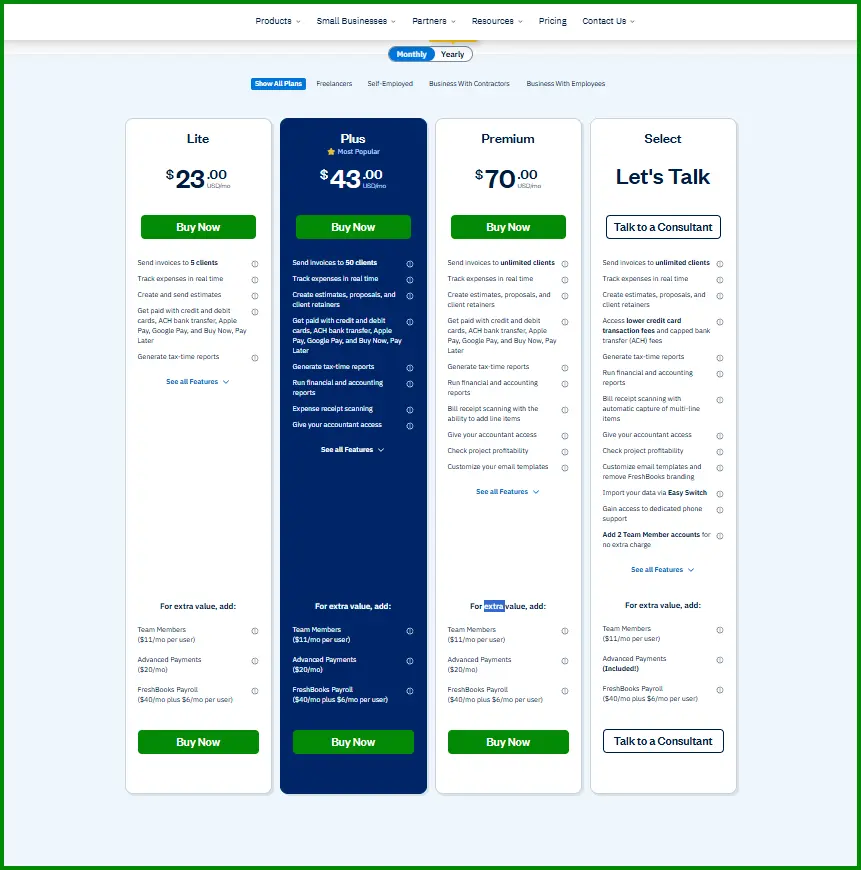
FreshBooks currently offers four main plan levels: Lite, Plus, Premium, and Select. The first three have published prices, while Select uses custom pricing through a consultation.
The current pricing page is also showing a limited-time 90% discount for the first three months. Because this is a promotion rather than the standard long-term price, it’s worth looking at both the promotional and regular prices.
| Plan | Current Price* | Regular Price | Clients |
| Lite | $2.30/month | $23/month | Up to 5 |
| Plus | $4.30/month | $43/month | Up to 50 |
| Premium | $7/month | $70/month | Unlimited |
| Select | Custom | Custom | Unlimited |
Which Plan Makes Sense?
If you’re a freelancer with just a handful of clients, the Lite plan might be all you need—as long as your main goals are simply invoicing, tracking expenses, accepting payments, and keeping a basic handle on your finances.
If you need to send proposals, manage retainers, get financial reports, scan receipts, or have more than five clients, the Plus plan is likely the most practical middle ground for you.
If your client list is growing pretty fast, the Premium plan becomes a much better option because it gives you unlimited clients alongside extra financial and project management tools.
There are also some paid add-ons available. Right now, FreshBooks charges $11/month per user for extra team members, $20/month for Advanced Payments, and $40/month plus $6/month per user for FreshBooks Payroll.
Pricing note: FreshBooks is currently showing a 90% discount for the first three months, but this is a limited-time promotion, and we can’t know how long it will remain available. Pricing, plan details, features, and promotions can change, and pricing may vary by region. Check the official FreshBooks pricing page for the latest prices and plan details before subscribing.
Check the latest FreshBooks pricing →
Performance & Real-World Feedback
One of FreshBooks’ strongest points appears to be ease of use. At the time of writing, FreshBooks holds a 4.5/5 rating on both Capterra and G2, with thousands of user reviews on each platform. Capterra rates its ease of use at 4.5/5, while recent G2 reviews also frequently highlight its simple setup and navigation.
That feedback makes sense for freelancers and small businesses that don’t want to spend weeks learning complicated accounting software. FreshBooks seems to work particularly well when the priority is keeping financial administration organized without adding a steep learning curve.
There are, however, some recurring concerns. Recent user feedback points to pricing becoming less attractive as a business grows, while some users also mention limitations in reporting, accounting depth, or features needed by larger businesses. This suggests that FreshBooks can be a better fit for smaller businesses than for those with increasingly complex financial requirements.
Our research also found mixed experiences across community discussions. Some users appreciate FreshBooks for its straightforward invoicing, ease of use, and support, while others raise concerns about pricing, payment fees, or limitations as their accounting needs become more complex.
That’s an important distinction. FreshBooks doesn’t necessarily need to compete with enterprise-level accounting platforms to be useful. Its strength is more apparent when the business is still relatively small and the priority is simplicity, invoicing, expenses, payments, and straightforward financial management.
Overall, the real-world feedback is largely positive, but it comes with a consistent caveat: FreshBooks appears to be a stronger fit for freelancers and small businesses than for businesses that have outgrown simple financial workflows.
Who Should Use FreshBooks?
FreshBooks makes the most sense for freelancers, consultants, and small service-based businesses that handle their own invoicing and financial admin.
- Freelancers & Solopreneurs
If you’re managing your own clients and financial tasks, FreshBooks can be a really practical fit—especially when these chores start eating into the time you should be spending on your actual client work. - Consultants & Professional Service Providers
Consultants, designers, developers, marketers, writers, and other service professionals can benefit from it when they want to keep client billing and financial records organized without dealing with a complicated accounting system. - Small Service Businesses
FreshBooks can also make sense for small teams that have grown beyond one-person operations but still want a relatively straightforward financial workflow. However, as the business grows, your client numbers and team requirements make picking the right plan a lot more critical.
Who Might Want to Look at Something Else?
If you only send a handful of invoices each month and have very basic financial needs, FreshBooks might honestly offer more than you actually need.
On the other hand, businesses that require highly advanced accounting, complex inventory management, or specialized financial controls will probably be better off with a more comprehensive accounting platform.
Final Verdict
FreshBooks is a great option for freelancers, solopreneurs, and small service-based businesses that want to keep their financial admin relatively simple and organized.
Its biggest strength is its simplicity. Instead of forcing you to manage every single part of your financial workflow separately, FreshBooks brings the core pieces together in a way that makes it much easier to handle alongside your everyday client work.
The main thing to keep in mind is how your business will grow down the road. As your needs change, client limits, higher-tier features, payment-processing costs, and extra paid add-ons can really impact the overall value. A plan that works perfectly for a small freelance setup today might not necessarily be the best fit later on.
So, is FreshBooks actually worth it? For the right user, yes. If you’re a freelancer or run a small service business and want something more capable than basic invoicing, but don’t need a heavy, overly complex accounting system, FreshBooks is well worth serious consideration.
However, if your needs are incredibly basic, you probably won’t need everything FreshBooks has to offer. And if you already have highly complex accounting requirements, a more comprehensive accounting platform will likely be a better fit.
Our recommendation: Evaluate FreshBooks based on how you actually run your business, the specific features you need, and the total cost of the plan that fits your budget. The best choice isn’t automatically the plan with the most features—it’s the one that makes sense for your current workflow and expected growth.
Explore FreshBooks
If FreshBooks looks like a good fit for your business, you can learn more and decide whether it makes sense for your workflow.
Explore More Freelancer & Productivity Reviews
Looking for more tools to manage your freelance business? Explore our other freelancer and productivity software reviews to compare features, pricing, and overall value before choosing the right tool for your workflow.
Check our Bonsai Review →
Frequently Asked Questions About FreshBooks
Is FreshBooks good for freelancers and solopreneurs?
Yes. FreshBooks is particularly suited to freelancers, consultants, and small service-based businesses that want to keep invoicing and financial administration organized in one place.
How much does FreshBooks cost?
FreshBooks currently offers Lite, Plus, Premium, and Select plans. The first three have published prices, while Select uses custom pricing. Promotional pricing can change, so check the official FreshBooks pricing page for the latest costs and plan details.
What is FreshBooks mainly used for?
FreshBooks is mainly used for invoicing, payments, expense tracking, time tracking, and financial management. It also includes features such as estimates, proposals, projects, and financial reporting, depending on the plan.
Does FreshBooks track time?
Yes. FreshBooks includes time tracking for recording billable hours, and tracked time can be used when creating invoices.
Can FreshBooks track business expenses?
Yes. FreshBooks lets you record business expenses and, on applicable plans, scan receipts and import transactions from connected bank accounts.
Does FreshBooks have a free trial?
FreshBooks offers a free trial, although its availability and terms can change. Check the official FreshBooks website for the current trial details before signing up.
Is FreshBooks worth it?
FreshBooks can be worth it for freelancers and small service businesses that want more than basic invoicing and need a straightforward way to manage their financial workflows. Whether it’s worth the cost depends on your client count, required features, and how much of the platform you actually use.