

Introduction
Getting the information, documents, and files you need from clients can sometimes take more time than expected. You send an email, wait for their reply, then realize something is missing, and right there, the cycle of back-and-forth communication and follow-ups begins all over again.
‘Content Snare’ is designed to make this very process easier. It gives you a structured way to ask for information and documents from clients, and thanks to its automated reminders, you don’t have to repeatedly chase after them yourself.
But is it actually useful, and is spending money on a new tool the right decision?
In this Content Snare review, we’ll look at its features, pricing, pros and cons, ease of use, and who it’s best suited for.
Table of Contents
What Is Content Snare?
Content Snare is a tool for collecting information and documents from clients. It helps business owners gather details, files, and documents received from clients all in one place.
Instead of sending multiple emails for different questions and files, you can create a structured request and send it to the client. After this, clients can provide the requested information and also upload files through that single request.
Content Snare can be especially useful for businesses that constantly need to collect the same kind of information. For example, an agency can use it to collect project details, brand assets (logos, etc.), pictures, text, or other documents before starting work.
To put it simply, Content Snare focuses on one specific part of client onboarding: getting the information and files you need from clients.
Pros and Cons
Pros
- Structured client requests keep questions, answers, and files organized in one place.
- Automated reminders reduce the need to manually chase clients for missing information.
- Reusable templates make repeatable information requests faster to set up.
- Conditional questions let you show clients only the questions that apply to them.
- File uploads make it easier to collect documents, images, and other project assets.
- Review and approval lets you check submissions and request changes when needed.
Cons
- Limited broader business-management features compared with an all-in-one client platform.
- Some setup is required to create useful templates and requests.
- It adds another subscription if you already use a broader client-management platform.
- Some users report issues such as bugs, notification volume, or data-saving limitations.
What Users Say
Independent user feedback is generally positive about Content Snare’s core purpose. Users commonly mention time saved on client follow-ups, organized document collection, automated reminders, and an easier client experience.
Some users also point to the time needed to build good templates, notification volume, pricing, and occasional technical issues as drawbacks.
Community discussions also suggest an important limitation: collecting client content is not always the same as getting that content finalized or approved in its final context. For businesses that need deeper content collaboration, another workflow may be a better fit.
Overall, the feedback supports what we found in this review: Content Snare is strongest when client information collection is a recurring bottleneck, but it may be harder to justify if you only need this occasionally.
Content Snare Features
Content Snare’s features are mainly focused on making client information and document collection more organized and less manual.
Client Information Requests
Content Snare allows you to prepare a structured request so that you can ask for the information you need from a client.
Instead of sending multiple separate emails, you can put questions, instructions, and file upload options into a single request. After that, the client can complete everything in one place.
This can be particularly useful for businesses that repeatedly ask new clients for the same kind of information. You can create a standard request once and reuse it over and over again for future projects.
Automated Reminders
One of the most useful features of Content Snare is its automated reminders system.
Once you send a request to a client, Content Snare keeps reminding them on its own until they provide their remaining information or files. For this, email reminders are available, and it also supports SMS reminders.
For agencies that handle multiple clients at the same time, these automated reminders can reduce the hassle of doing daily follow-ups.
Templates
If you constantly collect the same kind of information from different clients, you don’t need to create a request from scratch every time.
Content Snare allows you to create reusable templates for requests that are frequently used. You can use a template as a base and make minor changes to it when a specific client or project requires different information.
This saves setup time and keeps your entire information-collection process consistent across different projects.
Conditional Questions
Content Snare can show different questions based on a client’s previous answers. This lets you create more relevant requests without asking every client the exact same questions.
For example, you might ask whether a client already has brand guidelines. If they select Yes, you can ask them to upload the file. If they select No, you can move on to the next relevant question.
This can make longer onboarding requests easier for clients to complete because they only see questions that apply to them.
File and Document Collection
Content Snare allows you to collect files and documents directly inside a client request. Instead of asking clients to send attachments separately via email, you can add a file-upload option right alongside your questions.
This comes in very handy when an agency needs multiple things before starting work, such as logos, brand guidelines, pictures, copy, or other client documents.
Keeping files and their related answers within a single request makes it much easier to see which things have already been received and which are still missing.
Review and Approval
Content Snare lets you review the information and files submitted by clients and approve them or request changes when needed.
This gives you a chance to check submissions instead of simply collecting everything and sorting through it later.
For agencies, this can be useful when the information collected during onboarding needs to meet certain requirements before the project can move forward.
Content Snare Pricing
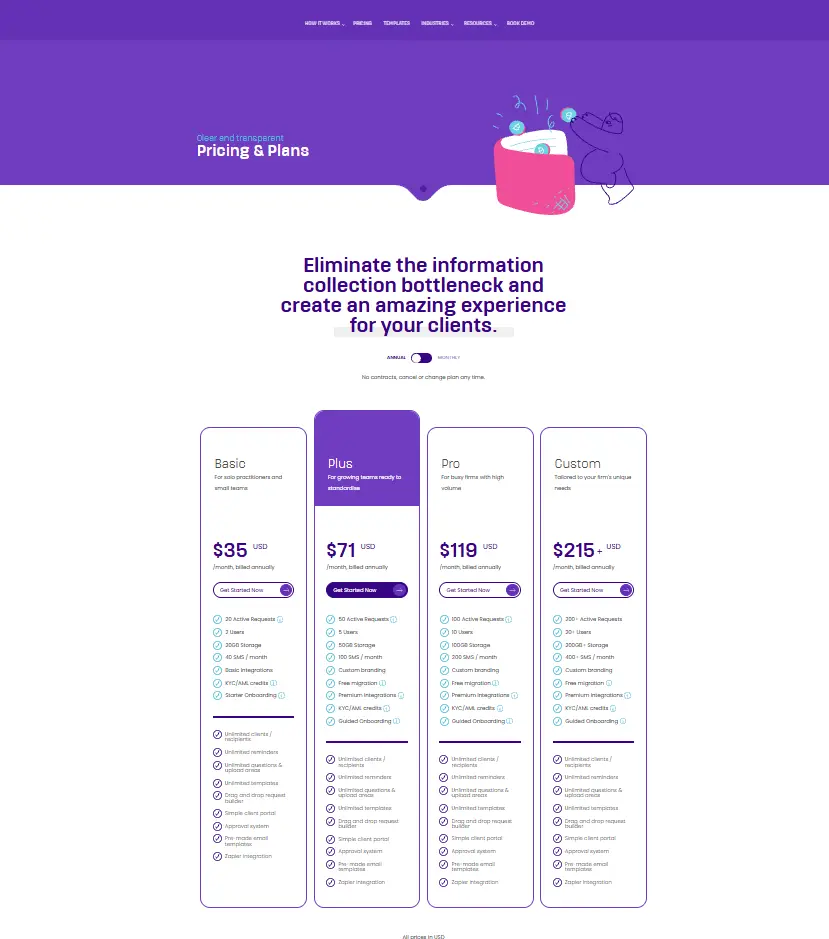
Content Snare’s current general plans are priced according to active requests, team members, storage, and other included features. Clients or recipients do not count toward the plan’s user limit.
| Plan | Monthly | Annual | Active Requests | Users | Storage |
| Basic | $42/mo | $35/mo | 20 | 2 | 20GB |
| Plus | $85/mo | $71/mo | 50 | 5 | 50GB |
| Pro | $143/mo | $119/mo | 100 | 10 | 100GB |
| Custom | $258+/mo | $215+/mo | 200+ | 20+ | 200GB+ |
All plans include unlimited clients/recipients, unlimited reminders, unlimited questions and upload areas, unlimited templates, a drag-and-drop request builder, a client portal, and an approval system.
Content Snare also offers a 14-day free trial with no credit card required.
Note: Pricing, plans, features, and other details may change over time. Before subscribing to Content Snare or making a purchase decision, we recommend checking the official Content Snare website for the latest pricing and feature information.
Content Snare official pricing page.
Which Content Snare Plan Should You Choose?
For most users, the Basic plan should be enough to get started. It includes 20 active requests and 2 team members, along with the core features needed for client information collection.
The Plus plan makes more sense for growing teams that need more active requests or additional team members.
The Pro plan is aimed at busier firms that regularly manage a larger volume of client requests. The Custom plan is designed for larger teams that need significantly more capacity.
Our take: If you’re a freelancer or small agency, start with Basic unless you already know you’ll need more active requests or team members. Upgrade when your workload actually requires it rather than paying for capacity you don’t currently need.
Ease of Use
Once your requests and templates are set up, Content Snare becomes quite easy to use.
Its request builder works on a drag-and-drop interface, allowing you to add questions, file uploads, instructions, and other things without any technical knowledge. Clients can access the request through a link without creating an account, and their progress is automatically saved.
Most of the effort is required during the initial setup. If your business has a large onboarding process, you will need to spend some time creating templates and deciding exactly what information needs to be requested.
Overall, Content Snare is simple enough for most teams. The biggest thing to learn here is just that it takes a little time in the beginning to set up a good request workflow.
Who Should Use Content Snare?
Content Snare is a good fit for businesses that regularly need to collect information, documents, or files from clients before starting work.
This can be especially useful for agencies, freelancers, accountants, professional services, and creative businesses whose client onboarding process is the same every time (repeatable).
This tool makes even more sense if your biggest onboarding headache is getting clients to send everything you need on time.
Who Shouldn’t Use Content Snare?
Content Snare may not be the best choice if you need a complete client management platform rather than a dedicated information-collection tool.
You may want to consider an alternative if you need:
- Proposals, contracts, and payments in the same platform
- Invoicing and client billing as part of your workflow
- A full CRM or lead management system
- Project management and task tracking alongside client onboarding
- One platform to manage the entire client lifecycle
If you need broader client-management and business workflow features, HoneyBook and Dubsado are worth considering.
Is Content Snare Worth It in 2026?
Content Snare is worth considering if collecting client information and files is a recurring problem in your business.
Its main value comes from making this process more structured and reducing the manual follow-up involved in collecting missing information.
If you already have a client-management platform that handles information collection well enough, Content Snare may be unnecessary. But if you’re regularly spending time chasing clients for missing documents, answers, or project assets, the time saved can make the subscription worthwhile.
Final Verdict
If your biggest challenge is getting information, documents, and files from clients without doing repeated follow-ups, Content Snare is a very good option.
Its entire focus is on this single job, which makes it highly useful for agencies and other businesses that repeat the same information-gathering process over and over with multiple clients.
The only drawback is that Content Snare is a specialized tool made for a specific task, not an all-in-one client management platform. If you want proposals, contracts, payments, invoicing, CRM, and other client-management features all within the same system, you will need a larger and more comprehensive solution.
Content Snare is truly worth the money for those businesses where collecting information from clients has become a major headache (bottleneck). However, if this is not a big issue in your workflow, taking another new subscription just for this specialized tool might not be the right decision.
Content Snare FAQ
What is Content Snare used for?
Content Snare is used to collect client information, documents, and files through structured requests instead of relying on email.
Is Content Snare a CRM?
No. Content Snare primarily focuses on collecting client information and documents rather than providing full CRM functionality.
Is Content Snare good for client onboarding?
Yes. It’s particularly useful when collecting information, documents, and project files is a regular part of your client onboarding process.
How much does Content Snare cost?
Content Snare’s pricing starts at $42 per month when billed monthly, or $35 per month when billed annually for the Basic plan. Higher-tier plans are available for businesses that need more active requests and team members.
Does Content Snare have a free trial?
Yes. Content Snare currently offers a 14-day free trial with no credit card required.
What are the best Content Snare alternatives?
The best alternative depends on your needs. HoneyBook and Dubsado are better suited to broader client-management workflows, while tools such as Leadsie and Process Street focus on specific parts of the onboarding process.