
Introduction
A client’s feedback often begins in a very simple way: like a few comments on the homepage, a word needs to be changed somewhere, or an image needs to be swapped. But the trouble starts when these comments begin coming from different places—such as email, WhatsApp, calls, and different versions of the website. Then suddenly, you get stuck in this confusion about what exactly has changed and which version the client was talking about.
For freelance web designers, having a clean process is very important because it makes it easier to organize client feedback. It also helps you avoid mixing new changes with old work or the next round of feedback.
The purpose here is not to refuse the client’s changes. You just want every request to have its own designated place, every change to be easily understood, and everyone to clearly know what to do next.
Table of Contents
Why Client Feedback Gets Messy
Managing client feedback becomes a real headache when you don’t have a set process in place.
What happens is that a client emails one change, shoots over another on WhatsApp, and then starts talking about a third thing over the phone. To top it off, someone else from the team might drop in a few comments later on. By the time you actually sit down to work, you’re just stuck digging through messages, trying to figure out which comment goes to what part or version of the site.
A few common issues tend to pop up:
• Feedback comes in scattered across different places.
• The client mentions a page or section but doesn’t clarify which one they mean.
• Different people tell you things that completely contradict each other.
• Old tasks and new requests get all mixed up together.
• You’re asked to redo a change you already finished.
• More new work piles on while you’re still wrapping up the last round.
Honestly, none of this means the client is just being difficult. The real issue is that there just isn’t a single workflow that everyone is following.
You don’t need a fancy system to clean up this mess. Just a few straightforward rules can make the whole thing incredibly easy to manage.
How to Organize Client Feedback in One Place
One of the easiest ways to organize client feedback is to give it one home.
If one change is in an email, another is in WhatsApp, and a third comes up on a call, you’ll have to pull everything together before you can start. It gets even messier when the client is commenting on an older version of the website.
Give clients one place to leave their feedback instead.
For a small project, Figma comments or a shared document may be all you need. If the site has lots of pages, several people reviewing it, or frequent revision rounds, a dedicated feedback tool can save some hassle.
The tool itself isn’t the main issue. Consistency is.
Your client should know:
- Where to leave feedback
- Which version they should review
- How to point out a specific change
- Where they can see whether a request has been handled
It helps on your side, too. When you sit down to make revisions, you can see what was requested without digging through several conversations first.
One project. One feedback channel. One current version.
It’s a small rule, but it cuts out a surprising amount of back-and-forth.
Ask for Feedback That You Can Actually Act On
Some feedback sounds clear enough but still doesn’t tell you what to change.
A client might say:
“I don’t like this.”
But what exactly should change? The layout? The colours? The wording? The image? Or something about the overall direction?
When a comment is vague, don’t guess. Ask a quick follow-up before you start changing the design.
When possible, ask clients to include three things:
- What they want changed
- Where they want it changed
- Why, if the reason affects the decision
For example:
“Can we change this section?”
isn’t as useful as:
“Can we shorten the text in the About section and make the heading more prominent?”
The second request gives you something specific to work with.
If a client says something like “This doesn’t feel right,” you could ask:
“Is the concern with the layout, the wording, the image, or the overall direction?”
Now you have something concrete to work with.
Clients don’t need to write a full design brief for every comment. You just need enough detail to know what should change and where.
Keep Feedback Tied to the Right Page or Version
A feedback comment is much easier to handle when you know exactly what the client is referring to.
“Change the hero section” might be clear when you’re working on a small project with one page. But on a larger website, you could have several pages with similar sections. If the client is also reviewing an older version, confusion can build quickly.
When collecting feedback, try to keep each request connected to:
• The specific page
• The section or element
• The version being reviewed
• A screenshot or visual reference, when helpful
For example, instead of:
“The button needs changing.”
A more useful request would be:
“On the Services page, change the CTA button below the pricing section from ‘Get Started’ to ‘Book a Call.’”
Now you know exactly what needs changing and where.
That becomes particularly useful once a project goes through several rounds. That way, you can work through the list without stopping every few minutes to ask the client which page or version they meant.
For smaller gigs, the comments right inside your usual design or project management tool should do the trick. But if you’re constantly jumping on calls to review live websites with clients, picking up a dedicated feedback tool is super handy, mostly because the comments stick exactly to the specific part of the page you need to fix.
Group Changes Into Revision Rounds
Once you’ve got all the feedback in one spot, just split those changes into different revision rounds.
There’s no point in handling one change today, another tomorrow, and something else next week. It’s much easier to bundle the agreed changes together and work through them as one revision round.
You could basically set it up like this:
Round 1: Big changes. Things like layout, content, and the main design.
Round 2: Fine-tuning and fixing the smaller details.
Final pass: Cleaning up errors and wrapping up the last agreed tweaks.
The upside? Both you and the client will know exactly where things stand. No guesswork.
Plus, it kills that annoying cycle where you finish a round and move on, only for some tiny new request to pop up out of nowhere. Next thing you know, you’re forced to reopen the whole thing.
Now, this doesn’t mean you just shoot down every single late comment. Some points make total sense and are worth doing. You just have to decide if the request fits into the current round or if it needs a completely separate conversation.
If your proposal or contract already lists revision rounds, follow the same structure throughout the project. That way, the client can see how those limits actually work as the project moves forward. Otherwise, just hearing about them at the very start doesn’t really work—people forget.
Separate Revisions From New Requests
One important distinction is worth making here: not every client request is a revision.
You need to draw a clear line here. A revision simply means tweaking something you already agreed to do. But if the client is asking for something that wasn’t even on the radar during the initial project scope, then honestly, that is a brand new request.
Think about it like this:
• “Make the heading size a bit smaller.” → Definitely a revision.
• “Need to swap the homepage photo.” → Yep, still a revision.
• “Add another new landing page.” → Now that could be new work.
• “Can we set up a booking system too?” → Potentially new work.
Catching this difference is super important. These new requests have a way of sneaking in and turning a tiny revision round into a massive mountain of extra design or coding work before you even realize it.
So, the next time a new request pops up, don’t just blindly throw it into the revision pile. Pause for a second and ask yourself:
Was this actually part of the original project scope?
If it was, great—just slide it into the right revision round. If it wasn’t, tell the client straight up that it’s extra work. And make sure you agree on the additional work, budget, or timeline before you start it..
That keeps the whole gig crystal clear, and you won’t have to waste time arguing or negotiating over every little comment.
What to Do When Client Feedback Is Vague
Sometimes the client knows that something feels wrong but can’t quite explain what they want changed.
That’s normal. You don’t need a long conversation every time this happens, but you shouldn’t start changing things based on a guess either.
Don’t Guess
If a client says, “This section feels off,” don’t immediately redesign the section.
You might fix the wrong thing and create another round of feedback.
Instead, find out what part of the design is bothering them.
Ask a Specific Question
A simple question can make vague feedback much easier to understand.
For example:
“Is the concern with the layout, the wording, the image, or the overall direction?”
Giving the client a few options is often easier than asking them to explain the whole problem from scratch.
Confirm Before Making the Change
Once you understand what the client means, confirm the requested change if there’s still any uncertainty.
For example:
“Got it. You’d like the section to feel less crowded, so I’ll reduce the amount of text and give the main CTA more space.”
At that point, you and the client are working from the same understanding.
A quick clarification can save you from doing an entire extra round of work.
What If Multiple People Are Giving Feedback?
Having too many people involved can turn a straightforward feedback process into a real headache.
Think about it: a project might involve the business owner, a marketing person, a copywriter, or whoever else from the client’s team. If every single one of them starts sending comments straight to you, you’re going to end up with requests that completely contradict each other. Or worse, you’ll have three different people talking about the exact same part of the site in totally different ways.
So, whenever possible, just tell the client to pick one person to gather and approve the team’s feedback.
Now, that designated person doesn’t need to make every single design choice. Their job is simply to bundle the team’s comments together so everything is sorted out before it ever reaches you.
A much cleaner workflow looks like this:
Client team → One point of contact → Designer → Updated version → Client approval
But look, if it’s absolutely necessary for multiple people to comment directly, at least make sure they’re all looking at the exact same version and using the same feedback channel.
More importantly, don’t take on the responsibility of settling arguments inside the client’s team. If two people want completely different things, they need to figure out what they actually want before you go ahead and make the change.
Your job is to turn agreed-upon feedback into design updates—not to play referee in the client’s internal drama.
Close Each Revision Round Before Moving On
Once you’ve wrapped up the requested changes, just close that revision round instead of leaving it open forever.
Send the updated version back to the client and give them a proper chance to review it. If there are still things to fix, collect them all together and deal with them before you take another step forward.
A simple workflow could look like this:
- Send over the updated version.
- Ask the client to look over the current draft.
- Gather any leftover changes.
- Knock out the agreed-upon updates.
- Confirm that this specific revision round is officially done.
- Move right onto the next stage of the project.
The exact steps might change a bit depending on the gig, but everyone needs to know when a revision round is actually over and done with.
Otherwise, an old round just sits in the background while you’re already working on something else. Then, out of nowhere, a tiny comment days later drags you right back into work you thought was long finished.
Closing out each round gives you a clean slate to move forward—and gives the client one clear version to sign off on.
When Does a Dedicated Website Feedback Tool Make Sense?
To be honest, you don’t really need a dedicated feedback tool for every single web design project.
If you’re only dealing with a handful of clients and most of the feedback fits perfectly into Figma comments, email, or your current project management system, adding another tool is just going to give you one more place to check.
Managing feedback manually is usually more than enough when:
• You’re working on pretty straightforward, simple projects.
• There are only a few people involved in the whole process.
• Clients are totally cool with dropping comments right on the designs.
• The overall volume of feedback is pretty low.
• You don’t really need to track the status of every tiny detail.
A dedicated tool only really makes sense when the actual chore of managing feedback starts eating up too much of your time.
When a Dedicated Tool Actually Starts Making Sense
You might want to think about grabbing one when:
• Feedback is scattered all over the place—like emails, texts, and who knows where else.
• Clients are pulling their hair out trying to explain exactly where a change needs to happen on the site.
• You need comments pinned directly to the exact spot on a live website.
• You’re juggling a bunch of different projects all at the same time.
• You need a crystal-clear way to see what’s already done and what’s still pending.
• Clients just want a frictionless way to review things and sign off on changes.
Look, the whole point isn’t to just pile up software for the sake of it. Any tool you bring in needs to sort out an actual bottleneck in your day-to-day workflow.
If your current setup gets the job done without any hassle, honestly, just stick with it. But if you find yourself constantly digging through messy threads, random screenshots, and different versions just to figure out what needs a fix, then checking out a dedicated feedback tool is definitely worth a shot.
A Simple Client Feedback Process for Freelance Web Designers
A good feedback process can stay pretty simple. The important part is just knowing what the client is reviewing, where they should leave their comments, and when that specific round is done.
If you are still collecting website content from clients before the design work begins, see our guide on: How to Collect Website Content From Clients Without Endless Follow-Ups.
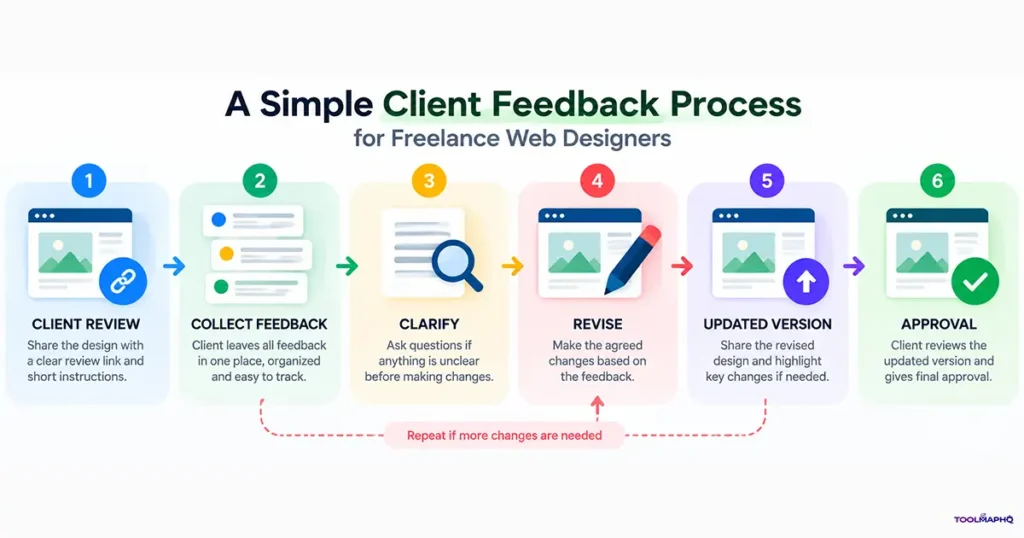
A simple workflow could look like this:
Client Review → Collect Feedback → Clarify → Revise → Updated Version → Approval
- Send one review link or feedback location
Give the client one clear place to review the current version and leave their comments. - Ask the client to review the current version
Make sure everyone is looking at the exact same version of the website or design. - Collect the feedback
Bring the requested changes together instead of handling them one at a time across different conversations. - Clarify anything vague
If a comment isn’t clear, just ask before you go ahead and make the change. - Separate revisions from new requests
Check whether the request belongs to the agreed project or if it falls outside the original scope. - Complete the revision round
Work through the agreed changes together as a single batch. - Send the updated version
Give the client a clean version to review once again. - Get approval before moving forward
Once the client is happy with the current version, close the revision round and move on to the next stage.
The tools may differ from project to project. The basic process doesn’t have to. Keep feedback in one place, make each request specific, and tie it to the right version of the work.
Frequently Asked Questions
How should freelance web designers collect client feedback?
Start out with just one clear feedback channel and have clients review the exact same current version of the website or design. For a straightforward project, Figma comments or your usual project management tool might be more than enough. If the project is a bit more involved, a dedicated feedback tool can really help keep all comments, revisions, and their status locked together in one spot.
What is the best way to organize website design feedback?
Keep all feedback in one single place and make sure to tie every request to the right page, section, or version. It also helps a ton to work through changes in structured revision rounds instead of reacting to every single comment the second it arrives.
How many revision rounds should a freelance web designer allow?
There isn’t a fixed number that works magic for every single project. You need to think about the scope, the type of work, and how hands-on the client is going to be. Whatever you end up agreeing on, spell out exactly what counts as a revision and what happens when a request falls outside that original scope.
How do you handle vague client feedback?
Don’t play guessing games. Just ask a quick follow-up question to find out exactly what the client wants changed and where. If anything still feels a bit unclear after that, confirm the request one more time before you actually start the work.
How do you handle multiple people giving feedback?
If possible, ask the client to pick one person to collect and sign off on their team’s feedback. It gives you one clear point of contact and cuts down on conflicting requests. If it’s absolutely necessary for several people to comment directly, just make sure they’re all reviewing the exact same version using the same feedback channel.
What is the difference between a revision and a new request?
A revision changes something that was already a part of the agreed project. A new request adds work that wasn’t included to begin with. For instance, tweaking the layout of an existing page could be a standard revision, while adding a completely new page would usually count as additional work.
Do freelance web designers need a client feedback tool?
Not necessarily. If Figma, email, or the software you already use handles your feedback just fine, you probably don’t need another platform. A dedicated feedback tool becomes way more useful when you’re juggling multiple projects, dealing with scattered comments, managing too many stakeholders, or sorting through a ton of website-specific feedback.