
Finishing a website doesn’t always mean you’re ready to launch it. You may have completed the agreed work, checked the pages, and fixed the issues from the last revision round. But has the client actually approved the finished version?
That final confirmation matters. Without it, you could end up making more changes when you thought the project was done, or waiting around because the client isn’t sure whether there’s anything left to review.
A straightforward approval process helps you close that gap. The client gets a chance to check the finished website, you get a clear decision, and both sides know what happens next.
Table of Contents
Why Final Website Approval Matters
Imagine you’ve finished a website and sent the client a message saying it’s ready. You assume they’ll take a quick look and give you the go-ahead. Instead, they come back a few days later with more changes—or tell you they thought you were still working on it.
Situations like this can delay a launch and make it harder to manage the remaining work.
Final website approval gives you a clear point to work toward. The client confirms that they’ve reviewed the current version and are happy for the project to move forward, subject to the terms you’ve agreed on.
It also gives you something to refer back to if new requests appear later. You can check what was approved and work out whether the new request belongs to the original project or needs a separate agreement.
Final Approval Is Different From Client Feedback
Feedback and final approval serve different purposes.
During the feedback stage, the client might ask you to adjust a heading, change an image, fix a layout, or revise a page. You’re still working toward a version that meets the agreed requirements.
Final approval comes after that work is complete. You’re asking the client to review the finished version and confirm that it’s ready for launch—not to begin another open-ended round of design feedback.
If you’re still dealing with comments scattered across emails, messages, and screenshots, our guide on How Freelance Web Designers Can Organize Client Feedback and Revisions covers that earlier part of the process.
Once the outstanding feedback has been handled, you can move on to final approval.
What Should Be Ready Before You Ask for Final Approval?
Before sending the website to your client, do your own final checks. You don’t want the client to discover a broken contact form or missing page that you could have caught yourself.
At a minimum, review the main pages, test important links and forms, check the layout on common screen sizes, and confirm that the agreed content and functionality are in place.
You may also want to review the Web Content Accessibility Guidelines (WCAG) when checking whether your website is accessible to people with disabilities.
Also, be honest about anything that isn’t finished. If a feature has been left for a later phase or an item falls outside the current scope, explain that before asking for approval. Don’t present the whole project as complete if there are still outstanding items the client needs to know about.
Once you’ve checked the agreed work, you’ll have a version that’s genuinely ready for the client’s final review.
Give the Client One Final Version to Review
Make it obvious which version you’re asking the client to approve.
If you’ve sent several links, screenshots, or preview versions throughout the project, the client might not know which one is the latest. That can create confusion later if you disagree about what was approved.
Send one clear review link or identify the exact version they should check. If you’ve made changes since the previous review, briefly explain what’s been updated.
You could introduce it with a message like:
“I’ve completed the agreed changes and finished my final checks. Here’s the latest version for your final review before launch. Please check the pages and features listed below and let me know if anything still needs attention.”
That gives the client a clear next step without making the process unnecessarily formal.
Tell the Client What They Need to Check
Don’t leave the client guessing about what a final review involves. A simple checklist can help them focus on the parts of the website they know best.
Depending on the project, ask them to check:
- Content and images: Are the text, photos, and other materials correct?
- Navigation and links: Do the important pages and links lead to the right places?
- Forms and contact details: Are the phone numbers, email addresses, and other business details accurate?
- Design and layout: Does the website look right on the devices they’re likely to use?
- Agreed functionality: Do the features included in the project work as expected?
- Business information: Are prices, addresses, service descriptions, and other key details correct?
You don’t need to send every client a lengthy technical checklist. Keep it relevant to the work you’ve done.
Your own technical checks should already be complete. The client’s review is an opportunity to confirm the finished website, catch anything they’ve missed, and make sure the result matches what you agreed to deliver.
What If the Client Requests Changes During the Final Review?
A client may still spot something that needs attention. The important thing is to work out what kind of change they’re asking for before deciding how to handle it.
A Genuine Correction
Perhaps a phone number is wrong, a link doesn’t work, or some agreed content is missing. These are corrections to the existing work, not new features.
Fix the issue and give the client the updated version to check. If the change affects other parts of the website, check those too before sending it back.
An Agreed Project Revision
The client might request a design change that’s still covered by your agreed scope or revision rounds.
Handle it according to your original arrangement. Make the change, update the review version, and ask the client to check the latest version before approval.
A New Request
Sometimes a final review turns into a request for something that wasn’t included in the original project. The client might ask for an extra page, a booking system, or a new feature they hadn’t previously discussed.
Before starting, explain what the additional work involves and agree on any changes to the budget or timeline.
It’s better to have that conversation now than to quietly absorb extra work and end up with a project that’s larger than the one you priced.
How to Record Final Website Approval
Once the client approves the website, keep a record of the decision. An email or a confirmation in your project management system may be enough; you don’t necessarily need a dedicated tool.
Make sure your records show:
- Which website version or review link was approved
- When the approval was given
- Who gave the approval
- A clear confirmation that the client approved the website for launch
If several people are involved, confirm who has the authority to approve the website on the client’s side. You don’t want to receive informal approval from one team member only to discover that another person still needs to review it.
It’s also worth noting any items that have been deliberately left for a later phase. That way, everyone knows they’re outstanding by agreement rather than accidentally forgotten.
This record gives you a shared reference if questions come up later. You won’t have to rely on memory to work out which version the client accepted.
What If the Client Doesn’t Respond?
You’ve sent the final version, explained what needs checking, and heard nothing back. It happens.
Start with a polite follow-up. Remind the client that the website is waiting for their review and ask when they expect to respond. Giving them a specific date can make the next step clearer.
If your project agreement includes a review period or an approval procedure, follow the terms you agreed on. Keep copies of your messages so you have a record of your attempts to get a decision.
Still no response? Send another follow-up and explain how the delay affects the launch schedule. Depending on your agreement, you may need to hold the launch until the required approval arrives.
Don’t treat silence as approval by default. If your agreement requires explicit confirmation, wait for it. If it sets out a different process for non-response, follow that agreed process instead.
When Does a Dedicated Approval Tool Make Sense?
For a small project with one client reviewer, email and a clear preview link may be all you need. You can request approval, save the response, and move on to launch.
Things get harder when you’re managing several projects, dealing with multiple stakeholders, or trying to keep track of different website versions. Approval requests can get buried in inboxes, and it becomes harder to tell which changes are still outstanding.
A dedicated approval tool may help by bringing review comments, version details, and approval status into one place. The value depends on the tool: check whether it supports the workflow you actually need rather than assuming every product does everything.
You don’t have to buy software just to make the process look professional. If your current method is reliable and you can easily find each approval, keep using it. Consider a dedicated tool when manual tracking starts costing you time or causing confusion.
A Simple Final Website Approval Process for Freelance Web Designers
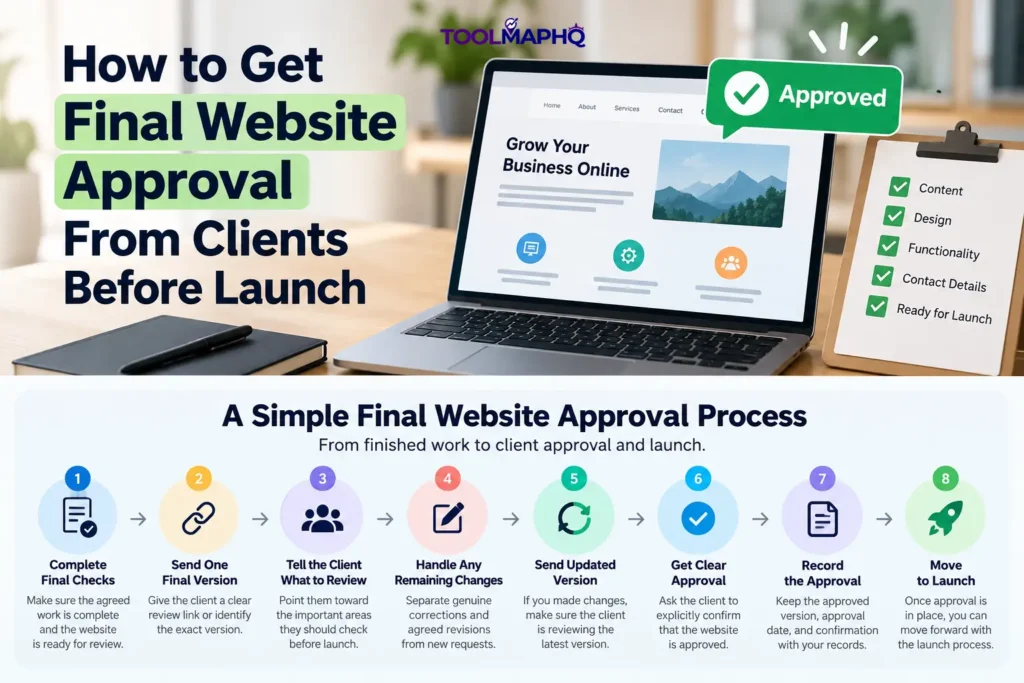
Here’s a practical sequence you can reuse from one project to the next.
1. Finish your own checks.
Test the agreed pages, links, forms, and functionality before asking the client to review the site.
2. Send one final version.
Share a clear preview link or identify the exact version that’s ready for review.
3. Explain what the client should check.
List the important pages, content, business details, and features they need to confirm.
4. Handle any remaining changes.
Work out whether each request is a correction, an agreed revision, or additional work.
5. Send the updated version if needed.
If you’ve made changes, make sure the client reviews the latest version rather than an earlier one.
6. Ask for explicit approval.
Get a clear confirmation that the client approves the version for launch.
7. Save the approval record.
Keep the approved version, the client’s confirmation, the approval date, and the name of the person who approved it.
8. Move to launch.
Once the required approval is in place, follow your launch process and complete the remaining launch tasks.
The process doesn’t need to be complicated. You just need to know that the agreed work is ready, the client has reviewed the right version, and the required approval is recorded before you move ahead.
Frequently Asked Questions
What Does Final Website Approval Mean?
Final website approval means the client has reviewed a specific version of the finished website and confirmed that it’s ready to move toward launch. It gives both sides a clear record of which version was accepted.
How Should a Freelance Web Designer Get Final Website Approval?
Complete your own checks, send the client one clearly identified version, and explain what they should review. Ask them to confirm explicitly that the website is approved for launch, then save that confirmation with your project records.
Should Website Approval Be in Writing?
Written approval is useful because it creates a record of the client’s decision. An email or a confirmation through your project management system may be sufficient, depending on your agreement. Make sure it’s clear which version was approved and whether the client has authorized the launch.
What Should a Client Check Before Approving a Website?
The client should review the content, images, contact information, important pages, and features included in the project. They should also confirm that the finished website matches the requirements you agreed on. Technical checks should be completed by the designer before the final review.
What If a Client Asks for Changes After Final Approval?
Check whether the request is a correction, work already included in the project, or something new. Handle existing obligations according to your agreement. For additional work, agree on the scope, cost, and timeline before proceeding.
Can a Web Designer Launch a Website Without Client Approval?
Follow the approval requirements in your project agreement. If explicit client approval is required, don’t assume that no response means yes. Follow up, document the delay, and use the procedure you’ve agreed on with the client before deciding how to proceed.