

Introduction
Choosing a client-management platform can sometimes be more complicated than expected. HoneyBook and Dubsado both bring tools like proposals, contracts, invoices, payments, scheduling, and client communication into one place, but the way both handle client workflows is different.
That makes the choice less about which platform has the longest feature list and more about which one fits your actual workflow.
In this comparison, we will test HoneyBook vs Dubsado based on the aspects that matter most to freelancers and service businesses. This includes ease of use, CRM features, proposals and contracts, automation, scheduling, payments, pricing, and the overall client experience. Along with this, we will also look at what real users have to say about both platforms.
By the end, you should have a clearer idea of which platform fits your workflow, budget, and business needs.
Affiliate Disclosure
This article contains affiliate links. If you sign up for Dubsado through our link, we may earn a commission at no additional cost to you.
Table of Contents
HoneyBook vs Dubsado at a Glance
| Feature | HoneyBook | Dubsado |
| Starting price | $29/month, billed annually | $35/month or $335/year |
| Free trial | 30 days | 21 days |
| CRM / Client management | Yes | Yes |
| Proposals & contracts | Yes | Yes |
| Invoicing & payments | Yes | Yes |
| Scheduling | Yes — Starter includes 1 session type | Yes — Premier |
| Automation | Yes — Automations | Yes — Flows |
| Client portal | Yes | Yes |
| Payment processors | HoneyBook Payments | Dubsado Payments, Square, PayPal |
| Best suited for | Simpler, connected workflows | More customizable workflows |
Important: Pricing and feature availability can vary by plan, so this table is intended as a quick comparison rather than a substitute for the detailed sections below.
What’s the Difference Between HoneyBook and Dubsado?
Fundamentally, HoneyBook and Dubsado solve a similar problem: they help freelancers and service businesses manage the entire client journey from inquiry to payment and project completion.
The biggest difference is how much control you want over that entire process.
HoneyBook takes a simpler and more streamlined approach. Its platform brings proposals, contracts, invoices, payments, scheduling, client communication, and automation together into one system, with an emphasis on keeping the client experience connected.
Dubsado also brings all these functions together, but it gives you more control over how each individual step of your workflow will be structured. Its ‘Flows’ can connect forms, emails, contracts, invoices, scheduling, tasks, and other actions to create a customized process for the client.
This difference becomes even more clearly visible when your business has multiple types of services or when the process of onboarding clients and taking follow-ups is more complicated.
For a simple workflow, you might prefer HoneyBook’s direct and easy approach. But for a workflow with many conditions and repeatable steps, this extra customization of Dubsado can prove to be more valuable.
HoneyBook: A More Streamlined Approach
HoneyBook is designed in such a way that the main parts of the client’s entire journey remain connected with each other.
You can move a client forward through these steps:
Inquiry → Proposal → Contract → Payment → Scheduling → Project
And for this, you don’t need to connect multiple separate systems to manage this process.
Its biggest advantage is convenience. Before starting to use the platform, you do not need to spend a lot of time designing your entire workflow.
Dubsado: More Control Over the Workflow
Dubsado follows the same broad client-management concept, but puts more emphasis on customization.
Its workflow tools allow you to create sequences based on the way your business actually operates. Different services can have different forms, emails, contracts, scheduling steps, payment requirements, and follow-ups.
That makes Dubsado particularly interesting once your client process becomes more complicated or you want to automate a large number of repeatable administrative tasks.
The simplest way to think about it
HoneyBook: “Keep my client process together and easy to manage.”
Dubsado: “Let me build my client process the way I want it.”
The rest of this comparison looks at where that difference matters most—from ease of use and CRM features to automation, scheduling, payments, and pricing.
HoneyBook vs Dubsado: Ease of Use
Ease of use is one of the biggest differences between HoneyBook and Dubsado, especially if you’re setting up a client-management system for the first time.
Both platforms offer a lot of functionality, but they approach that functionality differently.
HoneyBook: Easier to Get Started
HoneyBook generally takes a more direct and easy approach to setting up your client-management system.
Its main tools—such as projects, proposals, contracts, invoices, payments, scheduling, and client communication—are brought together inside the same platform.
For a freelancer whose workflow is quite simple, this can make the initial setup much easier to understand. You can start with its core (basic) tools and, as your workflow gets established, you can gradually increase the use of automation.
This is the reason why HoneyBook proves to be quite useful for you when you do not want to spend a lot of time designing a complicated system before starting to use the platform.
Dubsado: More Setup, More Control
Dubsado gives you more flexibility over how your client workflow will be structured, but because of this flexibility, the initial setup can feel a bit more complicated or time-consuming.
Instead of simply following a direct and easy sequence, you can create a very detailed workflow around your services, forms, contracts, emails, scheduling, payments, and follow-ups.
It can take more time to fully configure this, especially when you are completely new to this platform. But once you understand how its workflow system works, this extra control can prove to be very useful for those businesses whose processes are more complicated.
Which One Is Easier?
If your priority is to get up and running quickly, HoneyBook has the advantage.
If you are ready to spend a little more time configuring your system in exchange for getting more workflow control, then the initial learning curve of Dubsado can prove to be beneficial for you.
The important thing is not to make the mistake of confusing more customization with a better user experience. More control is useful only when you actually need it.
HoneyBook vs Dubsado: CRM and Client Management
Both HoneyBook and Dubsado include client-management tools designed to keep important client information and project activity in one place.
The difference is less about whether either platform has a CRM and more about how that client information fits into your overall workflow.
HoneyBook CRM
HoneyBook organizes client information according to projects. From its workspace, you can keep an eye on client details, project activity, documents, conversations, payments, and all other information related to that project.
This makes it quite easy to see what stage a client is at, and for this, you do not have to jump between multiple separate tools.
HoneyBook also provides a client portal, giving clients a single place from which they can access their important documents, payments, and other information related to the project.
For those freelancers who want their CRM to remain very closely connected with their proposals, contracts, invoices, and client communication, this approach can prove to be quite convenient.
Dubsado CRM
Dubsado also keeps client and project information together, but at the same time, it gives you more flexibility regarding how that information will connect with your workflow.
Client records can be linked with projects, forms, appointments, payments, and other activities. You can also use custom fields to save specific information according to your business.
This can prove to be even more useful when different types of clients need different information or follow different processes.
Dubsado also includes a client portal where clients can access important information and documents related to their project.
Which CRM Is Better?
For direct and easy client management, HoneyBook’s project-centered approach can be easier to work with.
For businesses that need more customization in terms of client information and workflows, Dubsado offers greater flexibility.
Neither platform becomes better simply because it has more CRM features. What really matters is whether that CRM can properly support the way you organize and manage your clients.
HoneyBook vs Dubsado: Proposals and Contracts
Both HoneyBook and Dubsado let you create and send proposals and contracts as part of your client workflow. The bigger difference is how those documents fit into the rest of the process.
HoneyBook Proposals and Contracts
HoneyBook allows you to create proposals and contracts right inside the platform and connects them with the remaining parts of the client’s journey.
For example, a client can receive a proposal, review the agreement, sign the contract, and move toward payment—and for all of this, you do not need to manage each individual step separately through different tools.
This approach works great for those freelancers who want to keep their process completely direct and simple in front of the client.
Dubsado Proposals and Contracts
Dubsado also supports proposals and contracts, with more flexibility around how they are incorporated into individual workflows.
You can connect forms, contracts, payments, scheduling, emails, and other steps so that the documents become part of a larger automated client process.
That additional control can be useful when different services require different proposals, contracts, or onboarding sequences.
Which Is Better for Proposals and Contracts?
Both platforms cover the basic requirements well.
HoneyBook is a good fit if you want proposals and contracts to be part of a simple, connected client experience.
Dubsado is more appealing if you want to build detailed workflows around those documents.
The difference isn’t really about whether you can send a proposal or contract. It’s about what happens before and after the client receives it.
HoneyBook vs Dubsado: Automation
Automation is one of the areas where the difference between HoneyBook and Dubsado becomes more noticeable.
Both platforms can automate repetitive parts of a client workflow, but they give you different levels of control over how those workflows are built.
HoneyBook Automation
HoneyBook’s automation tools are designed in such a way that they help you automate recurring client-management tasks, and for this, you do not need to prepare each step yourself (manually).
You can create automated sequences using triggers, actions, delays, and conditions. Depending on your workflow, these can be used to send emails, create tasks, move projects through different stages, and follow up with clients in an automatic manner.
HoneyBook has also introduced Automations 2.0, which gives users more flexibility while creating automated workflows. Its AI-powered automation builder can help create a workflow based on the description of what you want to achieve from that automation.
For example, you can create a workflow that starts when a new inquiry arrives, sends a reply, pauses for a fixed period of time, and then automatically follows up if the client has not taken the next step.
The main advantage is that you can automate common processes while keeping the overall system relatively approachable.
Dubsado Automation
Dubsado handles automation through its ‘Flows’ system.
This flow allows you to connect different actions together within a client workflow, which includes forms, emails, contracts, invoices, scheduling, tasks, and remaining steps.
This approach proves to be even more useful when your process has multiple stages or different paths are formed based on the client’s action.
For example, you can create a workflow where a lead first receives a form, receives a proposal or contract after completing it, gets a follow-up email after a set time, and then moves into the next stage after completing the required action.
A big advantage of Dubsado’s approach is that, when needed, you can also intervene yourself in the middle of an individual project, instead of every single client moving forward on the exact same automated path.
HoneyBook vs Dubsado: Which Has Better Automation?
There isn’t a clear winner here.
If you want a useful automation without making workflow design the central part of your entire system, then HoneyBook is a great option for you.
If one of your main priorities is to closely customize the workflow, then Dubsado can prove to be more appealing to you.
The main difference between the two is control versus simplicity.
If your business process is completely direct and simple and you want to automate, then HoneyBook can give you everything you need.
If your workflow includes multiple branches, conditions, different services, and different client journeys, then this extra control of Dubsado can prove to be more valuable for you.
HoneyBook vs Dubsado: Scheduling
Scheduling is another area where both platforms can reduce back-and-forth with clients, but the way scheduling fits into the wider workflow is slightly different.
HoneyBook Scheduling
HoneyBook includes scheduling through its Scheduler, allowing you to create session types and let clients book available times based on your calendar and availability.
One useful aspect of HoneyBook’s approach is that scheduling can be connected with the rest of the client journey. For example, a client can move from a proposal or project into a booking step without you having to send them to a completely separate scheduling system.
The exact scheduling capabilities depend on your HoneyBook plan. Starter includes one session type, while higher plans allow additional session types.
Dubsado Scheduling
Dubsado also includes a built-in scheduler that lets clients book appointments based on your availability.
Where Dubsado becomes particularly interesting is how scheduling can interact with its broader workflow system. A scheduled appointment can become part of a larger client process rather than existing as an isolated calendar booking.
For businesses with different appointment types or more elaborate onboarding processes, this can give you more control over how scheduling fits into the workflow.
Dubsado’s scheduling functionality is available on its Premier plan.
Which Is Better for Scheduling?
Both platforms can handle the basic job of letting clients book appointments online.
HoneyBook is a good fit if you want scheduling to be simple and closely connected to your client-management system.
Dubsado is more appealing if you want scheduling to play a more customized role within a larger workflow.
The important thing is to look at scheduling as part of the entire client journey, rather than judging the two platforms only by their calendar features.
HoneyBook vs Dubsado: Invoicing, Payments and Payment Processing Fees
Both HoneyBook and Dubsado let you create invoices, collect payments, set payment schedules, and manage payments as part of the wider client workflow.
The important difference is how payment processing is built into each platform and how much choice you have over the processor you use.
HoneyBook Invoicing and Payments
HoneyBook lets you create invoices and collect payments directly inside the platform. You can create invoices, request deposits, split the payment into multiple installments, set recurring invoices, and automate payment reminders.
Clients can pay through multiple methods, which include credit and debit cards, bank transfer, Apple Pay, and Google Pay. When the payment happens outside HoneyBook, money received through cash and checks can also be recorded manually.
A big advantage of this approach is simplicity: HoneyBook has its own connected payment processor, so you do not need to connect a separate payment processor to accept payments through the platform.
HoneyBook Payment Processing Fees
HoneyBook’s current published fees include:
| Payment method | Current fee |
| Visa & Mastercard | 2.9% + $0.25 |
| Amex & Discover | 3.4% + $0.09 |
| Card-on-file | 3.4% + $0.09 |
| ACH / bank transfer | 1.5% |
| Cash/check outside HoneyBook | No HoneyBook processing fee |
These rates are from HoneyBook’s current payment documentation and can change, so readers should verify the latest rates before subscribing.
HoneyBook also offers instant deposits for qualifying users, with availability and fees depending on eligibility and account setup.
Dubsado Invoicing and Payments
Dubsado also lets you create invoices, collect deposits, set payment schedules, and manage payments within the client workflow.
The major difference is that Dubsado gives you more choice over your payment processor. You can use Dubsado Payments, Square, or PayPal, depending on your setup and location.
Dubsado does not add a separate payment-processing fee; your processing cost depends on the payment processor you use.
Dubsado Payment Processing Fees
If you use Dubsado Payments, the current rates vary by country and payment method.
For example, in the United States, Dubsado Payments currently charges:
- 2.9% + $0.30 for US-based cards
- 4.4% + $0.30 for international cards
- 0.8% for ACH, capped at $5
- $15 dispute fee
- 1% Instant Payouts fee, where available
Those are US rates only. Dubsado’s official fee schedule lists different rates for other countries, so we shouldn’t present the US figures as universal.
Our HoneyBook review and Dubsado review cover the platforms in more detail, but this comparison focuses on how they differ for freelancers and service businesses.
HoneyBook vs Dubsado: Which Payment System Is Better?
This comes down to simplicity versus choice.
HoneyBook is more straightforward if you want payment processing built directly into the platform without choosing and connecting a separate processor.
Dubsado is more flexible if you want the ability to choose between Dubsado Payments, Square, and PayPal.
There’s also an important distinction in how we should interpret the fees: don’t simply compare HoneyBook’s headline rate with Dubsado’s headline rate and declare one cheaper. Payment costs can vary based on the country, card type, payment method, and processor.
For that reason, your expected payment volume and the types of payments your clients usually make are more useful when evaluating the real cost.
HoneyBook vs Dubsado: Pricing
Pricing is one of the easiest places to compare HoneyBook and Dubsado—but the cheapest starting price doesn’t necessarily tell you which platform offers better value.
Both platforms use tiered plans, with higher-priced plans unlocking additional automation and workflow features.
HoneyBook Pricing
HoneyBook currently offers three plans:
| Plan | Monthly price | Billed annually |
| Starter | $36/month | $29/month |
| Essentials | $59/month | $49/month |
| Premium | $129/month | $109/month |
HoneyBook’s Starter plan includes core features such as unlimited clients and projects, invoices and payments, proposals and contracts, calendar, templates, client portal, basic reports, and HoneyBook AI.
The Essentials plan expands scheduling to unlimited session types and adds automations, QuickBooks Online integration, SMS reminders, and extra lead forms. The Premium plan adds unlimited team members, priority support, multiple companies, and advanced reporting.
HoneyBook also offers a 30-day free trial, for which no credit card is required.
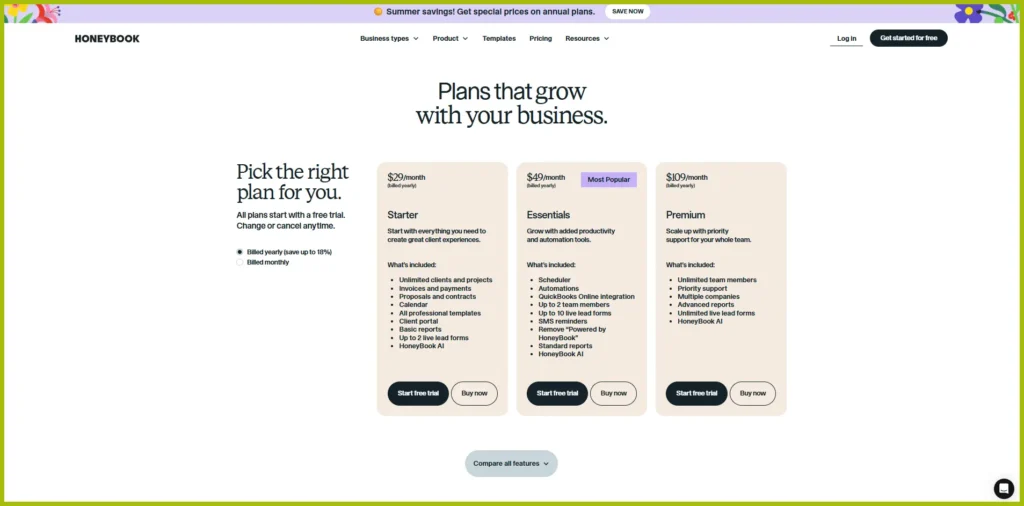
Prices and plan features can change over time, so check the official HoneyBook pricing page for the latest information.
Dubsado Pricing
Dubsado currently has two paid plans:
| Plan | Monthly price | Annual price |
| Starter | $35/month | $335/year |
| Premier | $55/month | $525/year |
The Starter plan includes core client-management features such as contracts, invoices, forms, client portals, email integration, and templates.
The Premier plan adds features such as scheduling, automated workflows, public proposals, multiple lead capture, Zapier integration, and extra integrations like QuickBooks and Xero.
Dubsado also offers a 21-day free trial, which includes access to Premier features during the trial.
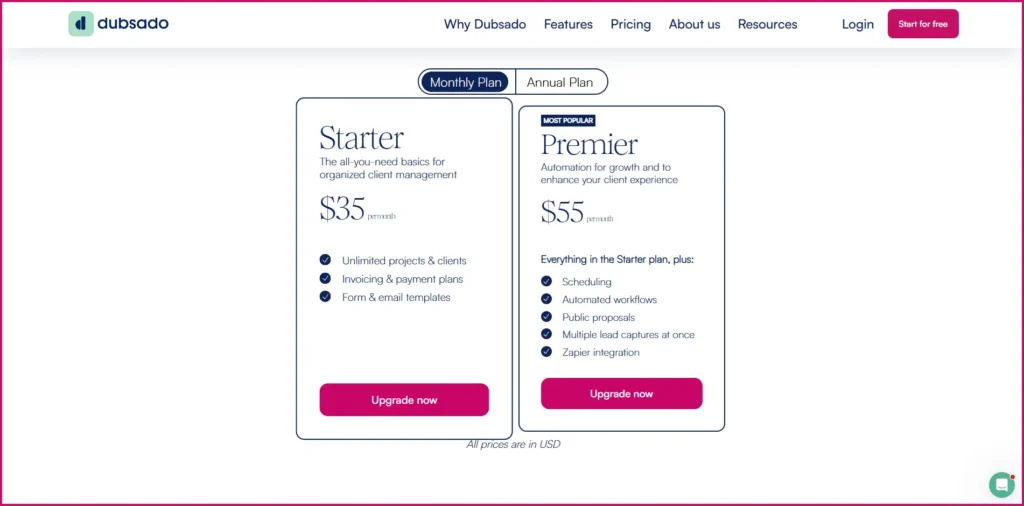
Prices and plan features can change over time, so check the official Dubsado page for the latest information.
HoneyBook vs Dubsado: Which Offers Better Value?
The answer depends on which plan you actually need.
If you only need basic client management, then on annual billing, Dubsado Starter is slightly cheaper than HoneyBook Starter, and at the same time, it also provides an excellent set of core business-management features.
If scheduling and automation matter to you, then this comparison changes. On annual billing, HoneyBook offers these features in its ‘Essentials’ plan at $49/month, while Dubsado includes them in its ‘Premier’ plan at $525/year. The annual Premier plan price of Dubsado works out to approximately $43.75/month, which is cheaper on a monthly basis than HoneyBook Essentials.
However, the decision should not be made based on price alone. Both platforms have packaged their features in different ways, so instead of simply comparing the starting prices, you should look at the features that are included in the plan you will actually use.
Quick pricing takeaway
HoneyBook: More plan choices, with automation and scheduling beginning at Essentials.
Dubsado: Fewer plans, with core features in Starter and advanced workflow tools concentrated in Premier.
For a freelancer who mainly needs client management, contracts, invoices, payments, and a client portal, HoneyBook Starter gives a large set of features at its starting price. Dubsado Starter also handles the basic tasks of client management, but to use its more advanced automation and scheduling tools, the ‘Premier’ plan is required.
If automation is the main center of your business, then this comparison becomes even more interesting. On annual billing, the monthly cost of Dubsado Premier works out to be slightly less than HoneyBook Essentials, while Dubsado Premier provides a big jump (more features) in terms of workflow-related features such as Flows, public proposals, and Zapier integration.
So rather than asking:
Which software is cheaper?
A better question is:
Which plan gives me the features I will actually use?
If you’re paying for advanced automation but only use invoices, contracts, and a calendar, the extra subscription cost may not be worthwhile.
On the other hand, if automation saves you hours of repetitive client administration every month, paying for the higher tier can make sense.
Don’t Forget Payment Processing Costs
Your subscription is only one part of the total cost. If you process significant client payments, compare the payment-processing fees discussed above as well.
You should also check the current pricing and payment terms directly before purchasing, because software plans and processing fees can change.
Which One Is Better for Different Types of Freelancers?
There isn’t one clear winner between HoneyBook and Dubsado for every freelancer. The better choice depends largely on how you work, how complicated your client process is, and how much control you want over your workflows.
Beginners and Solo Freelancers
If you are setting up your first client-management system, then HoneyBook can be an easy way for you to start, provided you want to organize your work without spending too much time configuring workflows.
Its Starter plan includes core (basic) tools such as clients and projects, invoices and payments, proposals and contracts, calendar, templates, and a client portal.
Dubsado can also work well for beginners. Its Starter plan is designed for business owners who want to organize their work before adopting more advanced automation.
Therefore, the final decision does not depend simply on what your experience level is. Rather, it depends on how much customization you want right from the beginning.
Freelancers With Complex Client Workflows
If your business provides multiple types of services, you have different onboarding methods, conditional follow-ups, or very detailed automation requirements, then Dubsado becomes a more attractive option for you.
Its Premier plan includes automated workflows, scheduling, public proposals, multiple lead captures, and integrations like Zapier.
HoneyBook can also handle automation through its higher-tier plans, so having a complicated workflow does not mean at all that you definitely need Dubsado. The real question is how much control you need over that workflow.
Photographers and Other Creative Professionals
Both platforms can work great for photographers, designers, consultants, and other such service businesses that take clients forward through a repeatable booking and delivery process.
You might prefer HoneyBook more when you want to keep proposals, contracts, payments, scheduling, and client communication inside a direct and easy system.
Dubsado might fit better for you when you need completely different workflows for different types of projects.
Instead of making a decision based on your profession alone, look at the number of steps that come between a new inquiry and a completed project.
Consultants and Service Businesses
Consultants and other service providers often have different needs depending on how they sell and deliver their services.
If most clients follow a similar process, HoneyBook’s combination of client management, proposals, contracts, invoices, payments, and scheduling can be sufficient.
If your services involve multiple packages, customized onboarding, or different workflows for different types of clients, Dubsado’s additional workflow control may be more useful.
The Quick Decision
| If your priority is… | Consider |
| Getting started quickly | HoneyBook |
| A straightforward client journey | HoneyBook |
| Detailed workflow customization | Dubsado |
| Complex automated processes | Dubsado |
| Starting simple and adding automation later | Either |
| Maximum control over different client journeys | Dubsado |
HoneyBook vs Dubsado: Pros and Cons
Both platforms have clear strengths, but the trade-offs are different. Instead of declaring one platform universally better, it’s more useful to look at where each one performs well and where its limitations may matter.
HoneyBook Pros
- Straightforward setup: HoneyBook is designed to bring core client-management tasks together without requiring a highly customized workflow from the beginning.
- Connected client experience: Proposals, contracts, invoices, payments, scheduling, and client communication can be managed within the same ecosystem.
- Built-in payment processing: You don’t need to connect a separate payment processor just to accept payments through HoneyBook.
- Useful automation: HoneyBook provides workflow automation and has continued expanding its automation capabilities in 2026.
- Good fit for small teams and solo businesses: Its combination of client management and business tools is particularly suited to independent service businesses.
HoneyBook Cons
- Less granular workflow control: If you want highly customized, multi-branch workflows, Dubsado may give you more control.
- Less suited to businesses that need advanced sales-CRM features such as lead scoring and complex lead nurturing.
Dubsado Pros
- Deep workflow customization: Dubsado’s Flows allow you to build detailed, repeatable client processes.
- Flexible client workflows: Different services can have different forms, contracts, payments, scheduling steps, and follow-ups.
- Multiple payment options: Dubsado supports its own payment processing as well as integrations with other processors such as Square and PayPal.
- Strong fit for process-heavy businesses: Businesses with complex or highly repeatable administrative workflows can make good use of its customization.
Dubsado Cons
- More setup can mean a steeper learning curve: The flexibility of its workflow system can take more time to configure and understand.
- You may not need all that flexibility: If your business has a very simple client process, investing time in extensive workflow configuration may provide little additional benefit.
What Real Users Say About HoneyBook vs Dubsado
Official feature lists tell you what HoneyBook and Dubsado can do. But community discussions can tell you something different: such as what users actually find convenient, frustrating, expensive, or difficult in day-to-day use.
We looked at recent discussions from freelancers and small-business owners who use or have used these platforms. Their feedback is not unanimous, but a few points come up repeatedly.
It is also important to keep the nature of this evidence in mind: discussions happening on Reddit reflect individual experiences, not the result of controlled product testing. A complaint from one user does not mean at all that everyone’s experience will be the same.
HoneyBook: Simplicity Is a Common Theme
One point that comes up repeatedly in recent comparisons is that HoneyBook can be easier to start and run.
In a discussion comparing HoneyBook and Dubsado on r/Entrepreneur in April 2025, users described Dubsado as more robust but a bit complicated to set up, while HoneyBook was called more user-friendly (easy to use).
This does not mean at all that HoneyBook users never face any problems.
Recent discussions also include complaints regarding the increase in HoneyBook’s prices. For example, a 2026 Reddit thread was specifically started by those freelancers who were looking for its alternatives after a price increase.
So the community picture isn’t simply “everyone loves HoneyBook.” A more accurate summary is that ease of use is frequently appreciated, while pricing is one area that can cause dissatisfaction.
Dubsado: Flexibility Comes With a Setup Cost
One point that frequently comes up in recent comparisons is that Dubsado can provide greater flexibility and control over client workflows, even though this flexibility requires more effort or time during the initial setup.
Users who prefer Dubsado often praise its workflow capabilities and the control it offers. On the other hand, some discussions also mention that setting up this platform takes more time.
Along with this, some users also seem troubled by its interface, product changes, or the hard work involved in configuring and maintaining their system. Such complaints can be clearly seen in long-running discussions related to Dubsado, but still, instead of considering them as everyone’s judgment, they should be viewed as the individual experiences of different users.
Pricing Is a Recurring Discussion for Both
Price comes up in discussions about both platforms, although the nature of the complaints varies.
Some HoneyBook users have questioned whether recent price increases justify staying with the platform.
Dubsado users have also discussed the cost of moving to Premier, particularly when features such as scheduling become important. A June 2026 discussion from a Dubsado user specifically questioned whether the jump to the $525 annual Premier plan was worthwhile for scheduling functionality.
This is another reason we wouldn’t use community comments to declare one platform “cheaper.” The better question is whether the features included in the plan you need justify its cost for your business.
Community Feedback at a Glance
| What users commonly mention | HoneyBook | Dubsado |
| Ease of getting started | Often praised for being easier to set up | More setup may be required |
| Workflow flexibility | Good for straightforward workflows | Frequently praised for deeper customization |
| Client experience | Often appreciated for its streamlined experience | Flexible, but may require more configuration |
| Pricing concerns | Some users dislike recent price increases | Some users question the cost of higher-tier features |
| Learning curve | Generally perceived as more approachable | Can take more time to learn and configure |
| Best fit according to community themes | Simplicity and convenience | Control and customization |
Community sources: April 2025 comparison discussion • HoneyBook pricing discussion • Dubsado Premier pricing discussion
Which One Should You Choose?
The right choice between HoneyBook and Dubsado depends on how you manage clients, how complex your workflows are, and how much customization you actually need.
Neither platform is automatically better for every freelancer or service business.
Choose HoneyBook If…
HoneyBook is likely the better fit if you:
- Want to get started without spending a lot of time building workflows
- Prefer a straightforward, connected client-management system
- Want proposals, contracts, invoices, payments, scheduling, and client communication in one place
- Have a relatively simple or predictable client process
- Prefer convenience over highly granular workflow customization
HoneyBook makes particular sense when your main goal is to spend less time managing administrative tasks rather than designing an elaborate automation system.
Choose Dubsado If…
Dubsado may be the better fit if you:
- Need more control over your client workflows
- Have multiple services with different onboarding processes
- Want to build detailed automated sequences
- Need different forms, contracts, scheduling steps, or follow-ups for different client journeys
- Don’t mind spending more time configuring your system
Dubsado becomes more compelling as the complexity of your client process increases.
Affiliate Disclosure: This article contains an affiliate link for Dubsado. If you sign up through our link, you can get 20% off your first month or year, while we may earn a commission at no additional cost to you.
Try Dubsado with your discount →
What If You’re Still Unsure?
If you’re stuck between the two, don’t start by asking “Which platform has more features?”
Instead, write down your typical client journey:
Inquiry → Lead capture → Proposal → Contract → Deposit → Scheduling → Project → Final payment → Follow-up
Then ask yourself:
How much of this process do I want the software to configure for me, and how much do I want to customize myself?
If you want a more straightforward system, HoneyBook is worth considering first.
If you want to design a more detailed workflow around your business, Dubsado is worth considering first.
And if you’re still undecided, use the free trials to build one real client workflow in each platform. That will tell you much more than comparing feature lists.
Frequently Asked Questions About HoneyBook vs Dubsado
Is Dubsado cheaper than HoneyBook?
It depends on which plans you compare.
HoneyBook starts at $29/month when billed annually, while Dubsado starts at $35/month. Dubsado Premier costs $525/year, which works out to about $43.75/month when paid annually, compared with $49/month for HoneyBook Essentials.
So it’s not accurate to simply say that Dubsado is cheaper or more expensive. Compare the plans based on the features you actually need.
Can I try HoneyBook and Dubsado for free?
Yes. Both platforms offer free trials, although the trial length and included features can change over time.
Before signing up, check the companies’ current trial terms so you know exactly what is included.
Can HoneyBook and Dubsado replace other business tools?
They can replace several separate tools for many service businesses because both combine functions such as client management, proposals, contracts, invoicing, payments, scheduling, and workflow automation.
However, neither platform necessarily replaces every tool you may need. You might still require dedicated accounting, project-management, email-marketing, or other specialized software.
Can I switch from HoneyBook to Dubsado or vice versa?
Yes, but switching isn’t something I’d do casually.
Before moving, consider your client records, documents, templates, payment setup, integrations, and automated workflows. You’ll also want to map your existing process so you don’t simply recreate the same problems in another platform.
Final Verdict: HoneyBook vs Dubsado
After comparing their features, workflows, pricing, scheduling, payments, and user feedback, the choice between HoneyBook and Dubsado comes down to one central question:
Do you want a simpler system, or do you want more control over how your client workflow is built?
H3 — Our Final Take
HoneyBook is the better fit for freelancers and service businesses that want a simpler, connected system and do not need highly customized workflows.
Dubsado is the better fit when detailed workflow control is a priority, and you are willing to spend more time configuring the system.
That is the simplest way to summarize this comparison—but it is not a universal winner. If you are still undecided, build one real client workflow in each platform during the free trials. Seeing how each handles your actual process will tell you more than a feature checklist ever can.
Ready to try Dubsado? Get your discount here →